Okta Single Sign-On (SSO)
Procedure
To configure Okta SSO, follow these steps:
In Okta
- Open Okta Admin Console
- Navigate to Applications > Applications in the left panel
- Click
Create App Integrationbutton - In the opened wizard select "OIDC - OpenID Connect" as a sign-in method and "Web Application" as the application type
- Complete the New Web App Integration form:
- Enter Application integration name
- Specify the Sign-in redirect URI:
https://<host>:8443/oauth2/callback(obtainable from the NFO User Management page > Okta configuration dialog box, Redirect URI parameter) - Optionally set Sign-out redirect URI:
https://<host>:8443/logout - Configure Controlled access settings
- Click
Save
- Copy Client ID and Client secret from the application's General page.
In NFO
- Click on
edit(pensil icon) button in Okta SSO panel
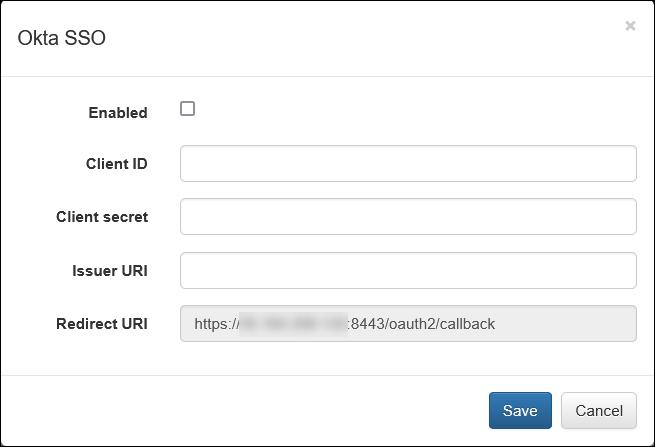
- Paste the Client ID and Client secret from the okta into the respective fields
- Enter the Issuer URI:
httsp://<your-okta-domain> - Note that the Redirect URI parameter is non-editable and must match the value used in the Okta configuration
- Click
Saveto apply your settings