Identity via Syslog
NFO can enrich flow data with user identity by receiving and parsing syslog messages that contain login and logout events. This is especially valuable for VPN authentication logs, which provide a direct mapping between a username and the private IP address assigned to that user's session — exactly the data needed to turn an anonymous source IP in a flow record into an accountable identity.
How It Works
When a user authenticates to a VPN gateway, the gateway logs an event that includes both the username and the internal (tunnel) IP address assigned to the session. NFO receives these events via syslog, parses them using configurable regex patterns, and maintains a live username-to-IP mapping table. This table is then used to enrich flow records from Network Conversations Monitor (Module 20062) with the username field.
The mapping is time-bounded: each entry expires after a configurable session timeout, ensuring stale associations are automatically removed.
User Identity Agent Configuration
Open the NFO web interface and navigate to the External Data Feeder page or the Network Conversations Monitor module's page, and perform the following:
-
Open the User Identity Monitor agent configuration window.
-
Change the schedule cron expression or leave the default. The agent runs every minute by default: syslog login events are received continuously and the identity watch list is updated accordingly.
-
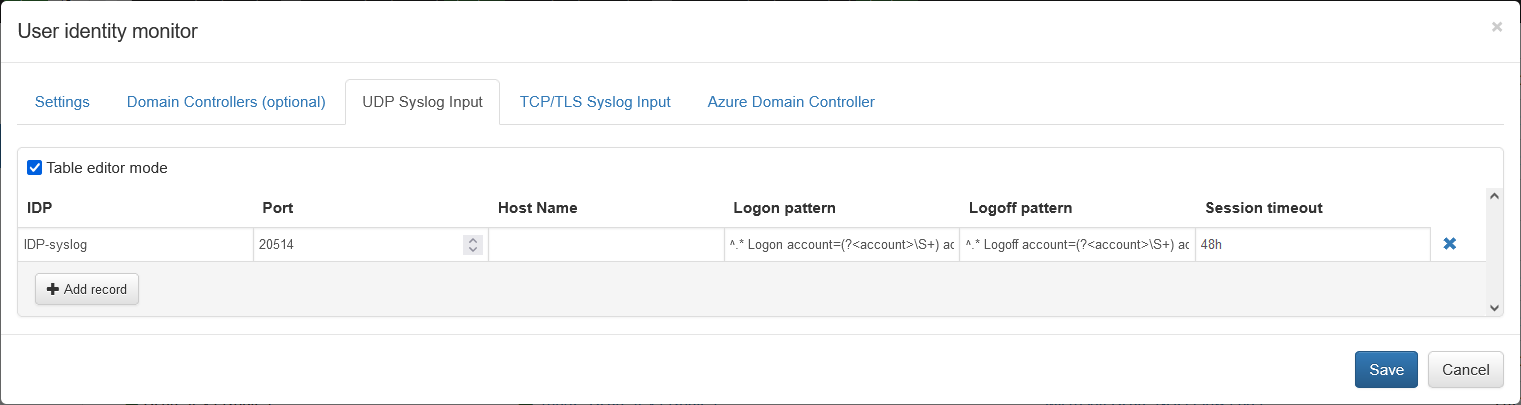
Select the UDP Syslog Input tab if you send login events via UDP, and/or the TCP/TLS Syslog Input tab if you send login events via TCP.
-
Click Add and provide the following fields:
- IDP — Identity Provider name (a label for your reference, e.g.,
FortiGate-VPN) - Port — Listening port for syslogs sent to NFO by the identity provider
- Host Name — (optional) Hostname or IP of the identity provider. If left blank, syslogs from any host will be accepted.
- Logon pattern — Regex expression to parse logon events. Must contain named capture groups
(?<account>...)and(?<address>...). Example:^.* Logon account=(?<account>\S+) address=(?<address>\S+)$ - Logoff pattern — Regex expression to parse logoff events. Same named groups required. Example:
^.* Logoff account=(?<account>\S+) address=(?<address>\S+)$
- Session timeout — How long (in seconds or minutes) to retain the username-to-IP mapping after a logon event if no explicit logoff is received.
- (TCP only) TLS — Check if your identity provider sends syslog over TCP with TLS encryption.
- (TCP only) TLS client certificates file — Path to the TLS client certificate file.
- IDP — Identity Provider name (a label for your reference, e.g.,
Once saved, configuration can be validated by pressing the Run Now button in the agent configuration window.
VPN Authentication Log Sources
Enterprise VPN gateways are the most common syslog source for identity enrichment. Each platform logs VPN session events in a different format. The sections below provide the recommended Logon pattern regex for the top enterprise and government VPN platforms.
In each case, the regex captures two named groups that NFO requires:
(?<account>...)— the authenticated username(?<address>...)— the private/tunnel IP address assigned to the session
1. Cisco Secure Client (AnyConnect)
Widely deployed in large enterprises and US federal agencies. Operates with Cisco ASA or Firepower (FTD) gateways. Authentication events are logged as semi-structured syslog strings identified by a Message ID.
The correct event for identity enrichment is Message ID 722051, which explicitly links a username to their assigned private IP address at the moment of session establishment.
Note on 722022: Message ID 722022 is a connection-established event, not an IP assignment event. Its format does not include an assigned tunnel IP address and should not be used for identity enrichment.
Syslog format (722051):
%ASA-6-722051: Group group-policy User jdoe IP 203.0.113.10 IPv4 Address 10.10.10.50 IPv6 address fe80::1 assigned to session
Logon pattern:
%(?:ASA|FTD)-6-722051:.*?User\s(?<account>\S+)\s.*?IPv4\sAddress\s(?<address>[0-9\.]+)
- Matches both
%ASA-6-722051(ASA devices) and%FTD-6-722051(Firepower/FTD devices). Useris followed by a space-delimited username (not angle-bracket-wrapped in 722051).IPv4 Addresscaptures the private tunnel IP assigned to the session.
2. Palo Alto Networks GlobalProtect
VPN integrated with Palo Alto Next-Generation Firewalls. Common in security-focused enterprises, banks, and defense contractors. GlobalProtect logs are structured CSV with a fixed field order.
Log field order (relevant excerpt):
FUTURE_USE, Receive Time, Serial Number, Type, Threat/Content Type, FUTURE_USE, Generated Time, Virtual System, Event ID, Stage, Authentication Method, Tunnel Type, Source User , Source Region, Machine Name, Public IP, Public IPv6, Private IP , ...
Logon pattern:
^(?:[^,]+,){3}GLOBALPROTECT,(?:[^,]+,){8}(?<account>[^,]+),(?:[^,]+,){4}(?<address>[0-9\.]+)
The regex skips fixed-position columns using non-capturing groups and extracts Source User (column 13) and Private IP (column 18).
Note: This pattern assumes the default GlobalProtect syslog field order. If you have customized your syslog profile or field delimiter, revalidate the column offsets against your actual log output.
Full field reference: GlobalProtect Log Fields
3. Fortinet FortiClient / FortiGate VPN
SSL VPN and IPsec capability integrated with FortiGate firewalls. Used in mid-to-large enterprises, MSPs, and government agencies. Logs are emitted as key=value pairs in syslog format, making the regex non-positional — fields can be matched in any order.
Compatibility note: SSL VPN tunnel mode was deprecated in FortiOS 7.6.3 (released August 2025). This pattern applies to SSL VPN deployments on FortiOS 7.6.2 and earlier. For FortiOS 7.6.3+, Fortinet recommends IPsec IKEv2 with FortiClient. The assigned client IP field name is also version-dependent — validate whether your logs emit
tunneliporassigned_ipbefore deploying.
Logon pattern:
subtype="vpn".*?user="(?<account>[^"]+)".*?(?:tunnelip|assigned_ip)=(?<address>[0-9\.]+)
subtype="vpn"filters to VPN-specific events.user=extracts the authenticated username.tunnelip=orassigned_ip=extracts the internal private IP assigned to the client, depending on FortiOS version.
4. Check Point Remote Access VPN
Strong presence in finance, government, and highly regulated industries. Syslog output uses key: value; or key=value formatted strings. The Office Mode IP (om_ip) is the internal address assigned to the VPN client, which is the correct field for identity enrichment.
Verification note: Check Point's full log schema reference requires SmartConsole or portal access. Validate that
om_ipanduserare populated correctly in your environment using the Run Now button after configuration.
Logon pattern:
product[:=]"?Remote Access"?.*?user[:=]"?(?<account>[^; "\n]+)"?.*?om_ip[:=]"?(?<address>[0-9\.]+)"?
- Handles both
key: value;andkey=valueformats. om_ip(Office Mode IP) is the internal address needed for flow correlation.
5. Zscaler Private Access (ZPA)
Zero-trust remote access platform that replaces traditional VPN architecture. Used in large enterprises adopting Zero Trust. Logs are delivered as single-line JSON to syslog collectors.
Verification note: ZPA log field names are defined in the Log Streaming Service configuration within the ZPA admin portal and vary by stream type. The pattern below is an example — validate the actual JSON key names in your tenant before deploying. Confirm that the user field maps to the individual user identity (not the tenant or org name) and that the IP field reflects the internal virtual address assigned to the session.
Example logon pattern:
"Customer":"(?<account>[^"]+)".*?"ClientPrivateIP":"(?<address>[0-9\.]+)"
Customercontains the authenticated user identity (email or username) in common ZPA stream configurations.ClientPrivateIPis the internal virtual IP assigned to the session.
6. Microsoft Azure VPN Gateway
Native VPN service in Microsoft Azure for site-to-site and P2S (point-to-site) remote access. Used in enterprises with hybrid cloud and government Azure deployments. Key identity fields are embedded in a Message string within the JSON log structure.
Log type: P2SDiagnosticLog
Prerequisites:
P2SDiagnosticLogmust be explicitly enabled in Azure Diagnostics settings for the VPN Gateway resource — it is not enabled by default. Navigate to Azure Portal → VPN Gateway → Diagnostic settings → Add diagnostic setting and enableP2SDiagnosticLog.
Verification note: The message text within
P2SDiagnosticLogcan vary by gateway SKU and Azure region. The pattern below is an example based on commonly reported log formats — validate it against your actual diagnostic output before deploying.
Example logon pattern:
Username\sis\s(?<account>[^\s]+).*?Internal\sIP\s(?<address>[0-9\.]+)
- Matches the literal phrase
Username isfollowed by the account name. - Matches
Internal IPto capture the private address assigned to the P2S client.
7. Google Cloud VPN
Managed VPN for connecting on-premises networks to Google Cloud via high-availability IPsec tunnels. Used by cloud-native companies and organizations running workloads on GCP. Logs are streamed as JSON strings.
Important: Google Cloud VPN is a site-to-site solution — it does not support individual user authentication and assigns no per-user tunnel IP. This is not user identity enrichment. Use this pattern only to correlate flows to a specific branch network or peer gateway. For per-user identity enrichment in GCP environments, consider Google Cloud Identity-Aware Proxy (IAP) logs instead.
Network segment correlation pattern:
"remote_ip":"(?<address>[0-9\.]+)".*?"vpn_tunnel":"(?<account>[^"]+)"
remote_ipis the peer gateway's public IP address — used as the address key for flow correlation.vpn_tunnelis the tunnel name identifying the remote site or branch — used as the account label.
8. Sophos Connect VPN
SSL/IPsec VPN client integrated with Sophos Firewall (formerly XG). Common in SMB and mid-enterprise environments, particularly in Europe. Logs use key-value pair format where field order may vary, so the regex is non-positional.
Compatibility note: The Sophos XG Series hardware appliances reached end-of-life on March 31, 2025. Current deployments run on XGS Series hardware with SFOS 20+. The correct field name for the assigned IP in SSL VPN events is
ipaddress— note thatleased_ipappears in DHCP Server logs and is not the correct field for VPN session enrichment.
Logon pattern:
log_component="SSL VPN".*?user_name="(?<account>[^"]+)".*?ipaddress="(?<address>[0-9\.]+)"
log_component="SSL VPN"filters to SSL VPN session events.user_namecaptures the authenticated user.ipaddresscaptures the internal address assigned to the client.
9. F5 BIG-IP Access Policy Manager (APM)
High-end application access and VPN gateway used in large enterprise datacenters, telecoms, and global banks. Session events are logged via syslog with a session path and assigned IP in the message string.
Verification note: F5 APM log message IDs and message text vary by APM version and policy configuration. The pattern below targets the IP assignment event in common APM deployments, but the exact message ID may differ in your environment. After configuring, use the Run Now button and verify that both
accountandaddresscapture groups are populated. If the pattern does not match, F5's community recommends using an iRule to emit a custom, consistently formatted syslog line combining the username and assigned IP — this approach is more reliable across APM versions.
Logon pattern:
01490115:5:.*?\/Common\/(?<account>[^:]+):.*?assigned\s(?<address>[0-9\.]+)
01490115:5:identifies the APM IP-assignment log event type in common deployments./Common/<account>:extracts the username from the session path.assigned <address>captures the IP assigned to the session.
10. Cato Networks (SASE VPN)
Cloud-delivered Secure Access Service Edge (SASE) platform combining VPN, SD-WAN, and zero-trust networking. Used in distributed enterprises replacing traditional MPLS/VPN infrastructure. Logs are received as single-line JSON.
Verification note: Cato event integration field names evolve over time and vary by event type. The pattern below is an example — validate the actual user and internal IP field names in your event stream configuration before deploying. Refer to the Cato Management Application under Events → Log Streaming for the current field reference.
Example logon pattern:
"src_user":"(?<account>[^"]+)".*?"src_ip":"(?<address>[0-9\.]+)"
src_usercontains the authenticated identity.src_ipcontains the source IP of the session as seen by the Cato cloud.
Quick Reference Table
| VPN Platform | Log Format | Key Fields |
|---|---|---|
| Cisco AnyConnect (ASA/FTD) | Syslog string (Message ID 722051) | User <username>, IPv4 Address <ip> |
| Palo Alto GlobalProtect | CSV (default field order) | Column 13 (user), Column 18 (private IP) |
| Fortinet FortiGate | Key=value syslog | user=, tunnelip= or assigned_ip= |
| Check Point Remote Access | Key: value syslog | user=, om_ip= |
| Zscaler Private Access | JSON syslog | Tenant-specific — validate Customer, ClientPrivateIP in your stream |
| Microsoft Azure VPN Gateway | JSON / embedded message string | Username is, Internal IP (validate against tenant output) |
| Google Cloud VPN | JSON syslog | remote_ip (peer IP), vpn_tunnel (site label) — site correlation only, not user identity |
| Sophos Connect | Key=value syslog | user_name=, ipaddress= |
| F5 BIG-IP APM | Syslog string | /Common/<user>:, assigned <ip> (validate message ID for your APM version) |
| Cato Networks | JSON syslog | Validate src_user, src_ip against your event stream |
Tips
- Test your regex using the Run Now button after saving the configuration. Check that
accountandaddressgroups are being populated correctly in the agent logs. - Session timeout should be set to match or slightly exceed the typical VPN session duration for your environment. For short-lived sessions (e.g., 8-hour workday sessions), a value of 28800 seconds (8 hours) is a reasonable starting point.
- Multiple VPN gateways can each be added as separate entries with different listening ports, allowing NFO to receive and parse events from all gateways simultaneously.
- Logoff patterns are optional but recommended. Without them, the username-to-IP mapping will persist until the session timeout expires, which may cause brief identity misattribution if the same IP is immediately reassigned to a different user.