Model Driven Telemetry (MDT)
NetFlow Optimizer supports receiving telemetry data using Model Driven Telemetry (MDT). This modern approach allows network devices to proactively stream structured data based on defined data models, providing real-time insights into your network's state and performance.
Key Features of MDT Support in NFO
- Dial-Out Mode: NFO listens for incoming telemetry streams initiated by your network devices. In this dial-out mode, your routers and switches act as clients, establishing a persistent connection to NFO (the server) and continuously pushing telemetry data. To learn more about dial-in and dial-out MDT, click here.
- gRPC Transport: NFO utilizes the gRPC protocol for efficient and high-performance data transport, ensuring reliable and fast delivery of telemetry information. To learn more about gRPC, click here.
- Persistent Connections: Once a connection is established, NFO maintains it. If a connection drops, the sending device will automatically attempt to reconnect every 30 seconds, ensuring continuous data flow.
Preparing Your Network Devices for MDT Streaming
Before NFO can receive MDT data, you need to configure your network devices to stream telemetry. This typically involves using a configuration tool like Cisco YANG Suite.
- Select the Streaming Method: Configure your device to use the yang-push stream.
- Set the Reporting Policy: Define the frequency at which your device should send telemetry updates for specific data sets (yangsets) - periodic or on-change.
- Set the encoding: The kvGPB encoding should be specified.
- Specify the NFO Receiver: Configure the destination IP address or hostname of your NFO server, the port NFO will be listening on (default: 57000), and the protocol as grpc-tcp.
- Build and Apply Configuration: Use your device's configuration tools to build and apply these settings.
Configuring MDT Subscriptions in NFO
To enable NFO to receive and process MDT data, you need to configure MDT subscriptions.
Navigate to the Model Driven Telemetry section in the NFO web interface.
The service has the following parameters:
| Parameter | Description |
|---|---|
| Enable(1) or disable(0) MDT service | 1 - MDT service enabled; 0 - MDT service disabled |
| Enable(1) or disable(0) JSON flattening | 1 - Non-nested JSON (flattened), 0 - Nested JSON |
The following image highlights the key parameters and sections within the MDT interface, where you configure NetFlow Optimizer's interaction with network devices via Model-Driven Telemetry subscriptions and data collection using gRPC. This interface includes Watch list for managing MDT TLS configurations and the MDT endpoints list.
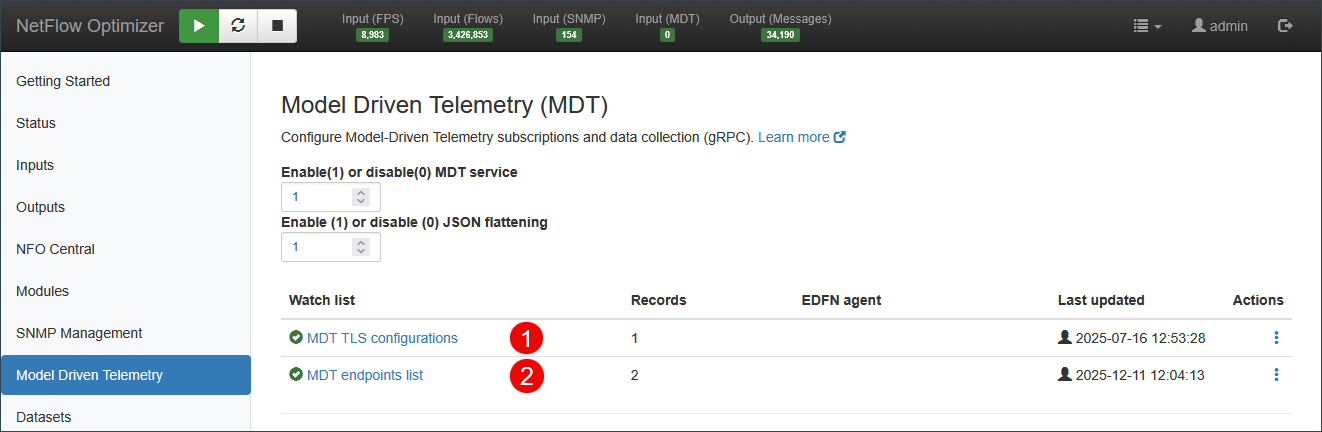
- Add MDT credentials by clicking on MDT TLS configurations Watch list.
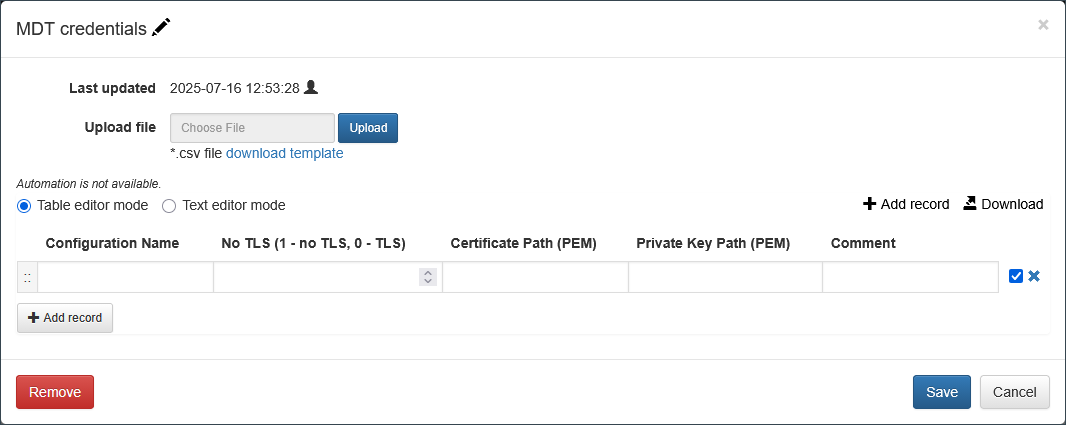
Enter the following parameters:
- Configuration Name: A unique string identifier for the credential set (should match to
TLS Configuration Namein the MDT Endpoints list). - No TLS: Set to 0 if TLS security is enabled. Set to 1 for insecure connections (not recommended for production environments).
- Certificate Path: The path to the server certificate file (PEM format).
- Private Key Path: The path to the server's private key file (PEM format).
- Comment: An optional field for your notes.
Click Save button.
- Add records to MDT inputs by clicking on MDT endpoints list Watch list.
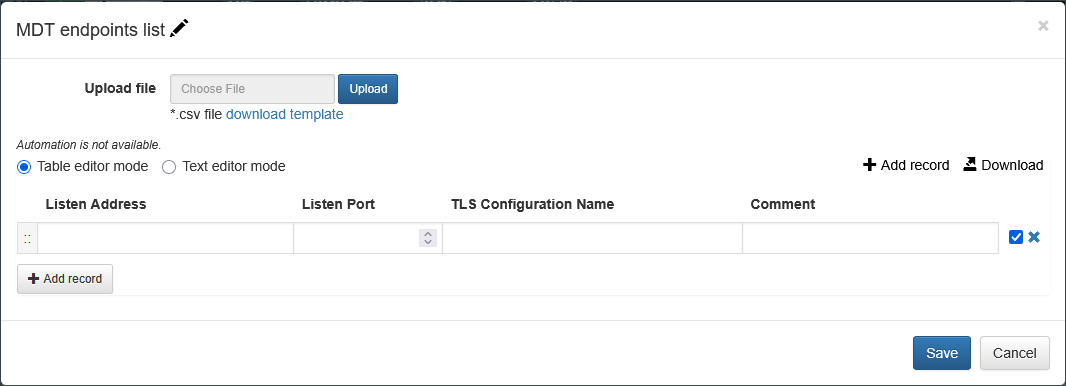
Enter the following parameters:
- Listen Address: Enter the IP address or hostname that NFO should listen on for incoming MDT connections. To listen on all available network interfaces, use 0.0.0.0. The default is 0.0.0.0.
- Listen Port: Specify the TCP port number that NFO will use to listen for incoming MDT streams. The default port is 57000.
- TLS Configuration Name: If you have configured TLS security for your MDT connections, enter the corresponding
Configuration Name. This links the input to the necessary certificates and keys. - Comment: You can add an optional comment for your own reference.
Click Save button.
Configuring MDT Output in NFO
In the NFO GUI navigate to Outputs on the left navigation bar and press the plus (+) sign. Select a JSON-compatible output type (e.g., JSON (UDP), AWS S3, Azure Blob Storage, Kafka, or OpenSearch).
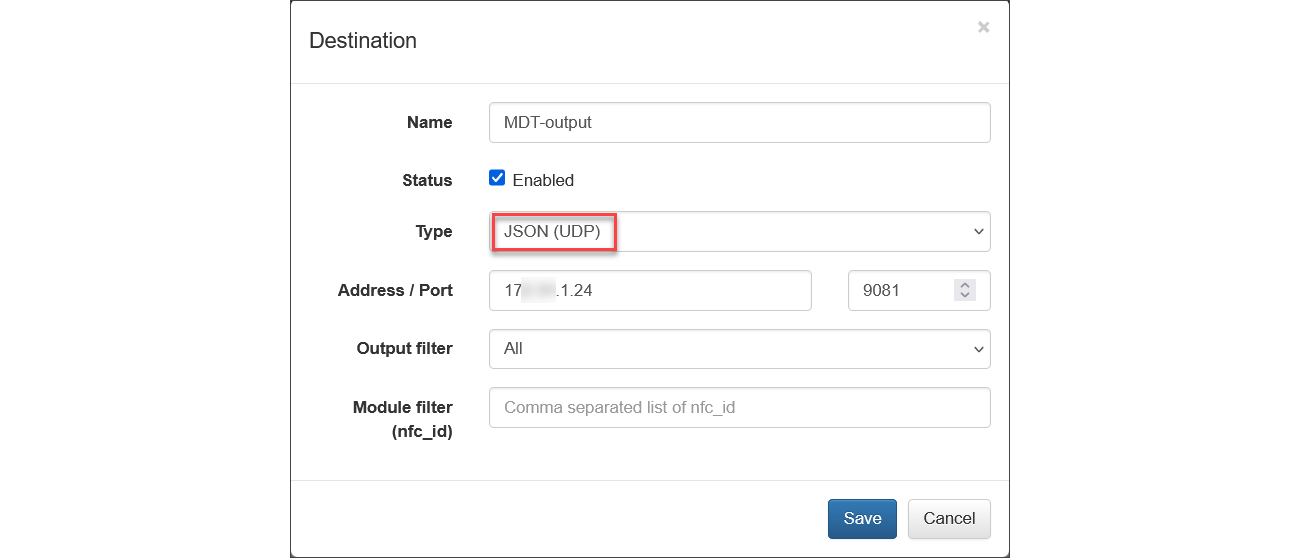
To restrict the output to only MDT metrics, set the Module filter (nfc_id) to 20600.
Data Format
NFO receives MDT data and processes it. The raw MDT messages (converted to JSON format) are then forwarded to the configured JSON Outputs.
Example of MDT Data (JSON) for Cisco Catalyst 8000V:
Memory Utilization
{
    "nfc_id": "20600",
    "mgmt_ip": "172.31.17.109",
    "node_id_str": "ip-172-31-17-109",
    "subscription_id_str": "2011",
    "encoding_path": "Cisco-IOS-XE-memory-oper:memory-statistics/memory-statistic",
    "collection_id": 5,
    "collection_start_time": 1765482432331,
    "msg_timestamp": 1765482432331,
    "dataGpbkv/timestamp": 1765482432331,
    "dataGpbkv/fields/keys/name": "Processor",
    "dataGpbkv/fields/content/total-memory": 1634282992,
    "dataGpbkv/fields/content/used-memory": 281804544,
    "dataGpbkv/fields/content/free-memory": 1352478448,
    "dataGpbkv/fields/content/lowest-usage": 1351897272,
    "dataGpbkv/fields/content/highest-usage": 1193874604
}
Interface Statistics
{
    "nfc_id": "20600",
    "mgmt_ip": "172.31.17.109",
    "node_id_str": "ip-172-31-17-109",
    "subscription_id_str": "2011",
    "encoding_path": "Cisco-IOS-XE-interfaces-oper:interfaces/interface/statistics",
    "collection_id": 149,
    "collection_start_time": 1765588461936,
    "msg_timestamp": 1765588461936,
    "dataGpbkv/timestamp": 1765588461936,
    "dataGpbkv/fields/keys/name": "GigabitEthernet1",
    "dataGpbkv/fields/content/discontinuity-time": "2025-12-12T22:19:45.154000Z",
    "dataGpbkv/fields/content/in-octets": 146491,
    "dataGpbkv/fields/content/in-unicast-pkts": 1892,
    "dataGpbkv/fields/content/in-broadcast-pkts": 0,
    "dataGpbkv/fields/content/in-multicast-pkts": 0,
    "dataGpbkv/fields/content/in-discards": 0,
    "dataGpbkv/fields/content/in-errors": 0,
    "dataGpbkv/fields/content/in-unknown-protos": 0,
    "dataGpbkv/fields/content/out-octets": 518393,
    "dataGpbkv/fields/content/out-unicast-pkts": 1905,
    "dataGpbkv/fields/content/out-multicast-pkts": 0,
    "dataGpbkv/fields/content/out-discards": 0,
    "dataGpbkv/fields/content/out-errors": 0,
    "dataGpbkv/fields/content/rx-pps": 0,
    "dataGpbkv/fields/content/rx-kbps": 0,
    "dataGpbkv/fields/content/tx-pps": 0,
    "dataGpbkv/fields/content/tx-kbps": 0,
    "dataGpbkv/fields/content/num-flaps": 0,
    "dataGpbkv/fields/content/in-crc-errors": 0,
    "dataGpbkv/fields/content/in-discards-64": 0,
    "dataGpbkv/fields/content/in-errors-64": 0,
    "dataGpbkv/fields/content/in-unknown-protos-64": 0,
    "dataGpbkv/fields/content/out-octets-64": 518393,
    "dataGpbkv/timestamp": 1765588461936,
    "dataGpbkv/fields/keys/name": "VirtualPortGroup0",
    "dataGpbkv/fields/content/discontinuity-time": "2025-12-12T22:19:45.154000Z",
    "dataGpbkv/fields/content/in-octets": 1196,
    "dataGpbkv/fields/content/in-unicast-pkts": 16,
    "dataGpbkv/fields/content/in-broadcast-pkts": 0,
    "dataGpbkv/fields/content/in-multicast-pkts": 0,
    "dataGpbkv/fields/content/in-discards": 0,
    "dataGpbkv/fields/content/in-errors": 2,
    "dataGpbkv/fields/content/in-unknown-protos": 0,
    "dataGpbkv/fields/content/out-octets": 240,
    "dataGpbkv/fields/content/out-unicast-pkts": 4,
    "dataGpbkv/fields/content/out-multicast-pkts": 0,
    "dataGpbkv/fields/content/out-discards": 0,
    "dataGpbkv/fields/content/out-errors": 0,
    "dataGpbkv/fields/content/rx-pps": 0,
    "dataGpbkv/fields/content/rx-kbps": 0,
    "dataGpbkv/fields/content/tx-pps": 0,
    "dataGpbkv/fields/content/tx-kbps": 0,
    "dataGpbkv/fields/content/num-flaps": 0,
    "dataGpbkv/fields/content/in-crc-errors": 0,
    "dataGpbkv/fields/content/in-discards-64": 0,
    "dataGpbkv/fields/content/in-errors-64": 2,
    "dataGpbkv/fields/content/in-unknown-protos-64": 0,
    "dataGpbkv/fields/content/out-octets-64": 240
}