Deployment & Configuration
Integrating NFO with Exabeam requires configuring a syslog destination that points to your Exabeam ingestion point.
1. Configure Exabeam Ingestion
Exabeam typically ingests NFO data via the Exabeam Site Collector.
- In your Exabeam console, navigate to Settings > Site Collectors.
- Ensure you have a Syslog Source configured to receive UDP or TCP traffic.
- Note the IP address and Port assigned to this collector.
2. Configure NFO Output
Set NFO to stream the enriched data to your collector.
- In the NFO GUI, go to Data Outputs and click (+).
- Type: Select JSON (UDP).
- Address: The IP of your Exabeam Site Collector.
- Port: The port configured in your collector settings (standard is often
514or1514).
3. Verify Parsing in Exabeam
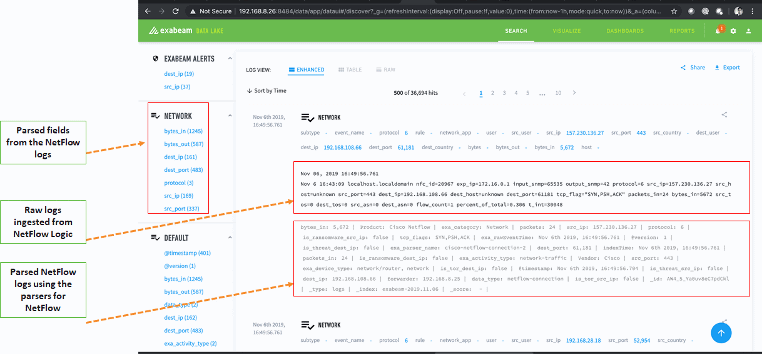
Once the data is flowing, you can verify that Exabeam is correctly identifying and parsing the NFO fields.
Navigate to your Exabeam Data Lake or Search interface. You should see incoming logs categorized under the NETWORK or NetFlow context.
![Exabeam Search UI showing parsed NFO fields, raw ingested logs, and categorized network events] (Insert image_6c84a8.png here)
Why this verification is important:
As shown in the image, Exabeam’s parsers break down the NFO JSON into discrete fields like bytes_in, dest_port, and src_ip. This structured format allows you to:
- Filter by parsed fields in the left sidebar.
- View the Raw Log to see the original NFO
nfc_idand metadata. - Confirm Parser Accuracy by checking the "Parsed NetFlow logs" section to ensure indices are being populated correctly.