CrowdStrike Integration
Integrating NetFlow Optimizer (NFO) with CrowdStrike Falcon provides powerful network telemetry and enhanced visibility into your infrastructure. By leveraging CrowdStrike's unified security platform, organizations can correlate enriched flow data with endpoint telemetry to detect lateral movement, identify data exfiltration, and streamline incident response.
This integration allows you to forward processed and enriched network flow data from NFO to CrowdStrike Falcon LogScale or the Falcon platform for advanced search, visualization, and long-term retention.
Installation Steps
- Configure CrowdStrike Ingest
- Configure NFO Output
Configure CrowdStrike Ingest
To send data to CrowdStrike, you must first ensure you have the appropriate ingestion method configured in your Falcon console. Depending on your environment, you can send data directly to a Falcon LogScale HEC (HTTP Event Collector) or via a LogScale Collector (Agent).
Obtain Ingest Token
- Log in to your CrowdStrike Falcon console.
- Navigate to LogScale (formerly Humio) and select your Repository or View.
- Go to Settings > Ingest Tokens.
- Copy an existing token or create a new one to be used for NFO data.
Set Up the Parser
To ensure field names are correctly identified, use the json parser or a custom NFO-specific parser in LogScale. If sending via JSON, CrowdStrike will perform automatic field extraction for all enriched NFO fields.
Configure NFO Output
Once your ingest endpoint is ready, configure the output in the NFO GUI to forward the data.
- In the NFO GUI, go to Outputs on the left navigation bar.
- Click the plus sign (+) to create a new output.
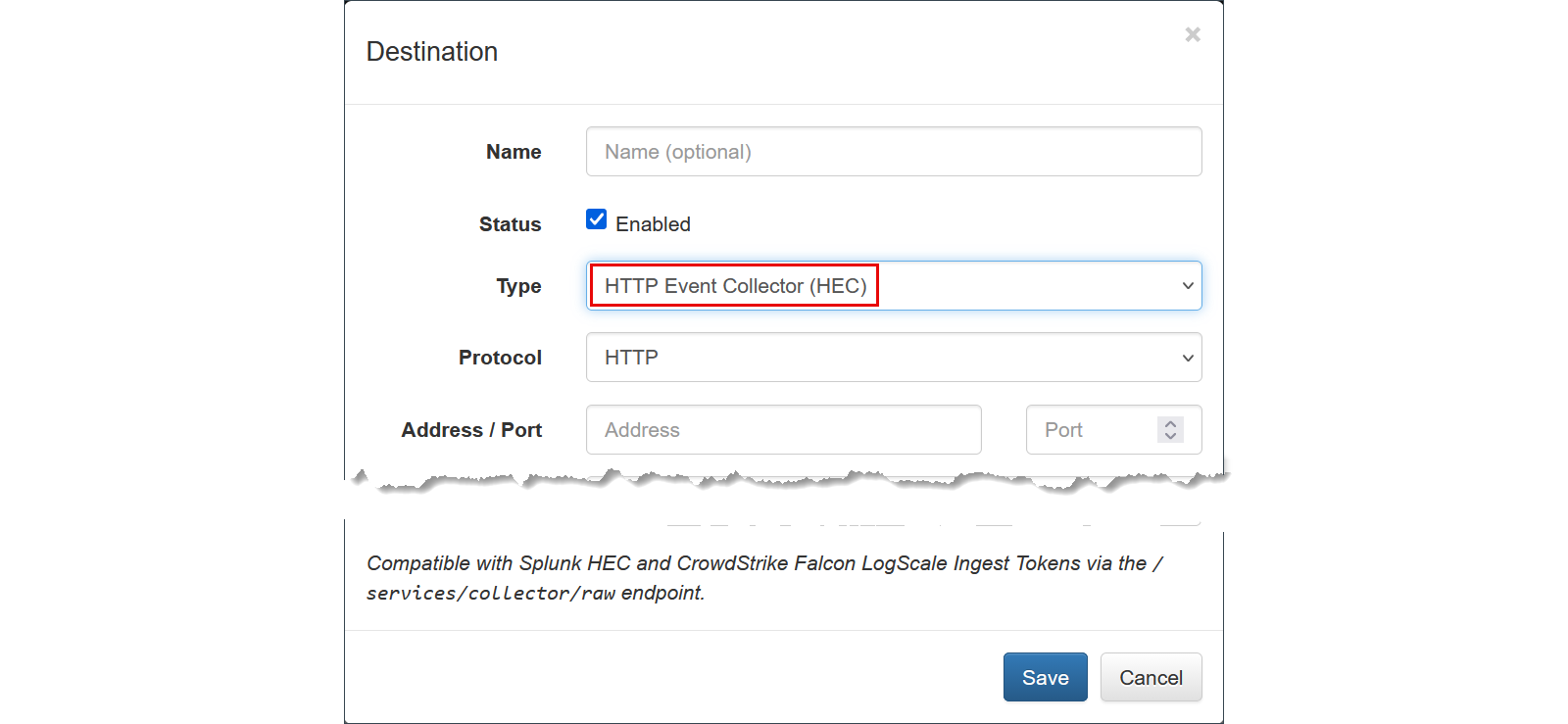
- Set the following parameters:
- Name (optional):
CrowdStrike Falcon - Output Type: Select HTTP Event Collector (HEC)
- Protocol:
HTTPorHTTPS - Address: Enter your CrowdStrike LogScale HEC endpoint (e.g.,
cloud.crowdstrike.com). - Port: Typically
443for HTTPS ingestion. - Token: Paste the Ingest Token obtained in the previous step.
- Formatting: Ensure the output format is set to JSON. This allows CrowdStrike LogScale to perform automatic field extraction on all enriched telemetry (such as GeoIP, User ID, and Application Name).
- Click Save.
Verifying the Integration
To verify that data is flowing correctly:
- Navigate to your CrowdStrike Falcon console and open the LogScale repository.
- Run a search query such as:
#repo = "your_repo_name" | nfc_id = "*"
- Confirm that flow records are appearing and that fields (e.g.,
src_ip,dest_ip,exp_ip) are correctly parsed.