Network Flow Ingestion
NFO is a high-performance flow processing engine capable of ingesting and normalizing millions of flow records per second. It supports all industry-standard flow protocols, allowing for a vendor-agnostic view of your entire network fabric.
Supported Protocols
NFO automatically detects and processes the following flow formats:
- NetFlow v5 & v9: The industry standard for Cisco and many other networking vendors.
- IPFIX (NetFlow v10): The IETF standard for flow information export, used by modern firewalls (Palo Alto, Fortinet) and high-end switches.
- sFlow: A packet-sampling technology widely used by Arista, Juniper, and white-box switching vendors, and by software agents such as Host sFlow.
- J-Flow: Juniper Networks' flow implementation.
Configuring Inputs
To begin ingesting data, you must configure a Listening Port on the NFO instance. By default, NFO is configured to listen for flows on port 9995 (UDP).
Adding a New Input
- Navigate to Inputs in the NFO Web UI.
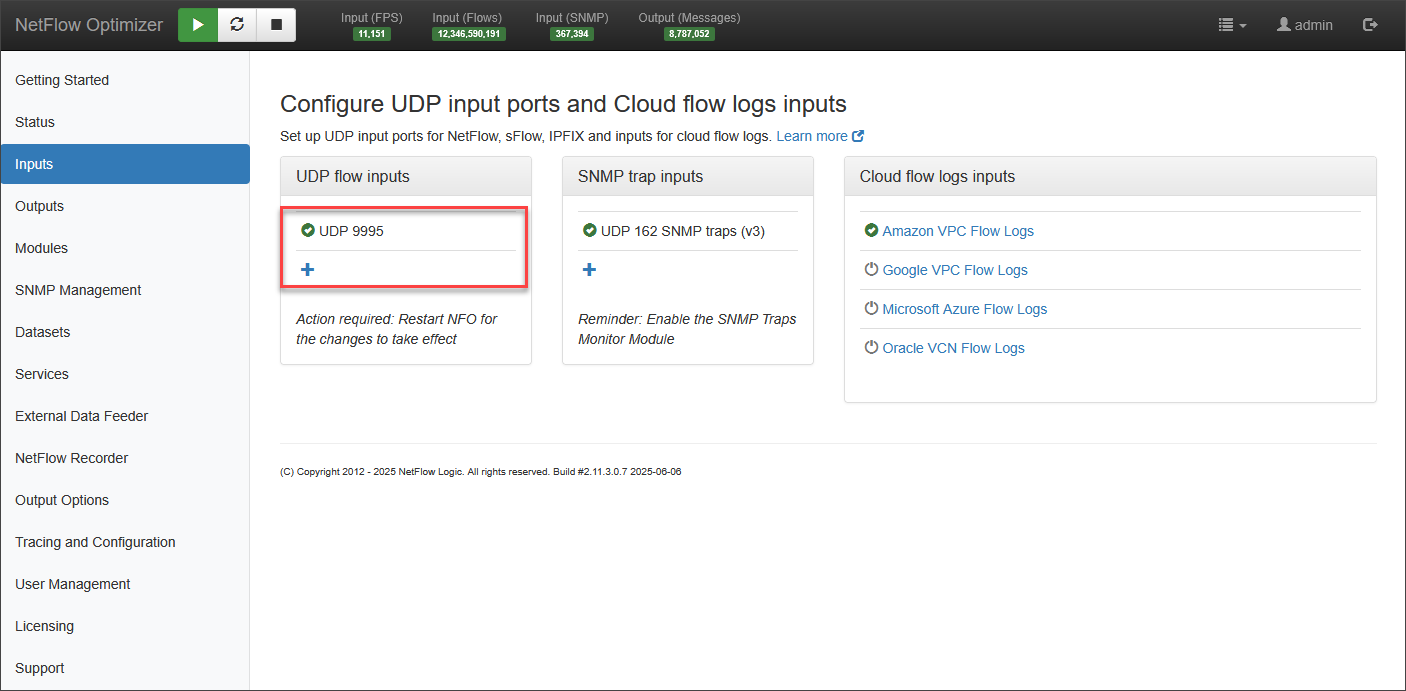
To change the default flow data input UDP port number or to add additional ports, follow the steps below.
- Mouse over and click on the edit symbol to change the existing input port

-
Click Save
-
Click on the
**+**sign to add additional data input ports -
Click Save
** Add a label to identify the source (e.g., "Core Switch Ingest").
For high-volume environments, it is best practice to use separate ports for different types of traffic (e.g., Port 2055 for Switches/Routers and Port 9995 for Firewalls) to simplify troubleshooting and load monitoring.
Flow Templates (IPFIX & v9)
Unlike NetFlow v5, which has a fixed format, IPFIX and NetFlow v9 use templates.
- NFO must receive a Template FlowSet from the exporting device before it can decode the data.
- If you see data arriving but no flows being processed, ensure your exporters are configured to send templates frequently (recommended every 1 to 5 minutes).
Host sFlow
Host sFlow is an open source agent that runs on a server and exports sFlow v5. Because its output is standard sFlow, NFO ingests it through the same sFlow input used for switches and routers, with no additional configuration on the NFO side.
Flows from a Host sFlow agent are processed by the Network Conversations Monitor in the usual way and carry flow_type="sFlow", so they can be separated from flows exported by network hardware.
Configuring the Agent
Point the agent's collector at the address and port of your NFO flow input:
collector { ip=<nfo-address> udpport=<nfo-flow-port> }
sFlow agents default to UDP port 6343, the sFlow convention, while NFO listens on 9995 by default. Either add an input on 6343 in NFO, or set the agent's udpport to match an input you already have.
Packet sampling must also be enabled in the agent, naming the interface to sample:
pcap { dev=eth0 }
Without packet sampling, the agent still sends host and interface counters on its polling interval, so the connection appears healthy while no traffic flows arrive. See Host sFlow configuration for the full set of agent options.
Sampling Rate
Host sFlow samples one packet in N, set by its sampling parameter. A rate of 1 captures every packet and is useful only for short diagnostic runs, since a busy server at that rate generates substantial volume.
Enable byte multiplication by sampling rate in the Network Conversations Monitor so that reported byte and packet counts reflect actual traffic. Without it, counts are understated by the sampling rate.
Host and Interface Counters
Alongside flow samples, the agent sends CPU, memory, disk, and interface counters on its polling interval. These are not flow records and are not processed by the Network Conversations Monitor. They appear in Original Flow Data output when that service is enabled.
Best Practices for Exporters
To ensure the highest data quality, configure your network devices with the following settings:
| Setting | Recommended Value | Why? |
|---|---|---|
| Active Timeout | 60 Seconds | Ensures long-lived sessions (like file transfers) are reported every minute rather than waiting for the session to end. |
| Inactive Timeout | 15 Seconds | Quickly flushes finished sessions from the device cache to the NFO instance. |
| Template Refresh | 60 to 300 Seconds | Vital for IPFIX/v9 so NFO can decode the traffic. |
Verifying Ingestion
Once configured, you can verify data is arriving by checking the NFO Status page:
- Input Rate (msg/sec): Shows the current PPS (Packets Per Second) arriving at each configured port.
- Processing Rate (rec/sec): Shows how many flows are being successfully decoded and passed to the logic modules.