Deployment & Configuration
To integrate NFO with DataSet, you will install the Scalyr Agent to act as a syslog listener. This method is superior to basic file monitoring as it allows DataSet to handle the NFO JSON stream with high concurrency.
1. Install the Scalyr Agent
- Obtain API Key: Visit DataSet API Keys and generate a Log Write Access key.
- Install Agent: Run the following on your NFO host (or a separate collector VM):
wget -q https://www.scalyr.com/scalyr-repo/stable/latest/install-scalyr-agent-2.sh
sudo bash ./install-scalyr-agent-2.sh --set-api-key "YOUR_API_KEY"
2. Configure the Agent for NFO
You must configure a Syslog Monitor within the agent to receive the NFO stream and assign it the NFO parser name.
- Edit
/etc/scalyr-agent-2/agent.json. - Add the following to the
monitorssection:
monitors: [
  {
    "module": "scalyr_agent.builtin_monitors.syslog_monitor",
    "protocols": "udp:515",
    "accept_remote_connections": true,
    "message_log": "nfo.log",
    "parser": "NFO"
  }
]
- Restart the agent:
sudo scalyr-agent-2 restart
3. Configure the NFO Parser
NFO logs are structured JSON. You must define an NFO parser in the DataSet UI so the fields are searchable as discrete attributes.
- In the DataSet UI, navigate to Configuration > Parsers.
- Create a new parser named NFO and paste the following configuration:
{
  "formats": [
    {
      "format": "${parse=json}$",
      "rewrites": [
        { "input": "time", "output": "timestamp", "match": ".*", "replace": "$0" }
      ]
    }
  ]
}
- Save the parser. This ensures every field in the NFO JSON (like
src_ip,bytes, andapp_name) is automatically indexed.
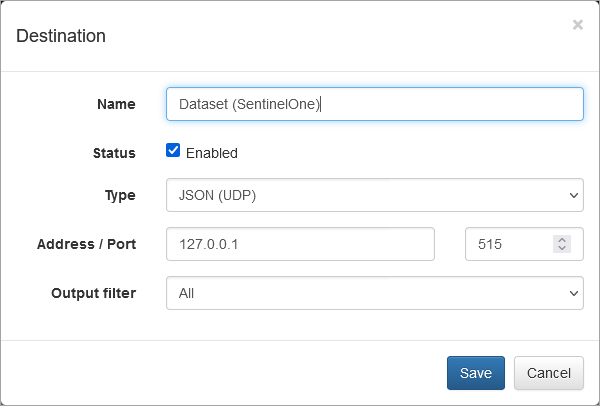
4. Configure NFO Output
Set NFO to stream the data to the agent you just configured.
- In the NFO GUI, go to Data Outputs and click (+).
- Type: Select JSON (UDP).
- Address:
localhost(if the agent is on the same machine) or the Agent's IP. - Port:
515(to match theprotocolssetting inagent.json).
5. Verification
Once the data is flowing, you can use the Inspect Log Line tool to verify that the NFO parser is breaking down the JSON correctly.