Tracing and Configuration
This page allows you to configure additional NFO server parameters, set tracing level, archive configuration, restore configuration, and download logs for issue resolution.
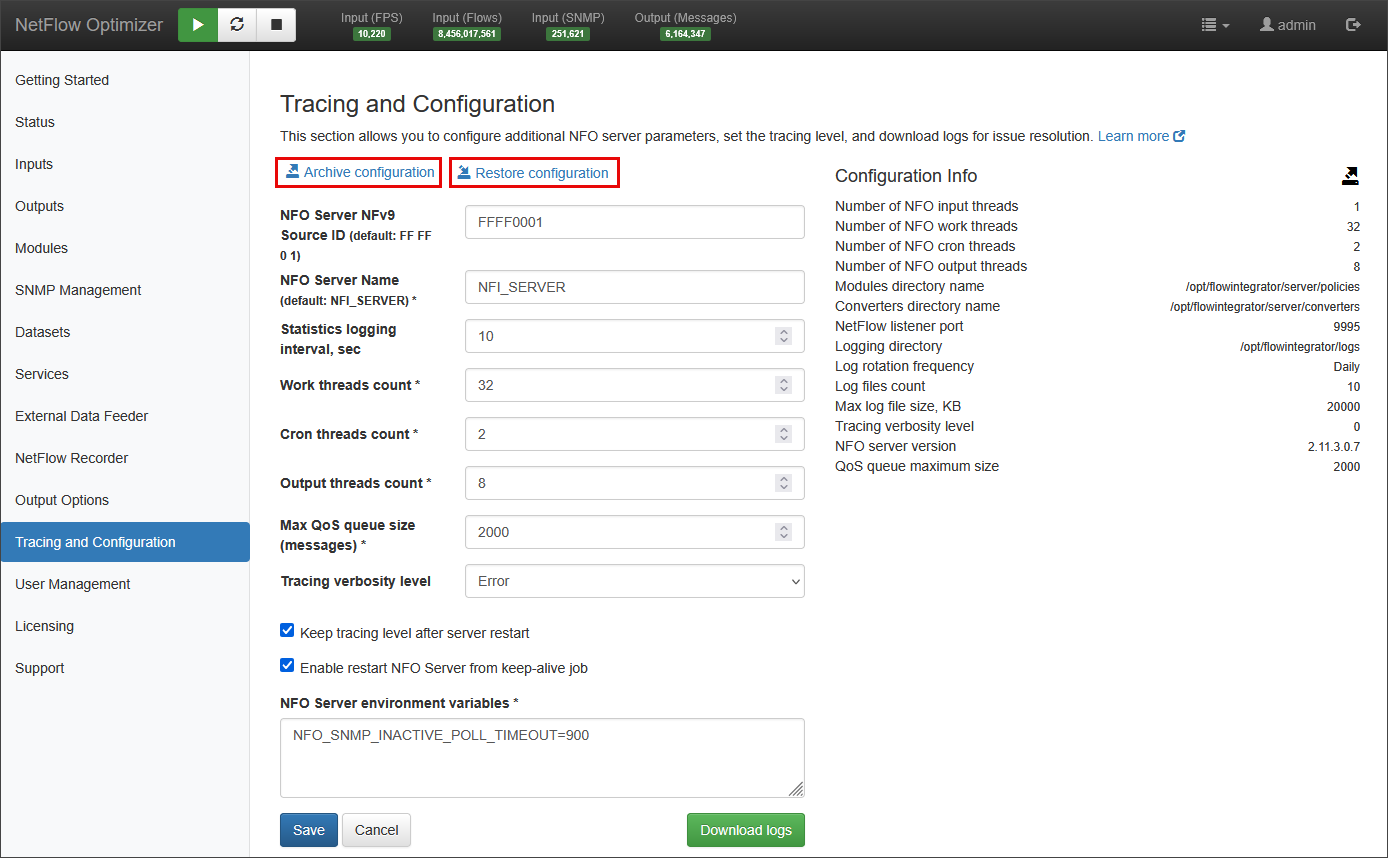
Parameters
- NFO Server NFv9 Source ID: a unique identifier used to distinguish the NFO server when it forwards NetFlow v9 messages. This ID is included in the header of every NetFlow v9 packet generated by NFO.
- NFO Server Name: a unique, user-defined name to the NetFlow Optimizer (NFO) instance.
- Statistics logging interval: specifies how frequently, in seconds, the NFO's operational statistics are logged and refreshed on Status page.
- Work threads count: specifies the number of parallel threads that the module uses to process incoming data. Increasing this count can improve performance by allowing NFO to handle more data concurrently.
- Cron threads count: specifies the number of parallel threads dedicated to executing scheduled tasks (cron jobs runniing at the end of data collection intervals).
- Output threads count: specifies the number of parallel threads that the module uses to format and send data to configured outputs. Increasing this count can enhance the throughput of data leaving the module, which is particularly useful for handling a high volume of output data.
- Max QoS queue size (messages): sets the maximum number of messages that the Quality of Service (QoS) queue can hold. When this limit is reached, any new incoming messages that are subject to QoS rules will be dropped. This parameter helps prevent the system from becoming overloaded by limiting the amount of buffered data.
- Tracing verbosity level: this drop-down controls the amount of detail included in the NFO's log files. A higher verbosity level provides more detailed information for debugging and troubleshooting, while a lower level reduces log volume for normal operations. The logging levels are (from least to most verbose): Error, Debug, Verbose, Flood.
NFO Environment Variables
The NFO Server is engineered for high-performance telemetry processing across massive hybrid infrastructures. To ensure system stability and data integrity, the platform supports a wide array of granular configuration parameters designed for precise performance tuning.
These variables allow for the optimization of:
- Throughput & Queuing: Fine-tuning internal request and trap buffers for high-volume traffic.
- Protocol Behavior: Adjusting SNMP timeouts, retries, and threading models.
- Resource Scaling: Managing memory and message handling for specific network architectures.
Performance Tuning and Customization
NFO environment variables are pre-configured with optimized defaults suitable for the majority of enterprise deployments.
If your environment has unique scale requirements or requires specialized optimization, do not modify these settings manually. Please contact NetFlow Logic Support to receive a recommended configuration tailored to your specific infrastructure needs.
To apply authorized variables, enter them in the NFO Server environment variables section and restart the NFO service.
Archive/Restore Configuration
"Archive configuration" zips all NFO configuration files and stores them on a local drive (the file name and path will be displayed). To restore the configuration, you need to move this file to your desktop (or any folder on your computer) and press "Restore configuration". This will open a dialog to upload the ZIP file. Note that for security reasons, we do not automatically save the zipped configuration to your computer.
This method is the standard for synchronizing logic and parameters across a distributed environment. It ensures that all peers in a cluster are processing data with identical rules and modules.
This is the recommended method for adding new Peers to your cluster. Instead of manually configuring each node, use the following workflow to ensure consistency:
- Configure Peer 1: Set up all required Logic Modules and parameters on your first peer node.
- Create Archive: Use the Archive function on Peer 1 to generate a configuration backup.
- Deploy Peers 2, 3, 4+: * Install a fresh NFO instance on the new machine.
- Use the Restore function to apply the archive from Peer 1.
- Once restored, join the instance to NFO Central.
Using this approach ensures that all peers operate as identical "processing units" without the risk of human error during manual setup.
Automating Configuration Archival
You can schedule periodic configuration backups without using the NFO GUI by utilizing the API script below.
#!/bin/bash

# NFO host
NFO_HOST=localhost
# NFO port
NFO_PORT=8443
# NFO admin account password
NFO_ADMIN_PASSWORD='changeme'

# -----------------------------
# If NFO version >= 2.11.1, the CSRF token is required
# for HTTP request types: POST, PUT, PATCH, and DELETE.
# For exampe:
# -H 'X-XSRF-TOKEN:QQA=' --cookie 'XSRF-TOKEN=A'
# -----------------------------

# loging
LOCATION=$(curl -si -d 'j_username=admin' --data-urlencode "j_password=${NFO_ADMIN_PASSWORD}" \
    -H 'X-XSRF-TOKEN:QQA=' --cookie 'XSRF-TOKEN=A' \
    -c cookies \
    --insecure \
    "https://${NFO_HOST}:${NFO_PORT}/j_security_check" \
    | grep -i "Location:" | awk '{print $2}' | tr -d '\r')

if [ "$LOCATION" != "/" ]; then
    echo "Invalid credentials"
    exit 1
fi

# dump config into /opt/flowintegrator/conf-backup/nfo_cfg_*.zip
curl -H 'Accept:application/json' -b cookies --insecure \
  "https://${NFO_HOST}:${NFO_PORT}/nfirapi/admin/config"


# logout
curl --insecure -X POST -H 'X-XSRF-TOKEN:QQA=' --cookie 'XSRF-TOKEN=A' -b cookies "https://${NFO_HOST}:${NFO_PORT}/logout"

echo ""

# remove cookies file
rm cookies