Raw Flow Retransmission (Repeater)
Please note that Repeater option is available only on Linux platforms.
This output type should be used if you want to retransmit binary flow records (NetFlow, sFlow, IPFIX, etc.) to another destination, such as your legacy NetFlow Collector or another NFO instance.
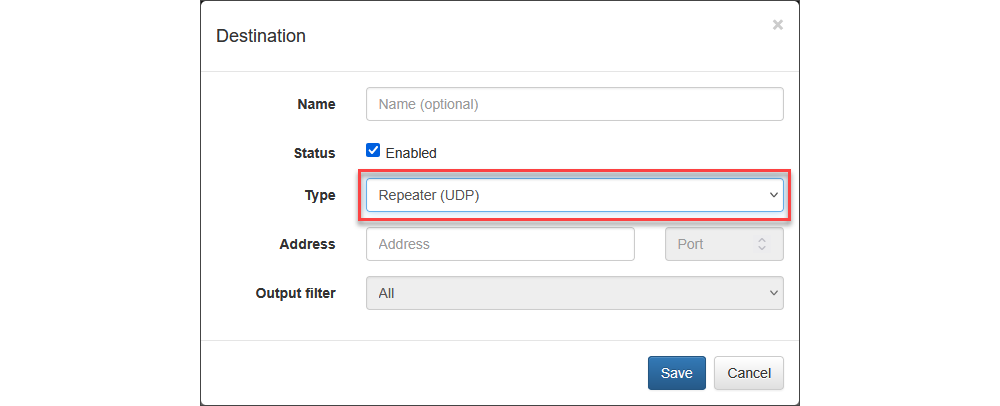
| Parameter | Description |
|---|---|
| Address | Destination IP address or host where NFO retransmits binary flow records to |
Please note that Repeater option allows you to specify the IP address, but not the destination port. This feature was designed so NFO can be "inserted" between NetFlow exporters and legacy NetFlow collectors. NFO will use the input port number and the exporter IP address when forwarding the original message received from the exporter. If you use this type of output NFO should be installed under root user.
Repeater Filter
The Repeater Filter Service is a feature that allows you to intelligently route incoming NetFlow data to different destinations based on configurable rules. While the service was originally designed for simple data forwarding, its enhanced filtering capabilities enable you to direct a subset of data to specific destinations.
The Repeater functionality is available only on Linux and is limited to retransmitting NetFlow data received via UDP.
How It Works
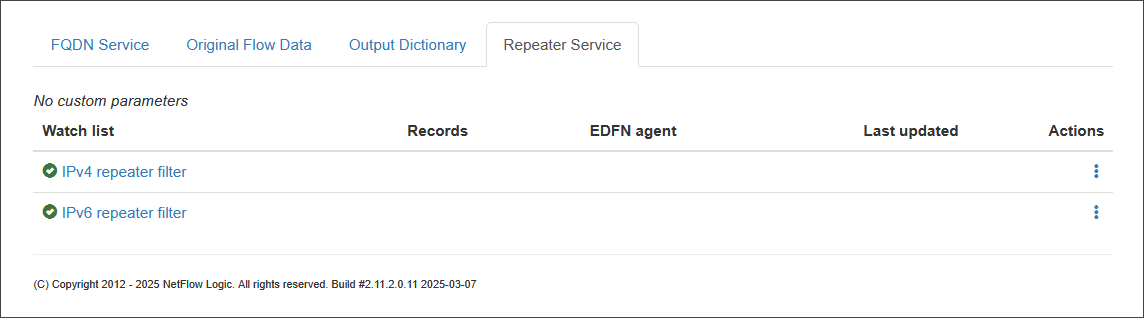
This service uses a list of filters to determine where to forward data from specific exporters. You can create rules to forward flow data from a particular exporter IP address, or an IP subnet of exporters to a distinct destination.
If a specific destination for the Repeater is not defined in any of the filter rules, it will receive all incoming flows by default.
Creating Filters
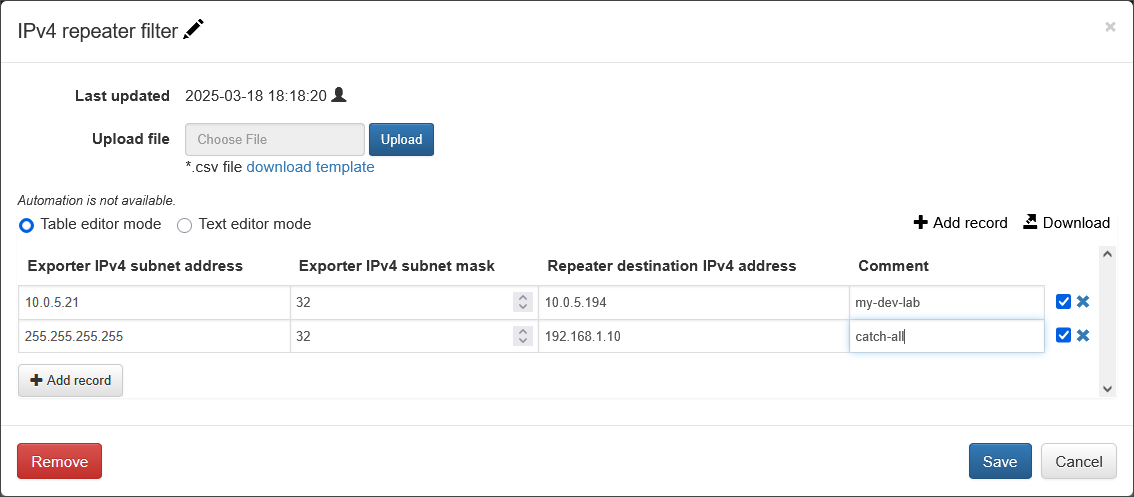
The filters are defined in lists, which enable you to configure which exporters' flow data is forwarded to which destinations.
Here is a parameter description for the example you provided.
Parameters
| Parameter Name | Description |
|---|---|
| Exporter IPv4 subnet address | The IPv4 address of the network device you want to filter. This is a crucial part of the filter rule. |
| Exporter IPv4 subnet mask | The subnet mask associated with the Exporter IPv4 subnet address. This defines the range of the network or a specific host to be filtered. |
| Repeater destination IPv4 address | The IPv4 address of the host where the filtered flow data will be forwarded. |
| Comment | An optional, user-defined field to add a description or note about the filter rule. |
IPv4 list example:
Exporter IPv4 subnet address, Exporter IPv4 subnet mask, Repeater destination IPv4 address, Comment
10.0.5.21,32,10.0.5.194,my-dev-lab
IPv6 list example:
Exporter IPv6 subnet address, Exporter IPv6 subnet mask, Repeater destination IPv6 address, Comment
2001:0db8:0003::,64,2001:db8:3:4:5:6:7:f,my-ipv6-dev-lab
Please note: Without Repeater filters all flows are re-transmitted to all Repeater destinations. If filters are created, only flows matching exporter subnets are re-transmitted to the corresponding destinations.
Catch-All Destination
A special repeater destination, called catch-all, can be created to capture and retransmit flows from exporters not in the list of subnets. It should be specified as: 255.255.255.255,32.
Repeater vs. NFO Central Load Balancer
While both the Repeater and the NFO Central Load Balancer (LB) manage the distribution of network telemetry, they serve different architectural roles. Use the table below to choose the right solution for your environment:
| Feature | Repeater (Stanalone NFO) | NFO Central Load Balancer |
|---|---|---|
| Logic Type | Manual & Fixed: Configuration is static and based on administrator-defined filters. | Automatic & Dynamic: Automatically distributes traffic based on node health and availability. |
| Primary Goal | Policy-Based Routing: Sending specific flows to specific destinations (e.g., Edge devices flows to one SIEM, Core routers and switches flows to IT Ops system). | Scalability & Resiliency: Balancing massive data volumes across a cluster of NFO instances to ensure high performance. |
| Data Handling | Selective Duplication: Can clone traffic or split it based on Exporter IP filters. | Intelligent Distribution: Balances traffic so each exporter's flows are processed by the most available node. |
| Configuration | Manual: Requires explicit rules to define which exporters are repeated to which destinations. | Automated: "Set and forget" logic that detects new nodes and handles failover automatically. |
| Typical Use Case | You need to route traffic from a specific branch office to a local collector while sending data from the main Data Center to the cloud. | You are dealing with a "NetFlow Tsunami" and need to scale your processing power across multiple servers. |
These are not mutually exclusive. In an NFO Central deployment, a Repeater output on NFO Central can forward a filtered slice of exporters to an NFO instance outside the Load Balancer Pools. This is how a staging instance receives real traffic for validating a configuration before it is pushed to production peers. See Using a Staging Instance.