Network Conversations Monitor (10062)
The Network Conversations Monitor is the primary foundational module for modern network observability within NFO. It is designed to transform high-volume, fragmented flow records into structured, enriched "conversations." This module is the recommended starting point for all new deployments, especially those requiring deep security forensics, user attribution, and cloud visibility.
Functionality
This module performs sophisticated analysis on raw telemetry to provide a complete picture of network interactions:
- Conversation Stitching (Bidirectional): Unlike traditional collectors that report two separate records for a single exchange, this module "stitches" forward and reverse flows into a single bidirectional event. It reports
bytes_in/bytes_outandpackets_in/packets_outfields, providing an immediate view of the symmetry and health of a connection. - Intelligent Consolidation: It aggregates flow records that share the same 5-tuple (Source/Dest IP, Source/Dest Port, Protocol) over a Data Collection Interval (DCI). This significantly reduces the volume of data sent to your SIEM while preserving the essential details of the interaction.
- State Tracking: The module tracks the lifecycle of every conversation:
- B (Begin): A new conversation is detected.
- C (Continuing): An ongoing conversation that spans multiple collection intervals.
- E (End): A conversation that has timed out or completed.
- Authoritative Deduplication: In complex networks where multiple routers see the same packet, NFO identifies the "authoritative" exporter and discards redundant records to prevent inflated traffic statistics.
- Conversation Duration: Network Conversation duration is calculated as a difference between the earliest
flow_start_timeof a conversation when its state=Band the latestflow_end_timefor state =CorE. - Session Origin: By defining local subnets, the module automatically classifies each conversation by where it originated relative to your network boundary:
inbound(external client to internal server),outbound(internal client to external server),internal(both endpoints are local), orunknown(cannot be determined). The field name in output isdirection— usedirection=inboundetc. in searches and filters.
Supported Inputs
The Network Conversations Monitor is protocol-agnostic and normalizes a wide array of telemetry sources into a unified schema:
- Standard Protocols: NetFlow (v5, v9), IPFIX, and sFlow.
- Cloud Flow Logs: AWS VPC, Microsoft Azure NSG and VNet, Oracle Cloud (OCI), and Google Cloud (GCP) Flow Logs.
- Application Delivery: Cisco AVC, Palo Alto Networks App-ID Technology, Fortinet App Identification, Citrix AppFlow.
Required NetFlow Fields
The following NetFlow/IPFIX Information Elements (IEs) must be present in flow records for the module to produce output. Recommended fields are optional but enable specific features when present.
Field availability depends on your exporter's NetFlow version and configuration. NetFlow v5 does not support IPv6 or most recommended fields. NetFlow v9 and IPFIX support the full field set.
| Information Element | IE ID | Size | Required / Recommended | Enables |
|---|---|---|---|---|
| sourceIPv4Address | 8 | 4 B | Required | IPv4 flow processing |
| destinationIPv4Address | 12 | 4 B | Required | IPv4 flow processing |
| sourceIPv6Address | 27 | 16 B | Required | IPv6 flow processing |
| destinationIPv6Address | 28 | 16 B | Required | IPv6 flow processing |
| octetDeltaCount | 1 | 4–8 B | Required | Byte counting (bytes_in) |
| packetDeltaCount | 2 | 4–8 B | Required | Packet counting (packets_in) |
| sourceTransportPort | 7 | 2 B | Recommended | Source port (src_port) |
| destinationTransportPort | 11 | 2 B | Recommended | Destination port (dest_port) |
| protocolIdentifier | 4 | 1 B | Recommended | Transport protocol (protocol) |
| tcpControlBits | 6 | 1–2 B | Recommended | TCP flags (tcp_flag) |
| ipClassOfService | 5 | 1 B | Recommended | Type of service (src_tos) |
| bgpSourceAsNumber | 16 | 2–4 B | Recommended | Source AS number (src_asn) |
| bgpDestinationAsNumber | 17 | 2–4 B | Recommended | Destination AS number (dest_asn) |
| ingressInterface | 10 | 4 B | Recommended | Input interface SNMP index (input_snmp) |
| egressInterface | 14 | 4 B | Recommended | Output interface SNMP index (output_snmp) |
| firewallEvent | 233 | 1 B | Recommended | Action field — Allowed/Blocked (action) |
| forwardingStatus | 89 | 1 B | Recommended | Action field — forwarded/dropped/consumed (action) |
| flowStartSysUpTime | 22 | 4 B | Recommended | Flow start time (flow_start_time) |
| flowEndSysUpTime | 21 | 4 B | Recommended | Flow end time (flow_end_time) |
Either the IPv4 pair or the IPv6 pair must be present. Both may be present in dual-stack environments.
Flow Enrichment
The Network Conversations Monitor is where all EDFN-based enrichment is applied. It is the only module that uses EDFN-provided data sets to enrich flow records. Enriched fields will only appear in its output. It enriches raw flows with the following contextual metadata:
- User Identity: Maps IP addresses to Active Directory, Okta, or Azure Entra ID usernames, allowing you to see who is responsible for specific traffic. See User Identity Enrichment.
- Cyber Threat Intelligence: Correlates source and destination IPs against real-time reputation lists (e.g., Botnets, C2 servers). Malicious communications are always reported, even if they fall outside of "Top N" traffic thresholds. See Cyber Threat Intelligence.
- GeoIP & ASN: Resolves IP addresses to geographic locations, country codes, cities, coordinates, and Autonomous System Numbers. See GeoIP and ASN Enrichment.
- Reverse DNS: Resolves IP addresses to hostnames using your existing DNS infrastructure. See Reverse DNS Lookup.
- Application Context: Identifies the specific application (e.g., Office 365, Facebook, SSH) using device-reported DPI data and configurable lookup lists. See Application Enrichment.
- Cloud & Virtualization Metadata: Adds cloud service, region, VM names, and VPC/VNet context for AWS, Azure, GCP, OCI, and VMware environments. See Cloud Enrichment.
- Cisco ACI: Maps flows to ACI Bridge Domain and tenant context for visibility into ACI fabric traffic. See Cisco ACI BD Subnets.
Configuration Parameters
To tune the module, click on 10062: Network Conversation Monitor in the NFO Web UI.
Core Logic Parameters
| Parameter Name | Description | Comments |
|---|---|---|
| Top N per exporter (0 for all traffic) | Top N Reported Hosts per NetFlow Exporter (set to 0 to report all flows). NOTE: Conversations with malicious hosts are reported regardless of whether they are in Top N by traffic volume or not! | min = 0, max = 100000, default = 50 |
| Session report timeout, sec | Inactivity threshold to determine when a conversation has ended. When reached, an event is reported with state="E". | default - 60s (Min: 0, Max: 600). Should exceed device inactive timeout. Set to 0 to disable duration/state tracking for maximum performance. |
| Report inactive sessions | If set to 1, report inactive session with 0 bytes/packets, even if there were no flows during DCI. If set to 0, inactive sessions are not reported. | default - 0 |
| Report long flows with cumulative bytes and packets | If set to 1, cumulative bytes and packets are reported for long sessions. If set to 0, incremental bytes and packets are reported for long flows (state = "C"). | default - 0 |
| Enable (1) or disable (0) deduplication | If set to 1 (de-duplication enabled), the Module reports flows only from authoritative exporters. | default - 0 |
| Enable (1) or disable (0) multiplying by sampling rate | If set to 1, when a flow is sampled (e.g. sFlow, sampled NetFlow/IPFIX), the sampling rate is used to multiply bytes and packets to report total traffic as a statistical approximation. | default - 0 |
| Default sampler rate | If sampling information is not available, use this rate to multiply bytes and packets to report total traffic as a statistical approximation. | default - 1 |
| Enable (1) or disable (0) reporting bidirectional conversations | If set to 1, stitch client-server flows reporting bytes_in and bytes_out, packets_in and packets_out in one consolidated message. | default - 0 |
| Enable (1) or disable (0) reporting client port | If set to 1, the ephemeral client port number is reported. If set to 0, client port number is not taken into account for consolidation, and reported as 0. To preserve client ports for specific destination ports, refer to the TIP below the table. | default - 1 |
| Enable (1) or disable (0) reporting flow denied events | If set to 1, denied or rejected flows are reported. If set to 0, only allowed or accepted flows are reported. | default - 1 |
| Enable (1) or disable (0) Cross-device application enrichment | If set to 1, the Application Collector is used to enrich flows from all exporters, including those that did not export app fields themselves. If set to 0, only flows that already carry app fields are enriched. | default - 1 |
| Enable (1) or disable (0) generating end of conversation events | If set to 1, events at the end of conversations (state=E) are created and reported. If set to 0, events with state=E are not reported. | default - 0 |
| Enable (1) or disable (0) SNMP enrichment | If set to 1, the Module will call SNMP service to enrich flow data with sysName and interface names. If set to 0, SNMP service is not called. | default - 1 |
| Enable (1) or disable (0) NetFlow timestamp correction | If set to 1, the Module will correct out of sequence flow_start_time and flow_end_time, which can occur due to a bug in the NetFlow implementation on certain devices. | default - 0 |
| Enable (1) or disable (0) flow start/end time substitution | If set to 1, the module uses the record's internal timestamp to populate missing flow_start_time and flow_end_time fields (e.g. for protocols like sFlow). | default - 0 |
| Enable (1) or disable (0) data quality filter | If set to 1, the module drops malformed records, including 0.0.0.0/8 IPs (except DHCP requests), invalid byte/packet counts, and flow_start_time / flow_end_time that fall outside a one-year range from the current date. | default - 0 |
While NFO inherently reduces volume through flow consolidation, you can achieve massive additional gains by ignoring ephemeral client ports.
By aggregating flows based only on Source IP, Destination IP, and Destination Port, you can achieve data reduction ratios of 20x to 100x. This significantly lowers SIEM costs and improves search performance without losing visibility into the services being accessed.
- Selective Visibility: To keep client ports for specific traffic (e.g., DNS), use the List of known server destination port numbers to exempt those ports from aggregation.
Data Consolidation Parameter
| Parameter Name | Description | Comments |
|---|---|---|
| Data Collection Interval, sec | The timeframe over which flows are consolidated. | default - 30s (Min: 5s, Max: 86400s) |
Data Sets and Enrichment Parameters
| Parameter Name | Description | Comments |
|---|---|---|
| Network / Traffic Classification | ||
| List of known server destination port numbers | List of server destination ports used to determine which host is a client and which is a server. If the list is empty, the server is assumed to be the one with the smaller port number. Ignored for unidirectional flows. | Pre-loaded from IANA service names |
| List of local subnets | Used to classify session origin for IPv4 traffic. Addresses in this list are considered "local" — traffic is labeled inbound, outbound, or internal accordingly. | default - { 10.0.0.0,8; 172.16.0.0,12; 192.168.0.0,16 } |
| List of local IPv6 prefixes | Used to classify session origin for IPv6 traffic. Addresses in this list are considered "local" — traffic is labeled inbound, outbound, or internal accordingly. | default - fc00:0:0:0:0:0:0:0,7 |
| User Identity | ||
| List of Users by IPv4 address | Maps IPv4 addresses to usernames logged in from those addresses. Populated automatically by EDFN agent from configured identity providers. | Provided by EDFN agent. See User Identity Enrichment |
| List of Users by IPv6 address | Maps IPv6 addresses to usernames logged in from those addresses. Populated automatically by EDFN agent from configured identity providers. | Provided by EDFN agent. See User Identity Enrichment |
| Cyber Threat Intelligence | ||
| Custom Threat list | List of public and private IP addresses with reputation known to be malicious. Flows matching these IPs are always reported regardless of the Top N threshold. | Provided by EDFN agent. See Cyber Threat Intelligence |
| GeoIP & ASN | ||
| IPv4 address block and country code | Mapping of country codes to IPv4 address blocks. Used to populate src_cc and dest_cc fields. | Provided by EDFN agent. See GeoIP and ASN Enrichment |
| IPv4 address block and city location | Mapping of city and country codes to IPv4 address blocks. Used to populate city, region, and geo-coordinate fields. | Provided by EDFN agent. See GeoIP and ASN Enrichment |
| AS Numbers IPv4 Blocks | Mapping of Autonomous System Numbers to IPv4 address blocks. Used to populate src_asn and dest_asn fields. | Provided by EDFN agent. See GeoIP and ASN Enrichment |
| AS Numbers IPv6 Blocks | Mapping of Autonomous System Numbers to IPv6 address blocks. Used to populate src_asn and dest_asn fields for IPv6 traffic. | Provided by EDFN agent. See GeoIP and ASN Enrichment |
| Cloud Services | ||
| IPv4 address ranges for cloud services | Lookup table mapping IPv4 ranges to cloud provider, service name, and region. Used to populate src_cloud_service, dest_cloud_service, src_cloud_region, and dest_cloud_region fields. | Provided by EDFN agent. See Cloud Service & Region |
| IPv6 address ranges for cloud services | Lookup table mapping IPv6 ranges to cloud provider, service name, and region. | Provided by EDFN agent. See Cloud Service & Region |
| AWS | ||
| AWS EC2 instances list | List of EC2 instances with IPs, VPC names, and related metadata. Used to populate src_vm_name, dest_vm_name, and related AWS fields. | Provided by EDFN agent. See AWS Cloud Enrichment |
| AWS VPC IPv4 Routes | List of AWS VPC IPv4 routes used for flow correlation and subnet context. | Provided by EDFN agent. See AWS Cloud Enrichment |
| AWS VPC IPv6 Routes | List of AWS VPC IPv6 routes used for flow correlation and subnet context. | Provided by EDFN agent. See AWS Cloud Enrichment |
| Microsoft Azure | ||
| Azure VM Instances | List of Azure VM names and associated metadata. Used to populate azure_src_vm_name and azure_dest_vm_name fields. | Provided by EDFN agent. See Azure Cloud Enrichment |
| Azure IPv4 Routes | List of Azure IPv4 routes used for flow correlation and virtual network context. | Provided by EDFN agent. See Azure Cloud Enrichment |
| Azure IPv6 Routes | List of Azure IPv6 routes used for flow correlation and virtual network context. | Provided by EDFN agent. See Azure Cloud Enrichment |
| Google Cloud (GCP) | ||
| GCP VM instances list | List of Google Cloud Compute Engine instance names and associated metadata. Used to populate src_vm_name and dest_vm_name for GCP flows. | Provided by EDFN agent. See Google Cloud Enrichment |
| GCP IPv4 routes list | List of Google Cloud VPC routes used for flow correlation and subnet context. | Provided by EDFN agent. See Google Cloud Enrichment |
| Oracle Cloud (OCI) | ||
| OCI Compute Instances | List of Oracle Cloud Infrastructure Compute instance names and associated metadata. Used to populate src_vm_name and dest_vm_name for OCI flows. | Provided by EDFN agent. See OCI Cloud Enrichment |
| OCI IPv4 Routes | List of OCI VCN IPv4 routes used for flow correlation and subnet context. | Provided by EDFN agent. See OCI Cloud Enrichment |
| OCI IPv6 Routes | List of OCI VCN IPv6 routes used for flow correlation and subnet context. | Provided by EDFN agent. See OCI Cloud Enrichment |
| Application Enrichment | ||
| Custom Applications (IPv4) | Maps ipv4/port/protocol → app_name/app_desc. Evaluated first for all flows. Overrides everything, including device-reported app_id names. The ignore list is never applied to custom matches. | Created manually: IPv4 Address,Prefix Length,Port,Protocol,Application Name,Application Ddescription,Comment |
| Custom Applications (IPv6) | Maps ipv6/port/protocol → app_name/app_desc. Evaluated first for all flows. Overrides everything, including device-reported app_id names. The ignore list is never applied to custom matches. | Created manually: IPv6 Address,Prefix Length,Port,Protocol,Application Name,Application Ddescription,Comment |
| Applications override list | Maps app_id → app_name/app_desc. Applied when no custom application matched and app_name is not directly in the flow. Overrides the auto-built Application collector. | Created manually: Application ID,Application Name,Application Description,Comment |
| Application collector | Auto-built from NetFlow Options (app_id type 95, app_name type 96, app_desc type 94). Read-only. Resolves app_name for flows carrying an app_id when no custom or override match is found. Subject to ignore list. | Populated automatically from flow data |
| Application names to be ignored | Device-reported app names suppressed from NFO output (e.g. unknown, incomplete, not-applicable). Applied to all sources except Custom applications list matches. | Created manually. default - { incomplete; not-applicable; unknown-udp; unknown-tcp; unknown-p2p } |
| Cisco ACI | ||
| List of BD subnets to Tenant mapping | Maps Cisco ACI Bridge Domain subnets to tenant names. Used to populate src_tenant_name, dest_tenant_name, src_bd_name, and dest_bd_name fields. | Provided by EDFN agent. See Cisco ACI BD Subnets |
| VMware | ||
| List of vCenter Virtual Machines | List of VMware vCenter VMs including VDS IPv4 address, VM IPv4/IPv6 address, VDS Port ID, vNIC key, Port Group name, VM name, VM MoRef, and vCenter UUID. Used to populate src_vm_name and dest_vm_name for VMware environments. | Provided by EDFN agent. See VMware vCenter Enrichment |
Converter Configuration
The Converter transforms the module's internal flow records into the syslog/JSON output format before sending to your configured outputs. It controls which fields are included and in what order, independently of the module's internal processing.
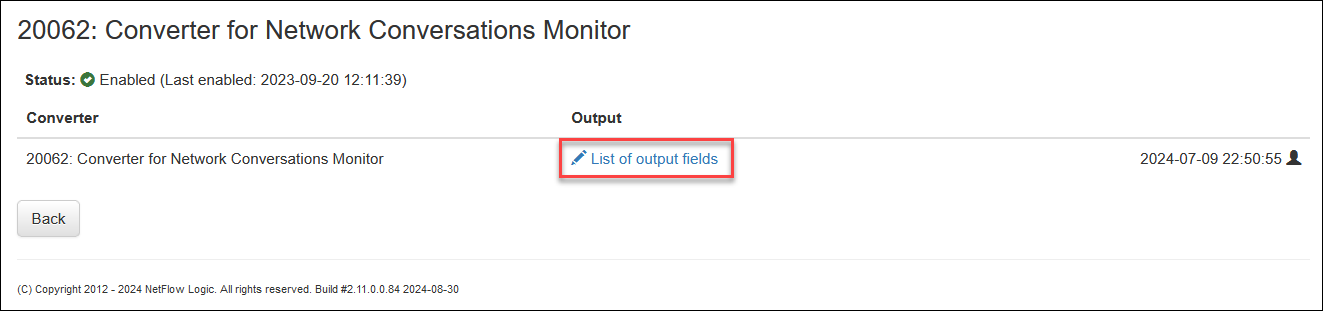
To configure the Converter, click on Converter for Network Conversation Monitor.

Output Fields
To configure output fields, including the order, click on List of output fields.
In this pop-up you can select and reorder fields for the Module output.
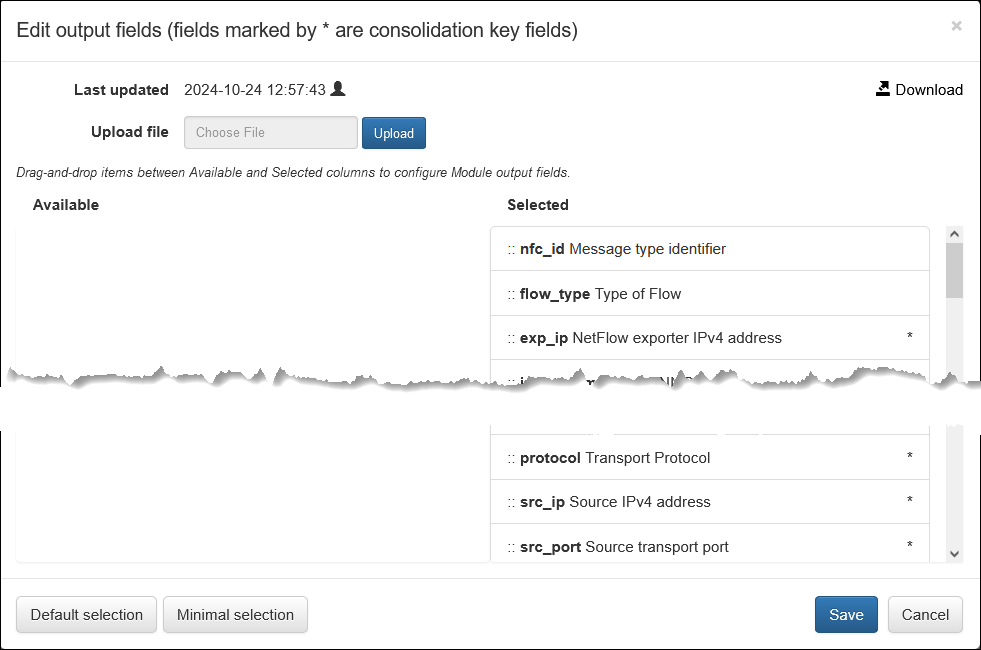
nfo_hostnamefield is added by the NFO server in Output Options, and therefore not selectable here.src_ip6anddest_ip6are selected automatically whensrc_ipanddest_ipfields are selected.
Syslog/JSON Message Fields
| Field Name | Description | Type | Example / Notes |
|---|---|---|---|
| nfo_hostname | NFO server hostname or FQDN | string | |
| site | Deployment location name | string | Optional. Used in logs and dashboards |
| nfc_id | Message type identifier | string | nfc_id=20062 |
| flow_type | Type of flow | string | NFv5, NFv9, sFlow, IPFIX, AWS, Azure, OCI |
| exp_ip | NetFlow exporter IPv4 address | IPv4 address | Added for public clouds for compatibility with other flow types |
| exp_ip6 | NetFlow exporter IPv6 address | IPv6 address | Added for public clouds for compatibility with other flow types |
| device_type | Device type | string | e.g. router, firewall, switch |
| input_snmp | Input SNMP index | number | |
| output_snmp | Output SNMP index | number | |
| exp_name | Exporter name | string | Populated from SNMP sysName |
| input_if_name | Input interface name | string | Populated from SNMP ifName |
| input_if_alias | Input interface alias | string | Populated from SNMP ifAlias |
| output_if_name | Output interface name | string | Populated from SNMP ifName |
| output_if_alias | Output interface alias | string | Populated from SNMP ifAlias |
| protocol | Transport protocol | number | TCP = 6, UDP = 17, ICMP = 1. See IANA Protocol Numbers |
| src_ip | Source IPv4 address | IPv4 address | |
| src_ip6 | Source IPv6 address | IPv6 address | |
| src_port | Source transport port | number | |
| post_nat_src_ip | Post-NAT source IPv4 address | IPv4 address | Present only when NAT is detected |
| post_nat_src_port | Post-NAT source transport port | number | Present only when NAT is detected |
| src_tos | Source type of service | number | DSCP/ToS byte from the IP header |
| src_asn | Source AS number | number | |
| src_cc | Source country code | string | GeoIP-derived: Country level (ISO 3166-1 alpha-2, e.g. US, DE, JP) |
| src_region | Source region | string | GeoIP-derived: City level |
| src_city | Source city | string | GeoIP-derived: City level |
| src_lon | Source longitude | number | GeoIP-derived: City level |
| src_lat | Source latitude | number | GeoIP-derived: City level |
| src_mac | Source MAC address | string | e.g. e0:46:9a:2b:83:13. Present for directly connected devices only |
| src_cloud_provider | Cloud source provider | string | e.g. AWS, Azure |
| src_cloud_region | Cloud source region | string | e.g. us-east-1, eastus |
| src_cloud_service | Cloud source service | string | e.g. EC2, S3, Azure VM |
| src_host | Source host name | string | Present when FQDN resolution is enabled |
| src_vlan | Source VLAN | string | |
| src_vm_name | Source VM name | string | AWS EC2 instance name, Azure VM name, or OCI Compute Instance name |
| src_vpc_name | Source VPC name | string | AWS VPC, Azure VNet, or OCI VCN |
| src_subnet_name | Source subnet name | string | |
| src_tenant_name | Cisco ACI source tenant | string | |
| src_bd_name | Cisco ACI source bridge domain | string | |
| dest_ip | Destination IPv4 address | IPv4 address | |
| dest_ip6 | Destination IPv6 address | IPv6 address | |
| dest_port | Destination transport port | number | |
| post_nat_dest_ip | Post-NAT destination IPv4 address | IPv4 address | Present only when NAT is detected |
| post_nat_dest_port | Post-NAT destination transport port | number | Present only when NAT is detected |
| dest_tos | Destination type of service | number | DSCP/ToS byte from the IP header |
| dest_asn | Destination AS number | number | |
| dest_cc | Destination country code | string | GeoIP-derived: Country level (ISO 3166-1 alpha-2, e.g. US, DE, JP) |
| dest_cloud_provider | Cloud source provider | string | e.g. AWS, Azure |
| dest_region | Destination region | string | GeoIP-derived: City level |
| dest_city | Destination city | string | GeoIP-derived: City level |
| dest_lon | Destination longitude | number | GeoIP-derived: City level |
| dest_lat | Destination latitude | number | GeoIP-derived: City level |
| dest_mac | Destination MAC address | string | e.g. e0:46:9a:2b:83:13. Present for directly connected devices only |
| dest_vlan | Destination VLAN | string | |
| dest_host | Destination host name | string | Present when FQDN resolution is enabled |
| dest_vm_name | Destination VM name | string | AWS EC2 instance name, Azure VM name, or OCI Compute Instance name |
| dest_vpc_name | Destination VPC name | string | AWS VPC, Azure VNet, or OCI VCN |
| dest_subnet_name | Destination subnet name | string | |
| dest_tenant_name | Cisco ACI destination tenant | string | |
| dest_bd_name | Cisco ACI destination bridge domain | string | |
| dest_cloud_region | Cloud destination region | string | e.g. us-east-1, eastus |
| dest_cloud_service | Cloud destination service | string | e.g. EC2, S3, Azure VM |
| tcp_flag | TCP flags | string | e.g. SYN, ACK, FIN |
| packets_in | Packets received by destination IP from source IP | number | |
| bytes_in | Layer 3 bytes received by destination IP from source IP | number | |
| packets_out | Packets sent by destination IP to source IP | number | |
| bytes_out | Layer 3 bytes sent by destination IP to source IP | number | |
| flow_count | Number of consolidated flows reported in this event | number | |
| action (*) | Flow action | string | Determined from IPFIX element 233 (firewallEvent) and NFv9/IPFIX element 89 (forwardingStatus) |
| state | Flow state | string | B = Begin, C = Continuing, E = End |
| latency | Latency as reported in flow records | number (msec) | |
| duration | Session duration (unidirectional) or conversation duration (bidirectional) | number (sec) | |
| direction | Session origin relative to the local network boundary | string | inbound = external client → internal server; outbound = internal client → external server; internal = both IPs are local; unknown = cannot be determined |
| netscaler_client_retrans_count | NetScaler client TCP retransmission count | integer | NetScaler only |
| netscaler_server_retrans_count | NetScaler server TCP retransmission count | integer | NetScaler only |
| netscaler_client_rtt | NetScaler client round-trip time | integer (msec) | NetScaler only |
| netscaler_server_rtt | NetScaler server round-trip time | integer (msec) | NetScaler only |
| idp | Identity provider for the user | string | |
| username | User name provided by EDFN Agent | string | |
| user_count | Total users per IP address as reported by EDFN Agent | number | |
| app_id | Application ID (Type 95) | string | Class Eng. ID:Selector ID — see RFC 6759 §4 |
| app_name | Application name | string | Type 96, or proprietary IPFIX/NFv9 elements (Palo Alto Networks, NetScaler) |
| app_desc | Application description | string | Type 94, or proprietary IPFIX/NFv9 elements (Palo Alto Networks, NetScaler) |
| app_engine_id | Application classification engine ID | string | Class Eng. ID description for part 1 of Type 95 (Type 101) |
| threat_list_name | Name of the matched cybersecurity threat list | string | |
| reputation | Reputation score from the threat list | string | |
| aws_vpc_id | AWS VPC identifier | string | |
| aws_vpc_name | AWS VPC name | string | |
| aws_interface_id | AWS interface ID | string | |
| aws_account_id | AWS account ID | string | |
| gcp_reporter | GCP VPC Flow Logs reporter | string | SRC or DEST |
| gcp_exp | GCP VPC Flow Logs exporter | string | Calculated from reporter field — Project ID/VPC/Subnet |
| gcp_subnet_id | GCP subnet ID | string | |
| src_vm_ip_pub | Source EC2 or OCI instance public IPv4 address | IPv4 address | |
| aws_src_inst_id | Source EC2 instance ID | string | e.g. i-390d7032, i-0c0a6ac75d9d87b7e |
| gcp_src_project_id | GCP source project ID | string | |
| gcp_src_vm_zone | GCP source VM zone | string | |
| azure_src_subs_id | Azure source subscription ID | string | |
| azure_src_subs_name | Azure source subscription name | string | |
| azure_src_nsg_name | Azure source NSG name | string | |
| azure_src_vnet_name | Azure source virtual network name | string | |
| azure_src_res_grp_name | Azure source resource group name | string | |
| dest_vm_ip_pub | Destination EC2 or OCI instance public IPv4 address | IPv4 address | |
| aws_dest_inst_id | Destination EC2 instance ID | string | |
| gcp_dest_project_id | GCP destination project ID | string | |
| gcp_dest_vm_zone | GCP destination VM zone | string | |
| azure_dest_subs_id | Azure destination subscription ID | string | |
| azure_dest_subs_name | Azure destination subscription name | string | |
| azure_dest_nsg_name | Azure destination NSG name | string | |
| azure_dest_vnet_name | Azure destination virtual network name | string | |
| azure_dest_res_grp_name | Azure destination resource group name | string | |
| oci_src_vcn_name | Source VCN name | string | OCI |
| oci_src_compartment_name | Source compartment name | string | OCI |
| oci_src_tenancy_name | Source tenancy name | string | OCI |
| oci_dest_vcn_name | Destination VCN name | string | OCI |
| oci_dest_compartment_name | Destination compartment name | string | OCI |
| oci_dest_tenancy_name | Destination tenancy name | string | OCI |
| flow_start_time | Start time of the first consolidated flow | time | |
| flow_end_time | End time of the last consolidated flow | time | |
| t_int | Observation time interval | number (msec) | The consolidation window during which similar flows are aggregated into this record |
(*) Action field values
| Value | Condition |
|---|---|
action=R | firewallEvent 0 (ignored), 2 (deleted), or 3 (denied); Rejected cloud flow logs |
action=A | firewallEvent 1 (created), 4 (alert), or 5 (update); Allowed cloud flow logs |
action=U | forwardingStatus 00 (unknown) |
action=F | forwardingStatus 01 (forwarded) |
action=D | forwardingStatus 10 (dropped) |
action=C | forwardingStatus 11 (consumed) |