Deployment Architecture and Strategy
Selecting the right architecture is a critical first step. While NFO is lightweight enough to run on a single virtual machine, high-volume enterprises and security-conscious organizations often require a more distributed approach.
NFO can operate as a standalone instance or as a distributed cluster of specialized nodes. This page compares the options in detail. For host requirements, network ports, and installation links, see Deployment.
Option A: Single-Node Deployment (Standard)
In this "all-in-one" model, the NFO engine, the Web UI (Controller), and the External Data Feeder (EDFN) are installed on a single host.
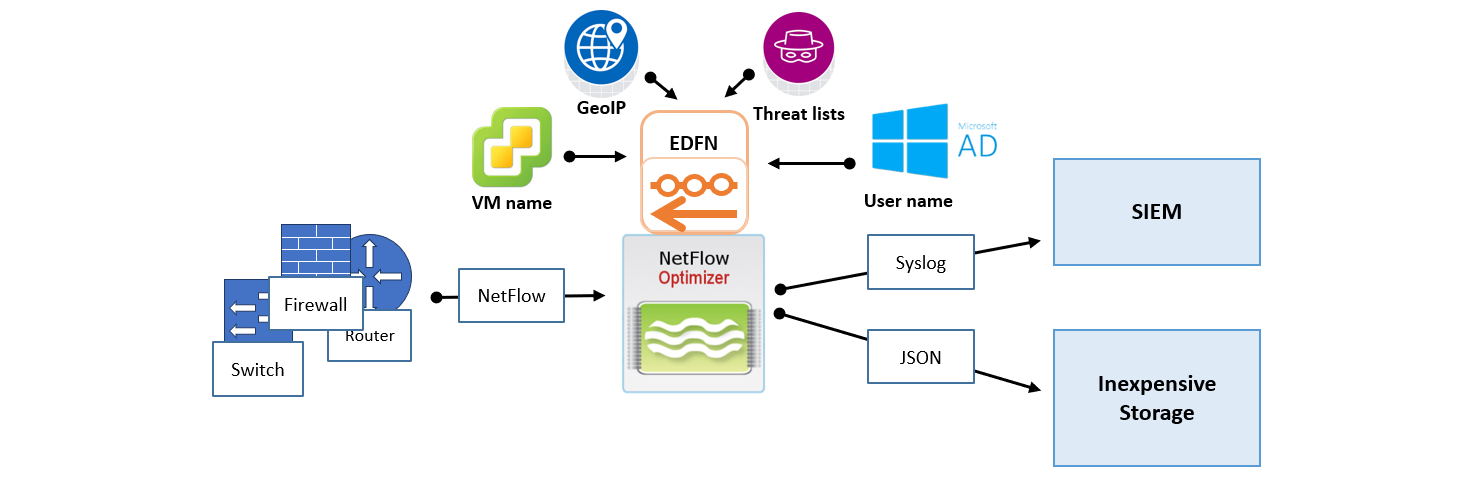
- Best For: Most enterprise environments. A single node running the full NetFlow module stack handles up to 50,000 flows per second (FPS).
- Pros: Simplest to maintain; single point of configuration and management.
- Cons: Requires the host to have outbound internet access (Port 443) to fetch threat intelligence and GeoIP updates.
Option B: Distributed Deployment (Security-Focus)
The Distributed architecture separates the NFO engine from the data fetching components. This is typically used to bridge the gap between an internet-connected DMZ and a restricted internal segment.
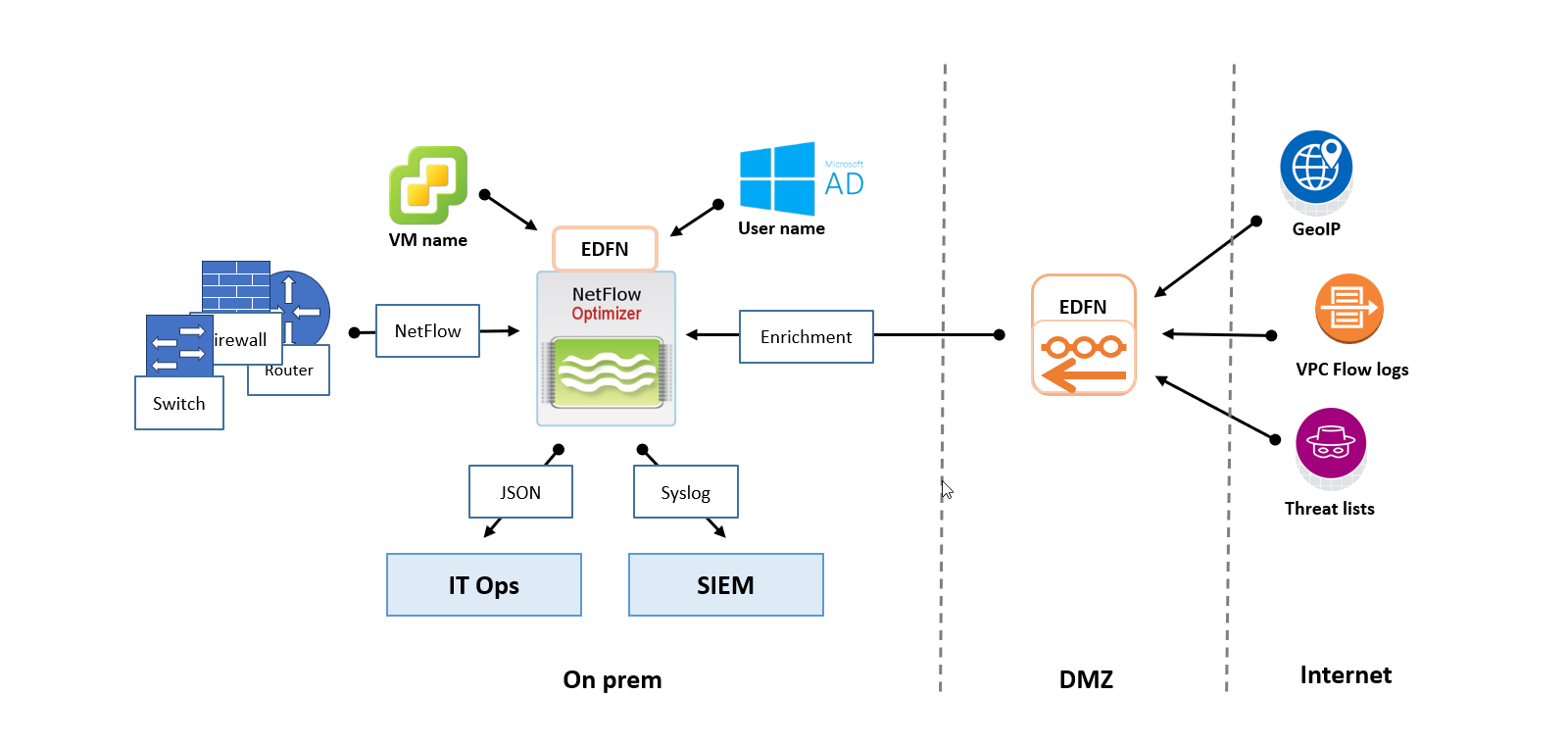
- Best For: Air-Gapped or Dark Segments where the main processing node cannot have a direct internet connection.
- The Setup: A standalone EDFN is installed on a proxy/DMZ host to fetch updates. It then "pushes" those updates internally to one or more NFO instances.
- Pros: High security; meets strict compliance requirements for isolated networks.
Option C: Horizontal Scaling with NFO Central
NFO Central and distributed deployment functionality are currently available only for Linux-based NFO installations. Windows deployments currently support Standalone mode only.
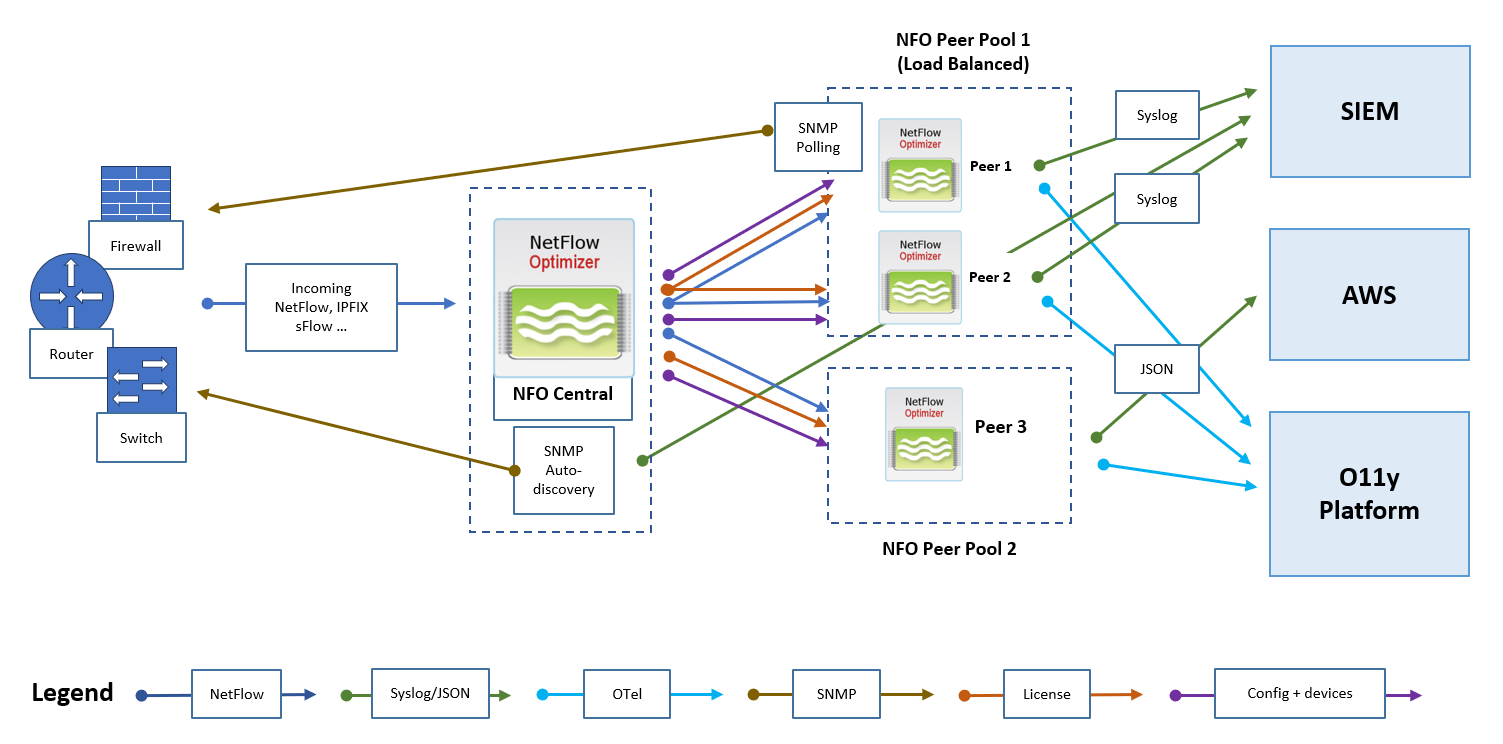
For massive scale or multi-tenant environments, NFO uses a "Controller and Peer" model. NFO Central acts as the load balancer, while multiple Peer Nodes do the heavy lifting of ingesting raw flow data.
Architecture Components
- NFO Central (Control Plane): The central management hub. It receives all incoming flow data, generates access tokens for peers, performs active health checks, optionally manages licenses, and dynamically distributes traffic to NFO Peers Pools.
- NFO Peer Pool (Load Balanced): A cluster of NFO Peer Nodes designated to receive and process the intelligently distributed NetFlow workload.
- Multiple Peer Pools: NFO Central can manage more than one pool. Every pool receives all incoming flows, and each pool carries its own configuration, so the pools can run different modules and send to different destinations. One pool might output Syslog to a SIEM while another outputs JSON to AWS S3 and OpenTelemetry to an observability platform.
NFO Central Deployment Architecture and Data Flows
Flow Ingestion and Intelligent Distribution
- Flow Ingestion: All NetFlow, IPFIX, and sFlow traffic is directed to NFO Central as the sole point of ingress.
- Exporter Affinity: All traffic from a single exporter IP is sent to the same peer node, so flows from one device are never split across peers.
- Dynamic Rebalancing: Exporter assignments are not permanent. NFO Central reassigns exporters when a peer joins or leaves the pool, and when the distribution becomes imbalanced. The Distribution Margin setting controls how much imbalance is tolerated before exporters are moved. See Rebalancing Interval and Distribution Margin.
- Health Checks: NFO Central performs active health checks and automatically removes unhealthy nodes from the load balancing pool.
Using More Than One Pool
A Load Balancer Pool is the unit of configuration in NFO Central. Each pool is assigned one configuration snapshot, which NFO Central pushes to every peer in that pool.
Every pool receives all incoming flows. Pools do not divide the traffic between them; they process the same data differently.
A single pool can already send to multiple destinations, so a second pool is not how you add an output. What a second pool gives you is a second configuration of the same module. A pool carries one configuration, which means one setting per module parameter. When two consumers need the same module tuned differently, each needs its own pool. For example, Network Conversations with Top N set to 100 for an IT operations platform that wants the heaviest talkers, and the same module with Top N set to 0 for a security system that needs every flow.
Within a pool, the exporter affinity and rebalancing behavior described above applies independently.
SNMP Discovery and Polling
SNMP work is split between NFO Central and the peers.
NFO Central runs SNMP Management and SNMP auto-discovery, building the device inventory once for the whole cluster, and runs Module 10701 to report that inventory and the discovered topology.
NFO Central then assigns a subset of the discovered devices to each peer. Each peer polls only its assigned devices and runs Module 10103 to report their metrics. Discovery is centralized because the inventory is a cluster-wide concern; polling is distributed because it is load that should spread across the pool.
Devices are spread so that no peer exceeds its target share plus the pool's Distribution Margin, the same setting that governs flow distribution. Assignments are sticky, so device counts across peers are often uneven. See SNMP Device Assignment for how assignment works and how to view it.
When a device both exports NetFlow and is polled over SNMP, its SNMP assignment follows its NetFlow assignment: the peer that receives the device's flows also polls it. This keeps flow records and device metrics for the same device on the same peer.
Peers also use their device list locally: their SNMP service supplies interface names when NetFlow modules enrich flow records.
Enrichment Data
The External Data Feeder built into NFO Central becomes a shared feeder for the cluster. It delivers threat intelligence, GeoIP, and other watch lists to NFO Central and to the peers you select, so each peer does not need its own feeder configured locally. See Shared External Data Feeder.
Output and External Integration
NFO Peer Nodes are responsible for processing, enrichment, and output to various downstream collectors and platforms:
- SIEM: NFO Peers output processed data via Syslog or JSON to a Security Information and Event Management (SIEM) system.
- Cloud Integration: Peers can send specialized output, such as JSON, to cloud services like AWS. This destination can be used for inexpensive long-term storage to address compliance use cases and enable the running of various reporting and analytical jobs.
- Observability Platform: Processed data is sent as OpenTelemetry (OTel) data to an O11y Platform for unified metrics, tracing, and logging analysis.
Management and Control
The entire deployment remains managed through the NFO Central interface:
- License Management: NFO Central serves as the centralized location to push, track, and manage licenses for all NFO Peer nodes, ensuring operational compliance.
- Configuration: NFO Central provides a GUI, including the ability to create NFO Peer Pools.
Peers in a pool are not configured individually. Configure one peer completely, import its configuration into NFO Central on the Configuration Management tab, then assign that configuration to a Load Balancer Pool. NFO Central pushes it to every peer in the pool, including peers added later. See Import the Configuration into NFO Central.
Once the cluster is running, a pool can be rolled back to any earlier configuration snapshot, and changes can be validated against real traffic on a staging instance before they reach production. See Changing a Pool Configuration.
Option D: Hybrid and Cloud Considerations
A hybrid environment, combining on-premises infrastructure with cloud resources, presents unique challenges for network flow collection. NFO is strategically designed to provide comprehensive visibility across these distributed environments while minimizing data transfer costs.
On-Premises SIEM with Cloud Flow Collection
If your primary SIEM is hosted in your physical data center, you need to collect flows from both local hardware and your cloud VPCs.
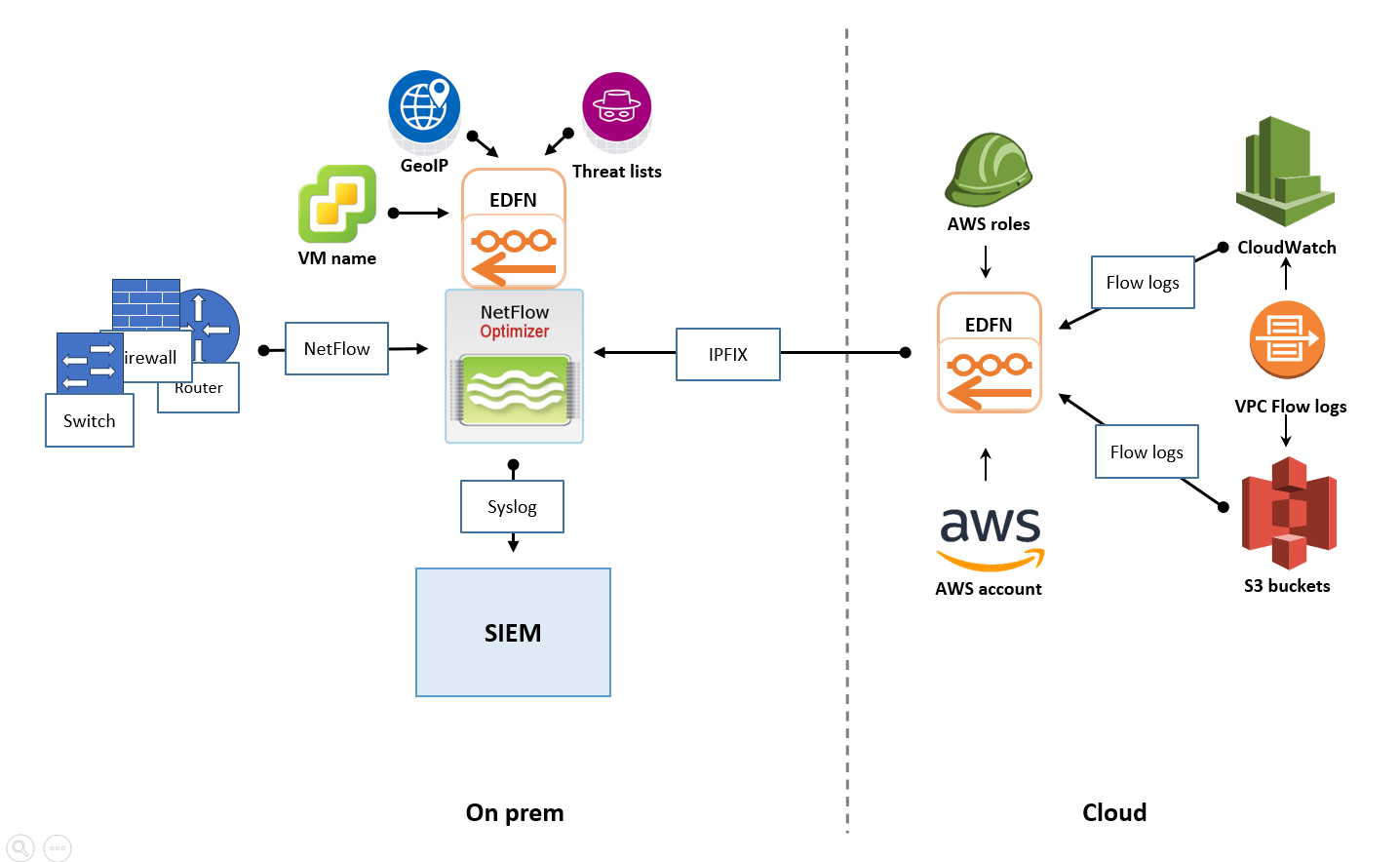
- The Strategy: Deploy a cloud-based EDFN instance within your AWS, Azure, or GCP environment.
- How it works: This cloud-resident EDFN ingests native cloud flow logs, converts them to IPFIX, and forwards them to your on-premises NFO instance.
- Benefit: You leverage existing on-premises infrastructure to process cloud telemetry without deploying a full NFO engine in the cloud.
Cloud-Based SIEM with Hybrid Flow Collection
For "Cloud-First" organizations using a cloud SIEM (such as Microsoft Sentinel or Splunk Cloud), the architecture shifts to prioritize cloud-native ingestion.
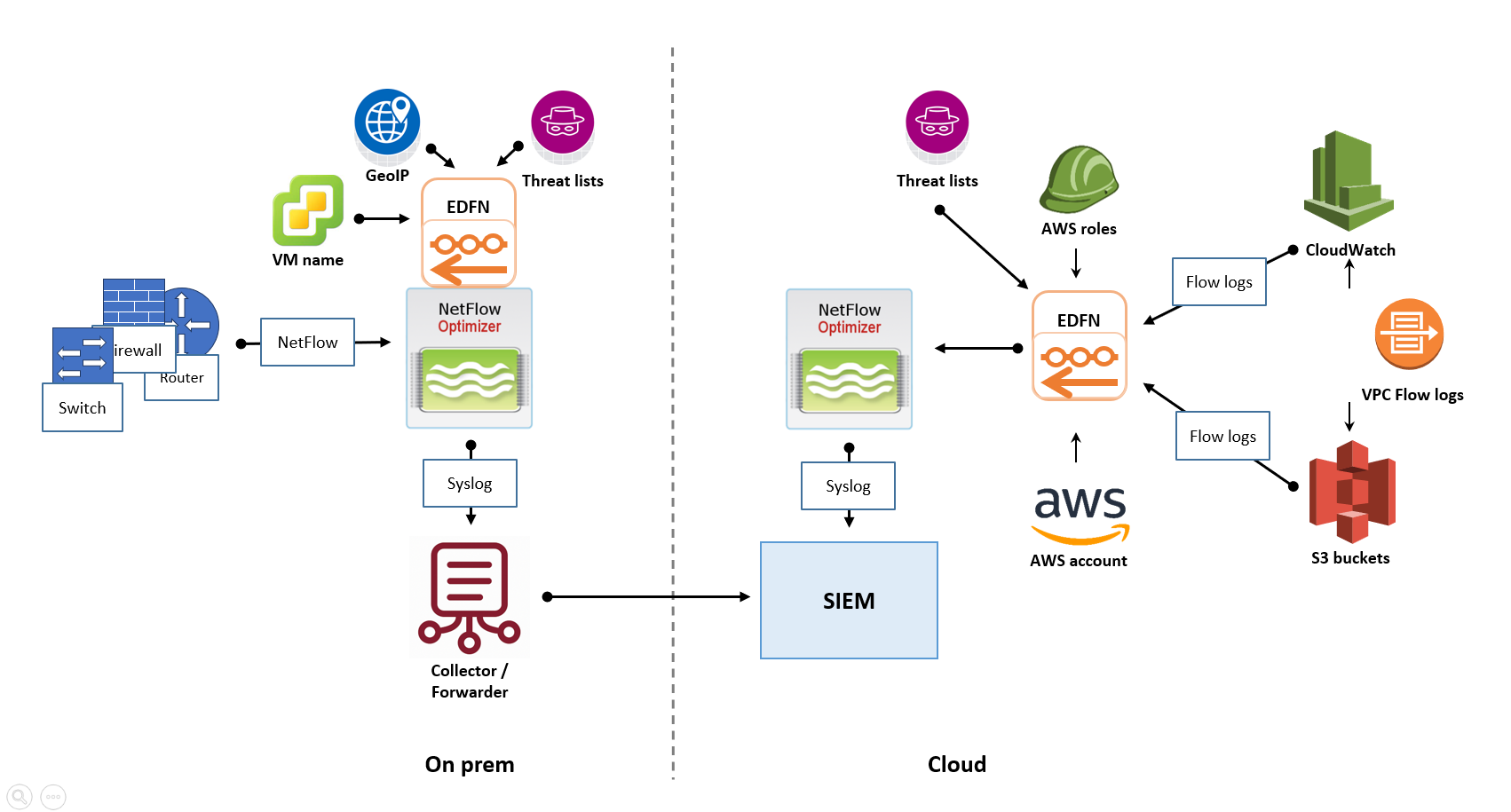
- The Strategy: Deploy NFO instances both on-premises (for physical devices) and in the cloud (for VPC logs).
- How it works: Both instances process and enrich data locally. They then securely forward the processed, "shrunk" data to the cloud SIEM.
- Benefit: By processing flows locally, you avoid sending massive amounts of raw UDP data across the internet, significantly reducing cloud egress costs.
Key Considerations for Hybrid Success
- Network Connectivity: Ensure reliable and secure connectivity (VPN or Dedicated Circuits) between your cloud and on-premises segments to allow for management and data forwarding.
- Security: Use NFO's encryption capabilities to protect flow data as it traverses the public internet between your hybrid sites.
- Cost Optimization: Right-size your cloud-based NFO/EDFN instances based on regional flow volume to avoid over-provisioning cloud compute resources.