Shared External Data Feeder
In a distributed deployment, every node that processes flows needs the same watch lists. A shared External Data Feeder delivers them from one place: you configure it once on NFO Central, and it updates NFO Central itself plus the NFO Peers you select. Before this feature, every node needed its own External Data Feeder configured locally.
Terminology
| Term | Meaning |
|---|---|
| External Data Feeder (EDFN) | The component that runs agents and produces watch lists. See EDFN Administration. |
| Primary controller | The NFO instance the EDFN reports to, set as uri in the EDFN configuration file. It is the only node that configures the EDFN and receives its logs. |
| Shared EDFN | An EDFN whose primary controller is an NFO Central, and which therefore also updates that Central's peers. |
| Data target | A destination for a watch list: this NFO (the primary controller), an NFO Peer, a Load Balancer Pool, or all peers. |
Shared EDFN covers enrichment watch lists only. Cloud flow log ingestion (AWS, Azure, Google Cloud, Oracle Cloud) is a flow-data path and is not distributed through a shared EDFN.
When an External Data Feeder Becomes Shared
There is no "shared" setting to switch on. An EDFN becomes shared as soon as both conditions hold:
- Its primary controller is in NFO Central mode, and
- That NFO Central has at least one connected NFO Peer.
Delivery to peers starts only after you configure data targets. Until then, and immediately after upgrading an existing installation, every agent updates its own node only, exactly as before.
If NFO Central is switched to another mode, or its last peer is removed, the target configuration is kept but every agent updates the primary controller only.
Prerequisites
- The primary controller is in NFO Central mode with at least one connected peer. See NFO Central for connecting peers.
- Network connectivity from the EDFN host to the HTTPS port of every peer (
8443by default). - One External Data Feeder per host per node. Two shared EDFNs that reach a peer from the same address, for example from behind a single NAT address, cannot both register there. Check this before deploying.
- The EDFN ID (parameter
uidin<EDFN_HOME>/conf/updater.properties,EDFN_IDby default) must be 249 characters or shorter, because the peer registers it under the derived IDSHARED_<uid>and the total is capped at 256. If the ID is longer, the EDFN service does not start and logsUpdater UID is longer than 249 characters. - The EDFN ID must be unique among all External Data Feeders that update the same peer.
When Not to Use a Shared EDFN
A shared EDFN uses one set of proxy settings and one trust store for all its agents. It cannot serve peers in different network zones that require different proxy configurations or different certificate trust. In that case, keep a local EDFN on the peers in the separate zone.
Migrating from Local EDFNs to a Shared EDFN
If your peers currently run their own local External Data Feeders, moving to a shared feeder is a takeover rather than a manual migration.
-
Confirm the prerequisites above, in particular that no two EDFNs will reach a peer from the same address.
-
On NFO Central, open External Data Feeder and configure the Data targets of the EDFN (see below). Until this is done, nothing changes on the peers.
-
The shared EDFN registers on each peer automatically. On first registration it takes over every agent that has no feeder yet or that is fed by a local EDFN of that peer. The peer logs one line per agent:
Agent "GeoIP" (1006218) watch list is updated by the EDFN SHARED_EDFN_ID of NFO Central from now on, the previous one was EDFN_ID.
-
The previous feeder stops updating those watch lists. It is reconfigured immediately if connected, and at its next registration otherwise.
-
Verify on each peer that the shared EDFN appears with the Managed by NFO Central badge and that the agents you expect are now fed by it.
An agent already fed by another shared EDFN is never taken over.
Rolling Back
To return an agent to a peer's local EDFN, do it on the peer: either select the local EDFN in the agent's row, or use Assign all agents on the local EDFN's row to reclaim all of them at once. The shared EDFN notices at its next registration and stops updating that watch list there.
Running the same agent locally on a peer and through a shared EDFN at the same time is not supported, because both would write the same data set. Decide per agent which External Data Feeder updates it.
Configuring Data Targets
Data targets are configured on NFO Central at two levels. You set them once for the External Data Feeder, which applies to all of its agents, and then optionally override them per agent for individual watch lists.
The Targets column appears only when the node is in NFO Central mode.
Step 1: Open the Targets of the External Data Feeder
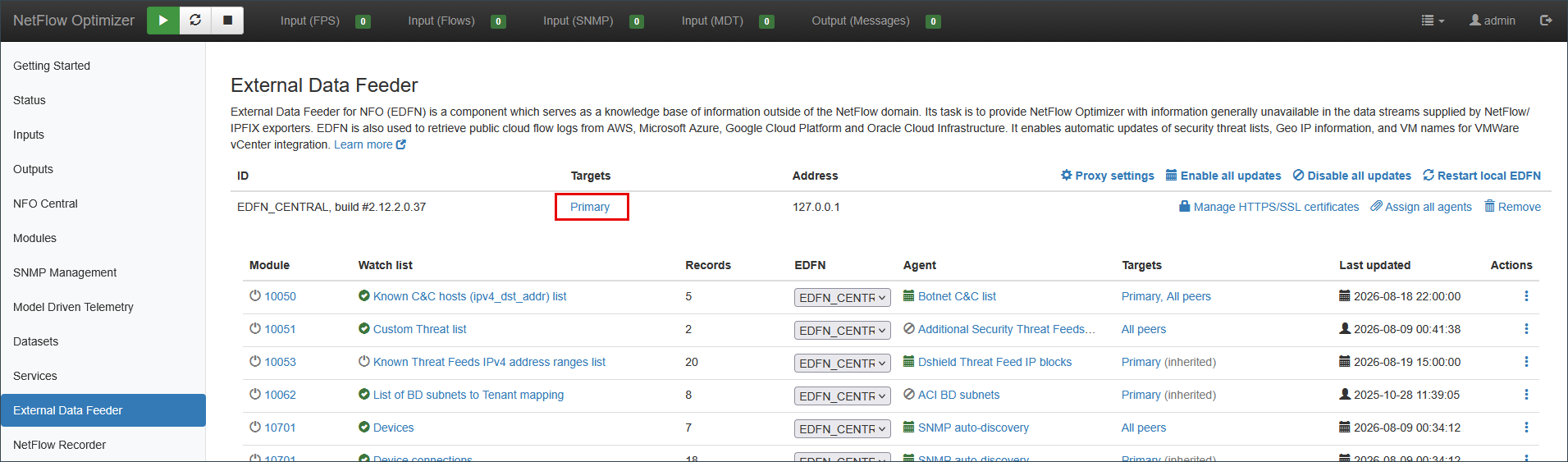
On the left navigation bar select External Data Feeder. The Targets column in the External Data Feeder table shows where that feeder currently sends. A new feeder shows Primary, meaning NFO Central only. Click the value to change it.
Step 2: Select the Destinations
The Data targets dialog opens, showing the name of the feeder at the top.
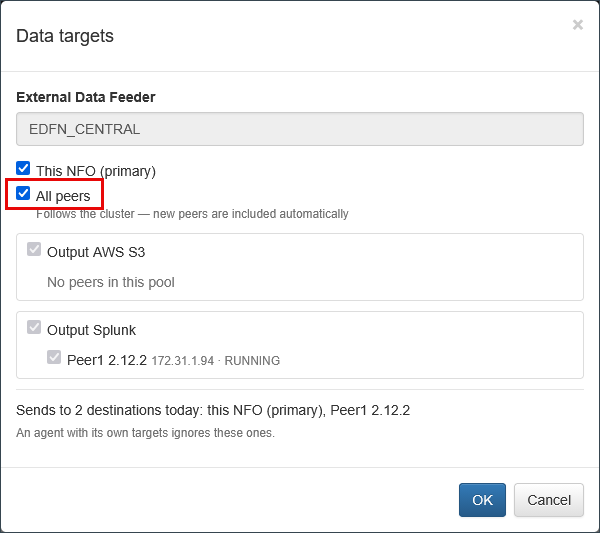
Select the destinations:
- This NFO (primary): NFO Central itself.
- All peers: every peer in the cluster, including peers connected later.
- A Load Balancer Pool: every peer that is a member of that pool, now and later.
- An individual peer, listed inside its pool.
Click OK.
Reading the dialog:
- Implied selections are checked and grayed out. All peers implies every pool and every peer, and a selected pool implies its own peers.
- A pool you select yourself carries a green follows pool badge, meaning its membership is followed as peers are added or removed.
- A pool with no members shows No peers in this pool, so you can see that selecting it has no effect today.
- The line under the tree resolves the selection into today's destinations, for example Sends to 2 destinations today: this NFO (primary), Peer1 2.12.2.
Step 3: Review What the Agents Inherit
Back on the External Data Feeder page, the feeder's Targets value now reflects your selection, and every agent in the table below shows the same destinations followed by (inherited).
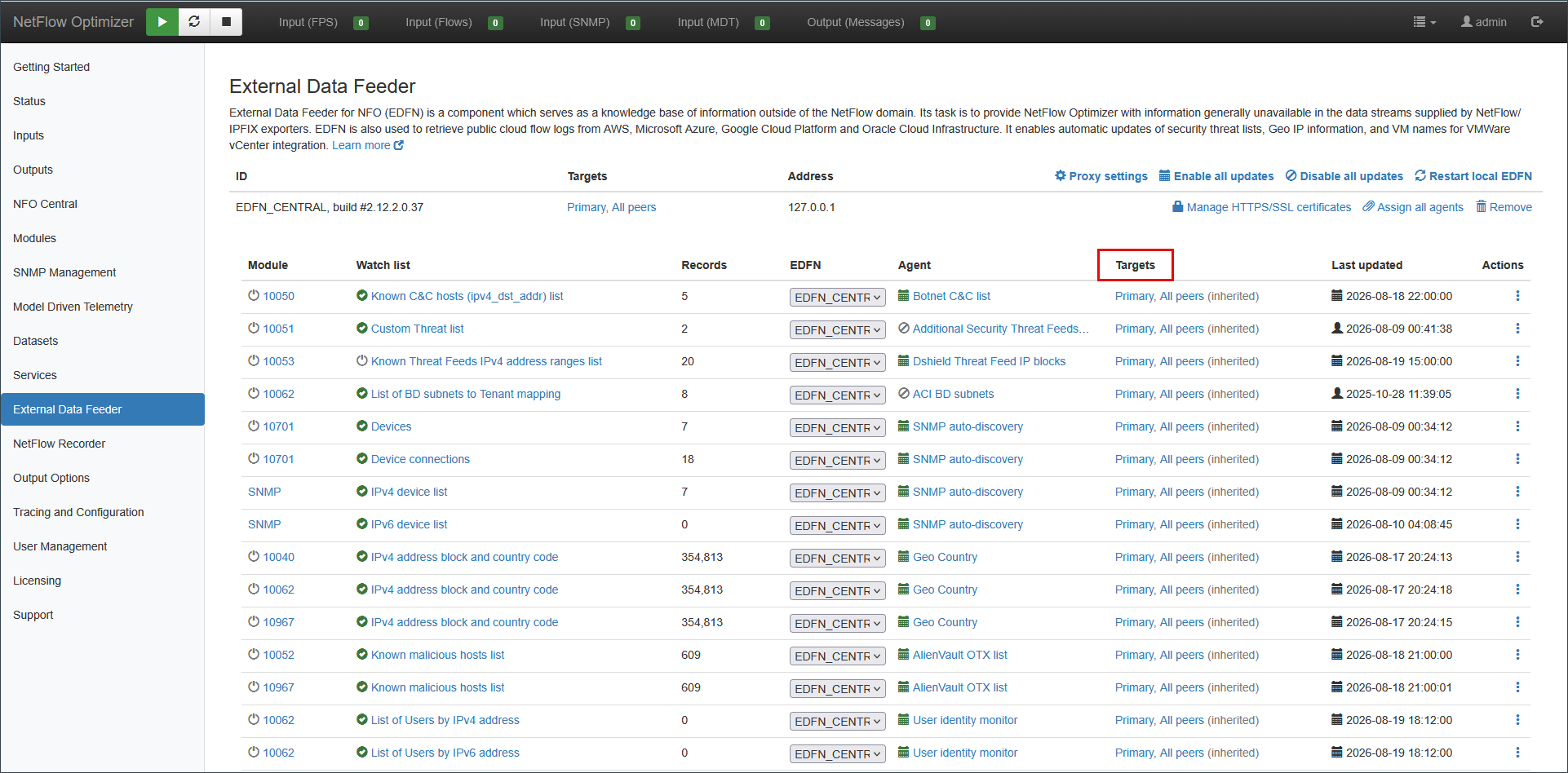
The (inherited) suffix is how you tell the two levels apart. An agent showing (inherited) follows its feeder. An agent showing destinations without the suffix has its own targets.
Step 4: Override the Targets of an Individual Agent
If one watch list needs to go somewhere different, click the value in that agent's Targets column.
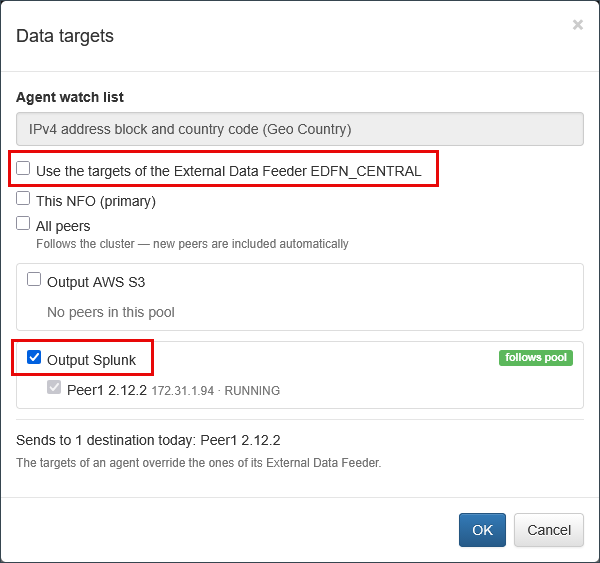
The dialog names the agent watch list at the top and adds one checkbox above the destination list: Use the targets of the External Data Feeder, followed by the feeder's name.
- Leave it checked for the agent to follow its feeder.
- Clear it to enable the destination list, then select the destinations for this watch list only.
Click OK.
An agent's targets replace its External Data Feeder's targets. The two lists are never merged. To return an agent to following its feeder, reopen this dialog and check Use the targets of the External Data Feeder again.
What Each Selection Means
| Selection | Delivered to | Follows later changes |
|---|---|---|
| This NFO (primary) | NFO Central itself | Not applicable |
| All peers | Every connected peer | Yes, peers connected later are included |
| A Load Balancer Pool | The current members of the pool | Yes, peers added to the pool later are included |
| An individual peer | That peer only | No, this is a fixed selection |
| Nothing selected | The primary controller only | Not applicable |
The distinction between selecting a pool and selecting its peers individually is the most consequential choice in this dialog. Selecting the pool follows membership; selecting peers inside it does not.
When Targets No Longer Exist
If every peer an agent targets has been removed from the cluster, nothing is sent and NFO reports:
Agent 1006218: watch list isn't sent, the configured NFO peers don't exist.
This is deliberate. The watch list is never silently redirected to another node. Correct the agent's data targets.
What You See on an NFO Peer
Everything NFO Central feeds is read-only on the peer.
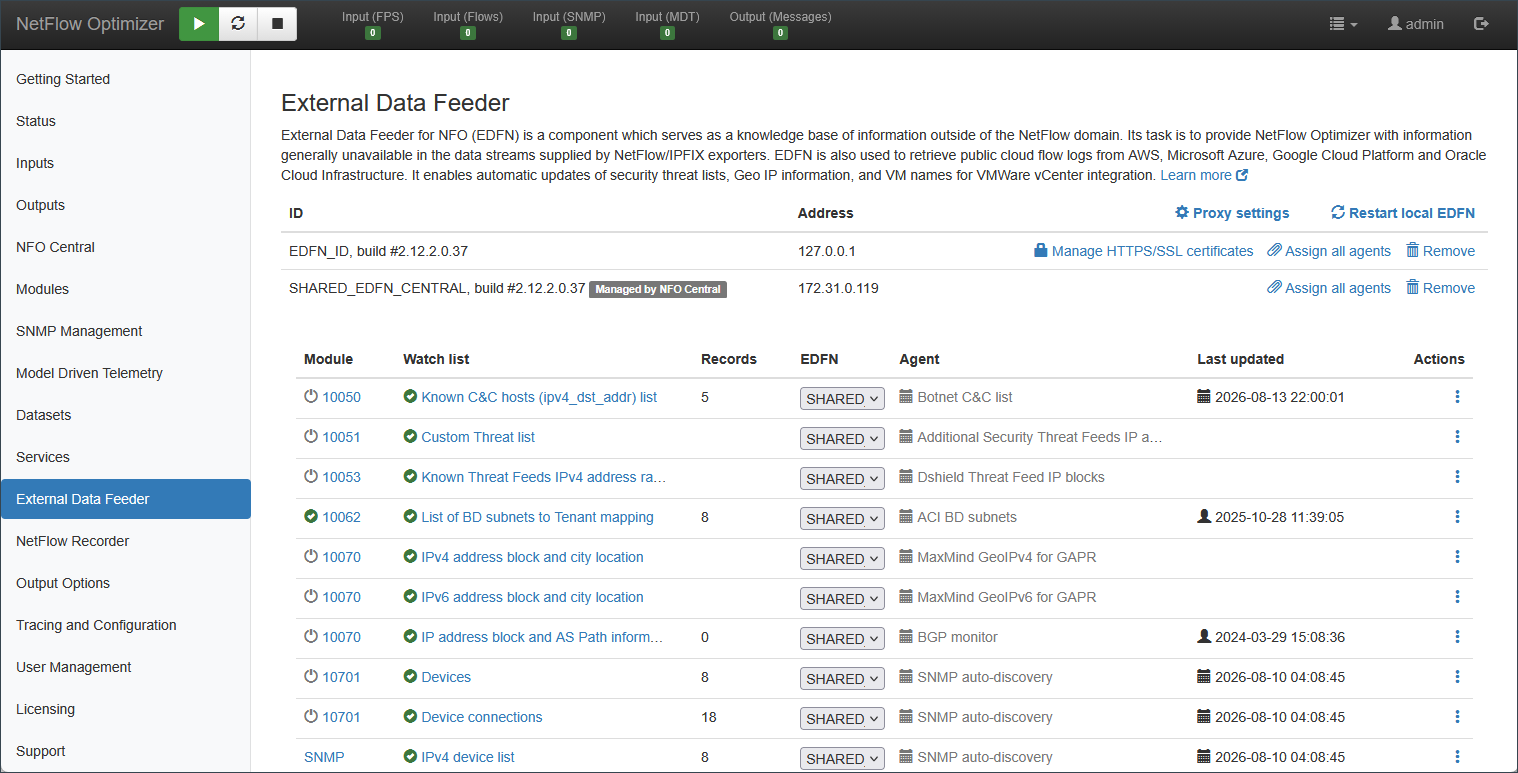
- The External Data Feeder row shows the ID
SHARED_<uid>and the Managed by NFO Central badge. Manage HTTPS/SSL certificates is not offered. - An agent fed by the shared EDFN shows a gray schedule icon and a gray agent name. Its row menu no longer offers Configure EDFN agent, Configure targets, Run EDFN agent, or Enable/Disable automatic updates.
- In the watch list editor, the Auto-update by checkbox is selected and disabled, followed by (configured on NFO Central).
- On the Inputs page, the cloud collectors show input is configured on NFO Central, and SNMP auto-discovery shows Auto-discovery is configured on NFO Central.
What remains available on the peer: editing the watch list itself, and enabling or disabling it.
Which External Data Feeder Updates a Watch List
On any node, a watch list is updated by exactly one External Data Feeder. This is what allows a shared EDFN and a peer's local EDFN to coexist without overwriting each other's data.
The rules are covered under Migrating from Local EDFNs above: first registration takes over agents that are unfed or locally fed, agents fed by another shared EDFN are never taken over, and an assignment made by an administrator is preserved.
Scheduling and Automatic Updates
- An agent whose module is disabled on NFO Central still runs when it has a peer target, because the watch list is needed on the peers even if Central does not use it.
- When an agent is not scheduled at all, the save dialog explains both conditions: the module must be enabled, or a peer target must be configured, and a scheduled update must run.
- Enable all updates and Disable all updates switch automatic updates for every agent on the node. Agents fed by a shared EDFN are skipped, since they are managed on NFO Central. On a peer fed entirely by NFO Central, these links are not shown.
Delivery and Synchronization
When an agent produces only changes, those changes are sent to targets that are in sync. A target that missed an update is marked out of sync and receives the full watch list on the next agent run, which brings it back in sync. A newly added target is out of sync by definition and receives a full watch list first.
A target that does not accept a watch list is logged and marked out of sync, and is updated again later. It never blocks delivery to the other targets.
Very large watch lists. A watch list larger than 512 MB is delivered to the primary controller only; the peers are marked out of sync and receive it on the next run. Nothing is ever truncated.
Where to look. Per-target detail is in the EDFN log at <EDFN_HOME>/logs/updater.log. Reported problems appear on NFO Central under Status > Logs. In the EDFN log, a target is identified by the peer's UUID, or by primary_controller for the primary controller. A peer's UUID is shown in the NFO UUID field on that peer's NFO Central page.
Configuration Reference
Settings in <EDFN_HOME>/conf/updater.properties relevant to a shared EDFN:
| Parameter | Default | Meaning |
|---|---|---|
uid | EDFN_ID | ID of this External Data Feeder. At most 249 characters, and unique among the External Data Feeders that update the same peer. Changing it re-registers the EDFN everywhere. |
uri | https://localhost:8443 | Address of the primary controller, the NFO Central that configures this EDFN. |
Restart the External Data Feeder service after changing either value.
Limitations
- One External Data Feeder per host on a node. Two shared EDFNs reaching a peer from the same address, for example behind one NAT address, cannot both register there. The same applies to two EDFNs using the same ID.
- One feeder per watch list. An agent cannot be updated by a peer's local EDFN and a shared EDFN at the same time; the second is refused.
- A Load Balancer Pool used as a data target cannot be deleted. Change the data targets of the External Data Feeders and agents named in the error, then delete the pool.
- Applying a configuration archive on a peer clears the data targets stored on that peer. The targets that matter live on NFO Central, and the peer continues receiving its watch lists.
- Watch lists larger than 512 MB reach the peers one agent run later.
- A shared EDFN is managed only on its NFO Central. Its certificates, proxy settings, agent configuration, manual runs, and logs are not available on a peer.
Troubleshooting
A peer never receives watch lists
Check, in this order: the peer is connected on the NFO Central page; the data targets of the EDFN or agent include that peer; the EDFN log contains Registered on the peer: ... name=<peer>. A peer for which NFO Central cannot obtain an access token is not offered to the EDFN at all. Look for EDFN access token get failed from peer-b on the Central and re-check the peer's connection.
Registration on a peer is rejected
The peer refused the registration and the reason follows in the message:
- ...is registered on this node and is managed from here. A shared NFO External Data Feeder of NFO Central cannot use this ID : a locally managed EDFN on the peer already uses that ID. Remove that EDFN if it is a leftover, or change the
uidof the shared EDFN. - ID ... is used by a shared NFO External Data Feeder, that is managed by NFO Central : the mirror case. A local EDFN on the peer is trying to use an ID belonging to a shared one. Change the local EDFN's
uid. - ...cannot be registered from 10.1.2.3: this host is used by SHARED_ABC : the peer already has an External Data Feeder registered from that host. Remove the obsolete one on the peer.
The EDFN retries every 15 minutes. Registration succeeds without a restart once the conflict is resolved.
Registration on a peer failed
The peer is unreachable or returned an error. Check that the peer is running and its HTTPS port is reachable from the EDFN host. The EDFN retries about every minute.
Agent 1006218: watch list isn't sent, the configured NFO peers don't exist
Every peer the agent targets has been removed. Open the agent's Data targets dialog and select existing destinations, or let it inherit the targets of its External Data Feeder.
Agent 1006218: the watch list of the NFO peer peer-b is updated by another EDFN, this one doesn't update it
On that peer the agent is assigned to a different External Data Feeder. Decide which should feed it: on the peer, assign the agent to the shared EDFN, or remove that peer from the agent's data targets. The shared EDFN re-checks every 15 minutes.
EDFN_ID cannot update the watch list of agent "GeoIP" (1006218): it is updated by SHARED_EDFN_ID
The same situation seen from the node. A local EDFN tried to update a watch list that NFO Central feeds. Either leave the agent to NFO Central and disable it on the local EDFN, or assign it back to the local EDFN on the peer.
Agent 1006218: watch list is bigger than 536870912 bytes, it isn't sent to the NFO peers
The watch list exceeds the 512 MB limit for delivery to multiple destinations. The primary controller receives it as usual and the peers receive it on the next agent run. If this happens on every run, reduce the size of the watch list in the agent's configuration, or contact NetFlow Logic support.
An action on a peer fails with ... is configured on NFO Central and cannot be managed from this node
The External Data Feeder or agent is fed by NFO Central. Make the change on NFO Central, or hand the agent back to a local EDFN on the peer first.