Deployment Architecture & Strategy
Selecting the right architecture is a critical first step. While NFO is lightweight enough to run on a single virtual machine, high-volume enterprises or security-conscious organizations often require a more distributed approach.
NFO can operate as a standalone instance or as a distributed cluster of specialized nodes.
Option A: Single-Node Deployment (Standard)
In this "all-in-one" model, the NFO engine, the Web UI (Controller), and the External Data Feeder (EDFN) are installed on a single host.
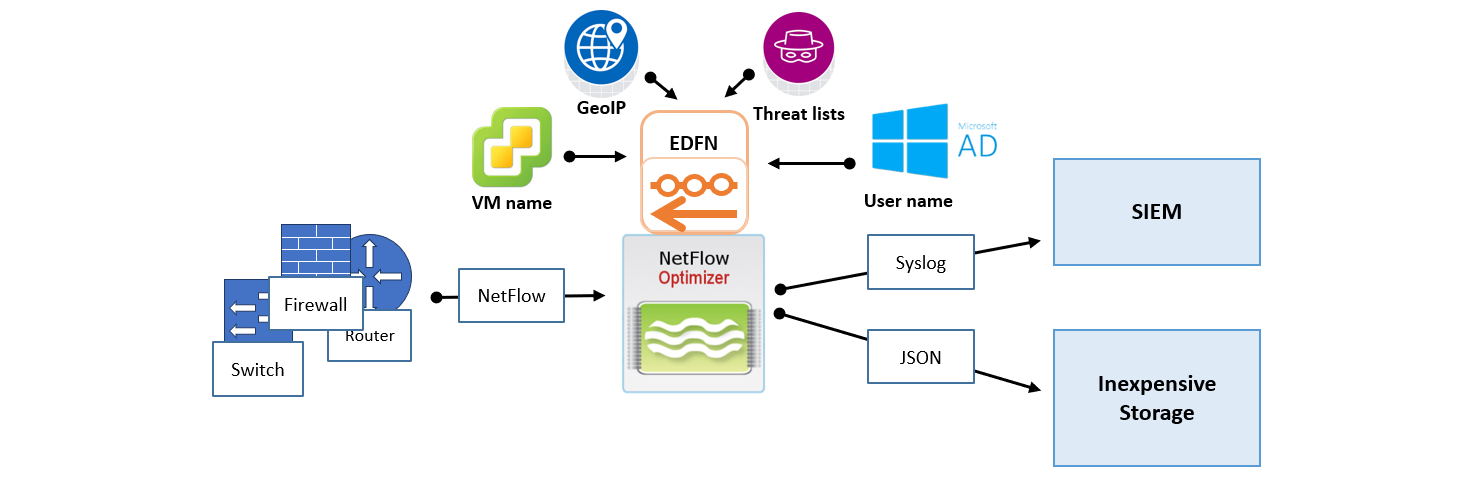
- Best For: Most enterprise environments processing up to 50,000 flows per second (FPS).
- Pros: Simplest to maintain; single point of configuration and management.
- Cons: Requires the host to have outbound internet access (Port 443) to fetch threat intelligence and GeoIP updates.
Option B: Distributed Deployment (Security-Focus)
The Distributed architecture separates the NFO engine from the data fetching components. This is typically used to bridge the gap between an internet-connected DMZ and a restricted internal segment.
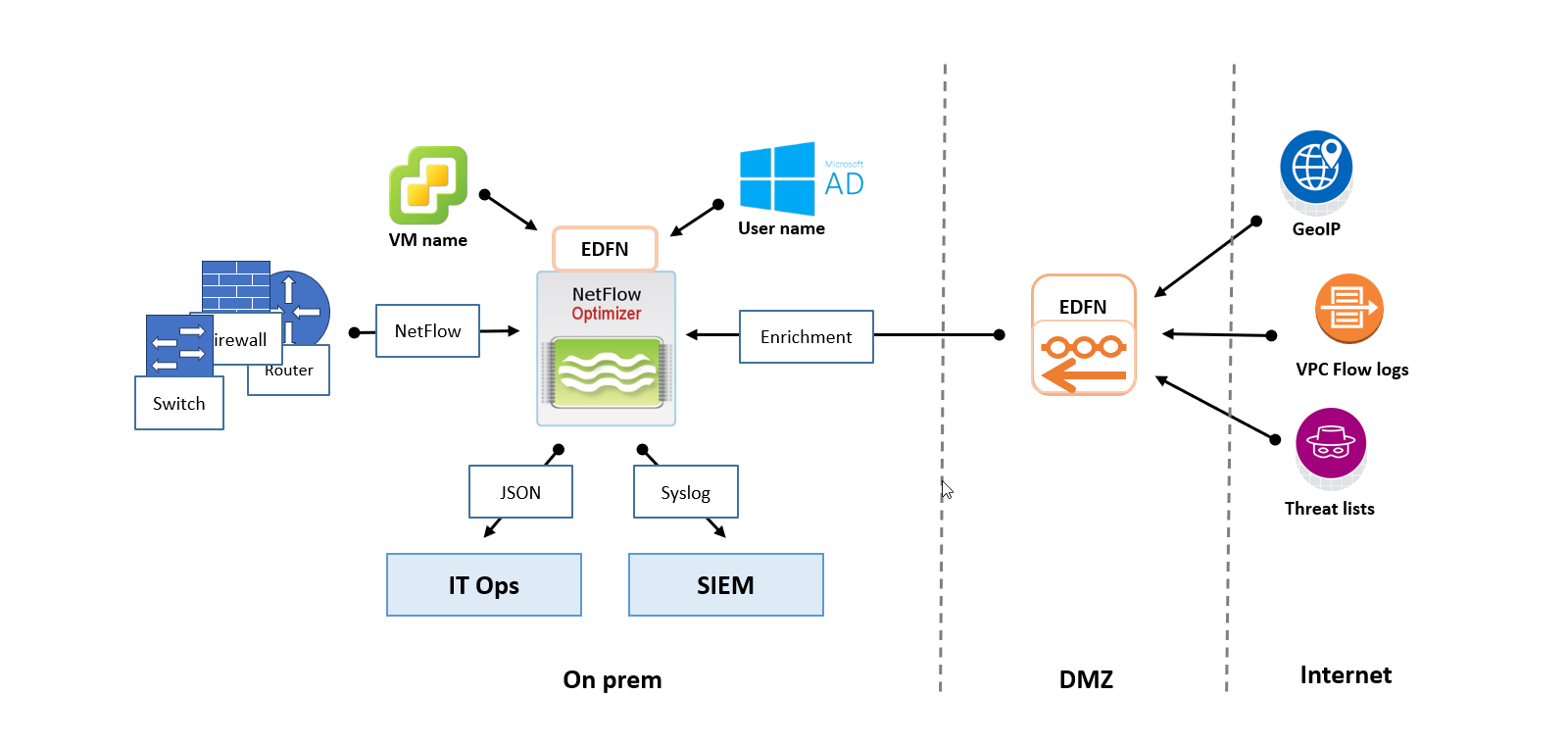
- Best For: Air-Gapped or Dark Segments where the main processing node cannot have a direct internet connection.
- The Setup: A standalone EDFN is installed on a proxy/DMZ host to fetch updates. It then "pushes" those updates internally to one or more NFO instances.
- Pros: High security; meets strict compliance requirements for isolated networks.
Option C: Horizontal Scaling with NFO Central
NFO Central and distributed deployment functionality are currently available only for Linux-based NFO installations. Windows deployments currently support Standalone mode only.
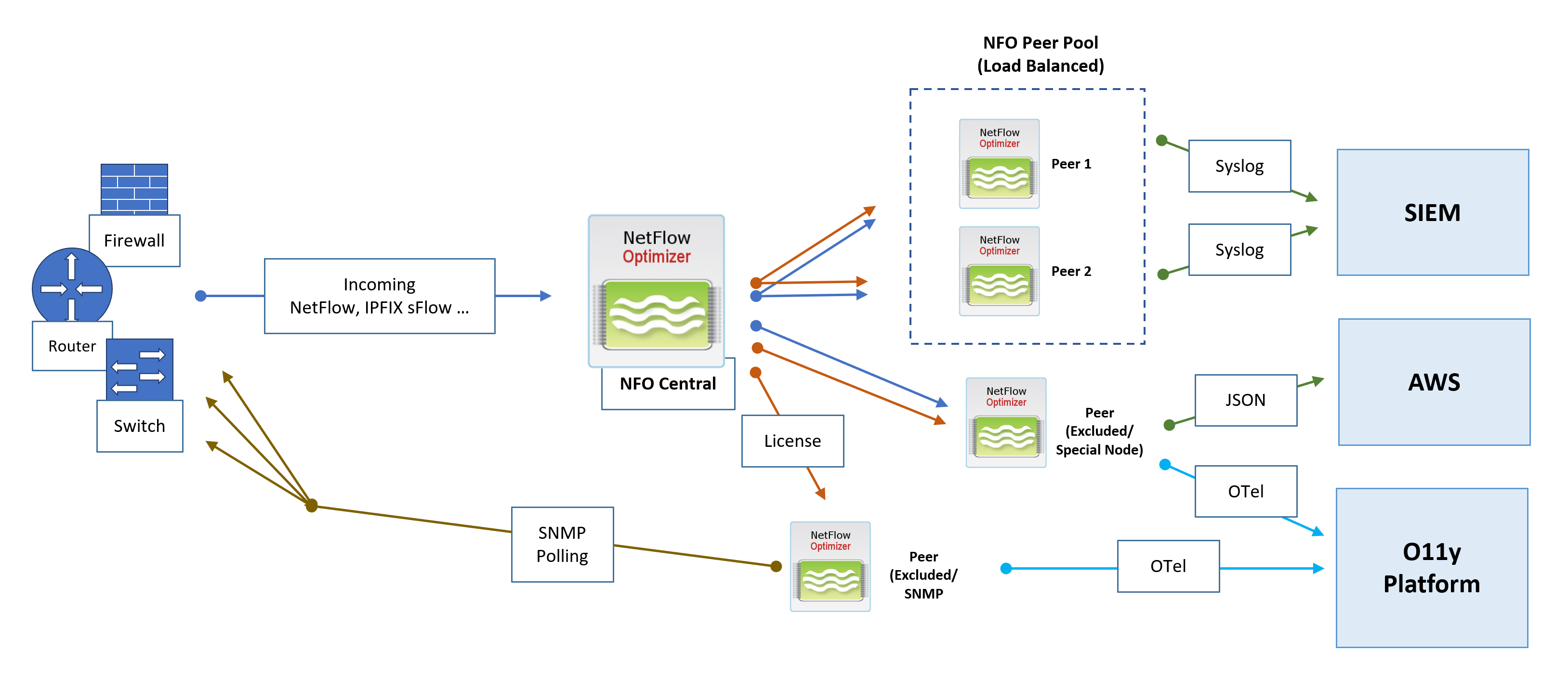
For massive scale or multi-tenant environments, NFO uses a "Controller and Peer" model. NFO Central acts as the load balancer, while multiple Peer Nodes do the heavy lifting of ingesting raw flow data.
Architecture Components
- NFO Central (Control Plane): The central management hub. It receives all incoming flow data, generates access tokens for peers, performs active health checks, optionally manages licenses, and dynamically distributes traffic to NFO Peers Pools.
- NFO Peer Pool (Load Balanced): A cluster of NFO Peer Nodes designated to receive and process the intelligently distributed NetFlow workload.
- NFO Peer (Excluded/Special Node): Nodes that can be excluded from the load balancing pool via the NFO Central GUI. These nodes may optionally receive all incoming flows and are excluded from central configuration pushes, allowing them to handle special configurations with unique rules or outputs, or used exclusively for SNMP polling.
NFO Central Deployment Architecture and Data Flows
Flow Ingestion and Intelligent Distribution
- Flow Ingestion: All NetFlow, IPFIX, and sFlow traffic is directed to NFO Central as the sole point of ingress.
- Dynamic Load Balancing: NFO Central intelligently distributes incoming NetFlow traffic to the NFO Peers Pool. The Load Balancer uses dynamic rebalancing to ensure all traffic from a single exporter IP consistently goes to the same peer node. Traffic distribution is automatically rebalanced when load changes, or when a peer node comes online or goes offline.
- Health Checks: NFO Central performs active health checks and automatically removes unhealthy nodes from the load balancing pool.
- Sticky Sessions: A "sticky sessions" mechanism is implemented to ensure that a stream of traffic from a single exporter IP is consistently sent to the same peer node.
SNMP Polling
- SNMP Polling metrics are collected by a dedicated NFO Peer designated for SNMP functions.
Output and External Integration
NFO Peer Nodes are responsible for processing, enrichment, and output to various downstream collectors and platforms:
- SIEM: NFO Peers output processed data via Syslog or JSON to a Security Information and Event Management (SIEM) system.
- Cloud Integration: Peers can send specialized output, such as JSON, to cloud services like AWS. This destination can be used for inexpensive long-term storage to address compliance use cases and enable the running of various reporting and analytical jobs.
- Observability Platform: Processed data is sent as OpenTelemetry (OTel) data to an O11y Platform for unified metrics, tracing, and logging analysis.
Management and Control
The entire deployment remains managed through the NFO Central interface:
- License Management: NFO Central serves as the centralized location to push, track, and manage licenses for all NFO Peer nodes, ensuring operational compliance.
- Configuration: NFO Central provides a GUI, including the ability to create NFO Peer Pools.
In a distributed deployment with NFO Central, the Archive/Restore Configuration is the primary method for scaling your peer pool. Instead of manual configuration on every node, you should follow the "Golden Image" pattern: configure your first peer (Peer 1), archive its state, and then use that archive to "pre-configure" all subsequent peers (Peer 2, 3, 4, etc.).
Option D: Hybrid and Cloud Considerations
A hybrid environment, combining on-premises infrastructure with cloud resources, presents unique challenges for network flow collection. NFO is strategically designed to provide comprehensive visibility across these distributed environments while minimizing data transfer costs.
On-Premises SIEM with Cloud Flow Collection
If your primary SIEM is hosted in your physical data center, you need to collect flows from both local hardware and your cloud VPCs.
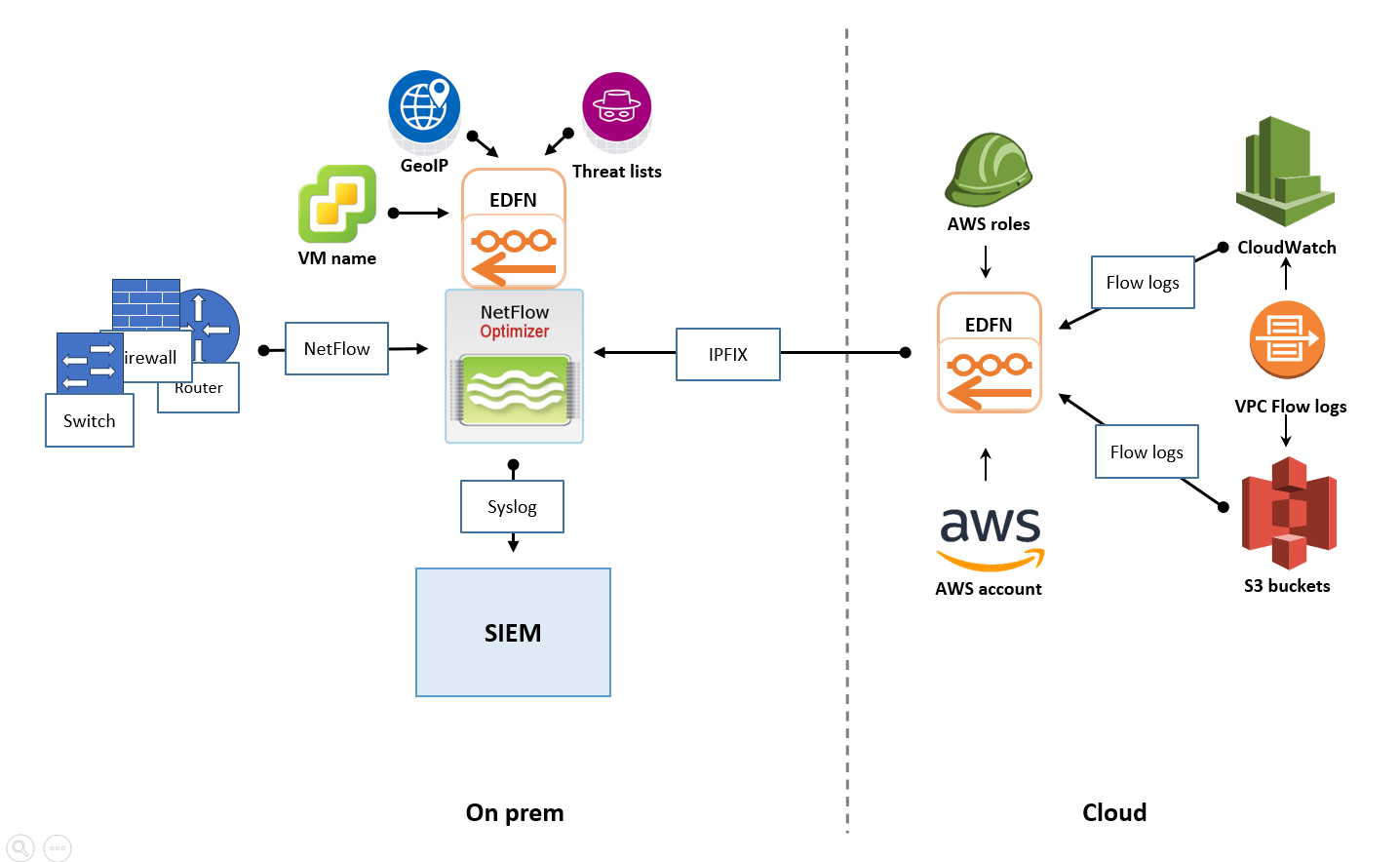
- The Strategy: Deploy a cloud-based EDFN instance within your AWS, Azure, or GCP environment.
- How it works: This cloud-resident EDFN ingests native cloud flow logs, converts them to IPFIX, and forwards them to your on-premises NFO instance.
- Benefit: You leverage existing on-premises infrastructure to process cloud telemetry without deploying a full NFO engine in the cloud.
Cloud-Based SIEM with Hybrid Flow Collection
For "Cloud-First" organizations using a cloud SIEM (such as Microsoft Sentinel or Splunk Cloud), the architecture shifts to prioritize cloud-native ingestion.
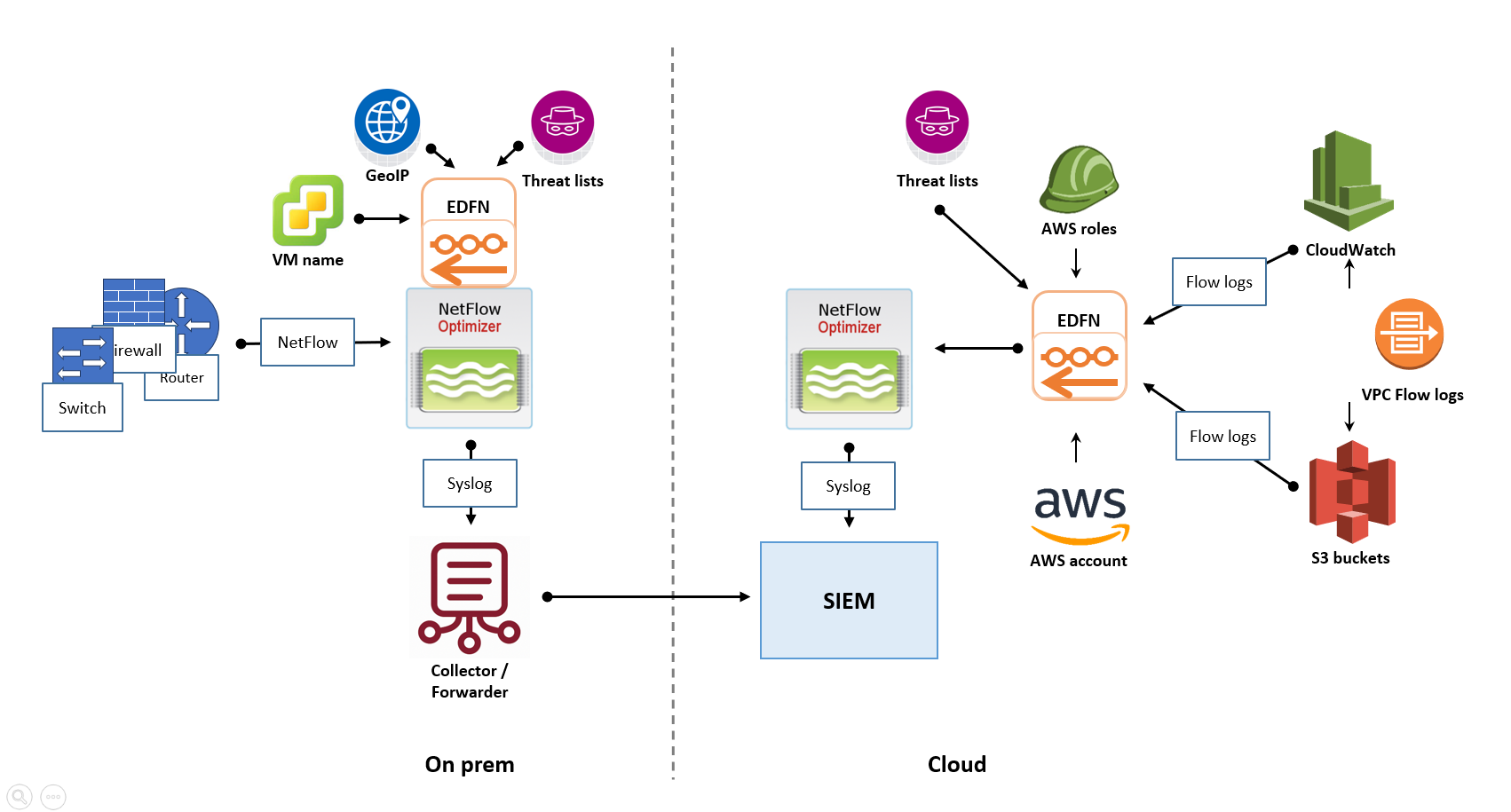
- The Strategy: Deploy NFO instances both on-premises (for physical devices) and in the cloud (for VPC logs).
- How it works: Both instances process and enrich data locally. They then securely forward the processed, "shrunk" data to the cloud SIEM.
- Benefit: By processing flows locally, you avoid sending massive amounts of raw UDP data across the internet, significantly reducing cloud egress costs.
Key Considerations for Hybrid Success
- Network Connectivity: Ensure reliable and secure connectivity (VPN or Dedicated Circuits) between your cloud and on-premises segments to allow for management and data forwarding.
- Security: Use NFO's encryption capabilities to protect flow data as it traverses the public internet between your hybrid sites.
- Cost Optimization: Right-size your cloud-based NFO/EDFN instances based on regional flow volume to avoid over-provisioning cloud compute resources.