Deployment Architecture Considerations
Standalone vs. Distributed Deployment
-
Standalone (Single Instance): All NFO components (Server, Controller, and optional EDFN) are consolidated on a single machine. This is suitable for smaller to medium environments, proof-of-concept evaluations, or centralized networks.
Installation details are covered in the NFO Installation Guide.
-
Distributed (NFO Central - Linux Only): This architecture is recommended when horizontal scalability is needed to process extremely high volumes of NetFlow data (typically exceeding 300,000 flows per second) or when intelligent traffic distribution and centralized management are required. It involves separating the core functions onto dedicated nodes:
- NFO Central: The unified management hub, serving as the Intelligent Load Balancer.
- NFO Peer Nodes: Dedicated servers for data collection, processing, and output.
For details on configuring NFO Central, visit NFO Central section of NFO Administration Guide.
Cloud vs. On-Premises Deployment
- On-Premises: Deploying NFO on your organization's physical or virtual infrastructure. Follow the Installation Guide for the chosen operating system.
- Cloud (Strategic Considerations): If deploying in the cloud (AWS, Azure, GCP), consider:
- Instance Selection: Choose appropriate virtual machine sizes based on the capacity planning outlined in the Administration Guide.
- Network Configuration: Configure cloud-based firewalls (Security Groups, Network Security Groups) to allow necessary inbound (flow data, GUI access) and outbound (to destination systems) traffic.
Single Instance Deployment
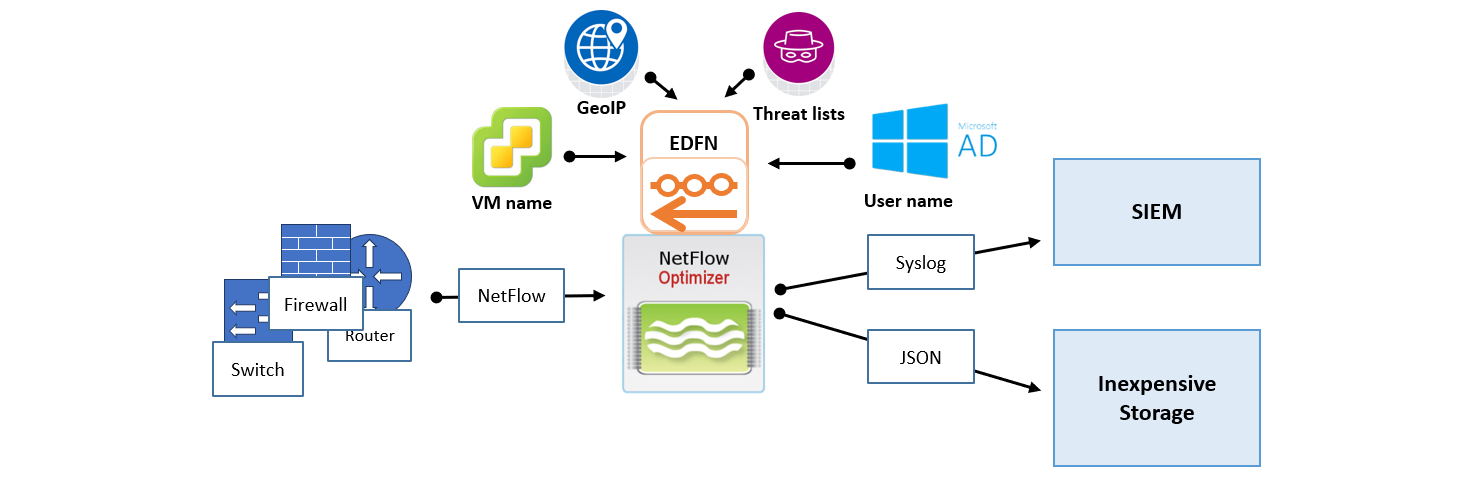
In this scenario, one instance of NetFlow Optimizer handles all flow data processing, enrichment, and SNMP polling. A single-instance deployment can be useful for evaluation purposes and might be sufficient to serve the needs of small to medium size organizations.
Distributed Deployment with NFO Central
NFO Central and distributed deployment functionality are currently available only for Linux-based NFO installations. Windows deployments currently support Standalone mode only.
For large-scale, high-volume environments, NFO Central is the recommended solution, replacing ad-hoc flow replication (Repeater feature) with an intelligent, load-balanced distribution system. This centralized control plane ensures stability, improves performance, and drastically simplifies administrative tasks. The goal of this architecture is to position NFO Central as a powerful, all-in-one control point for multi-node deployments.
Architecture Components
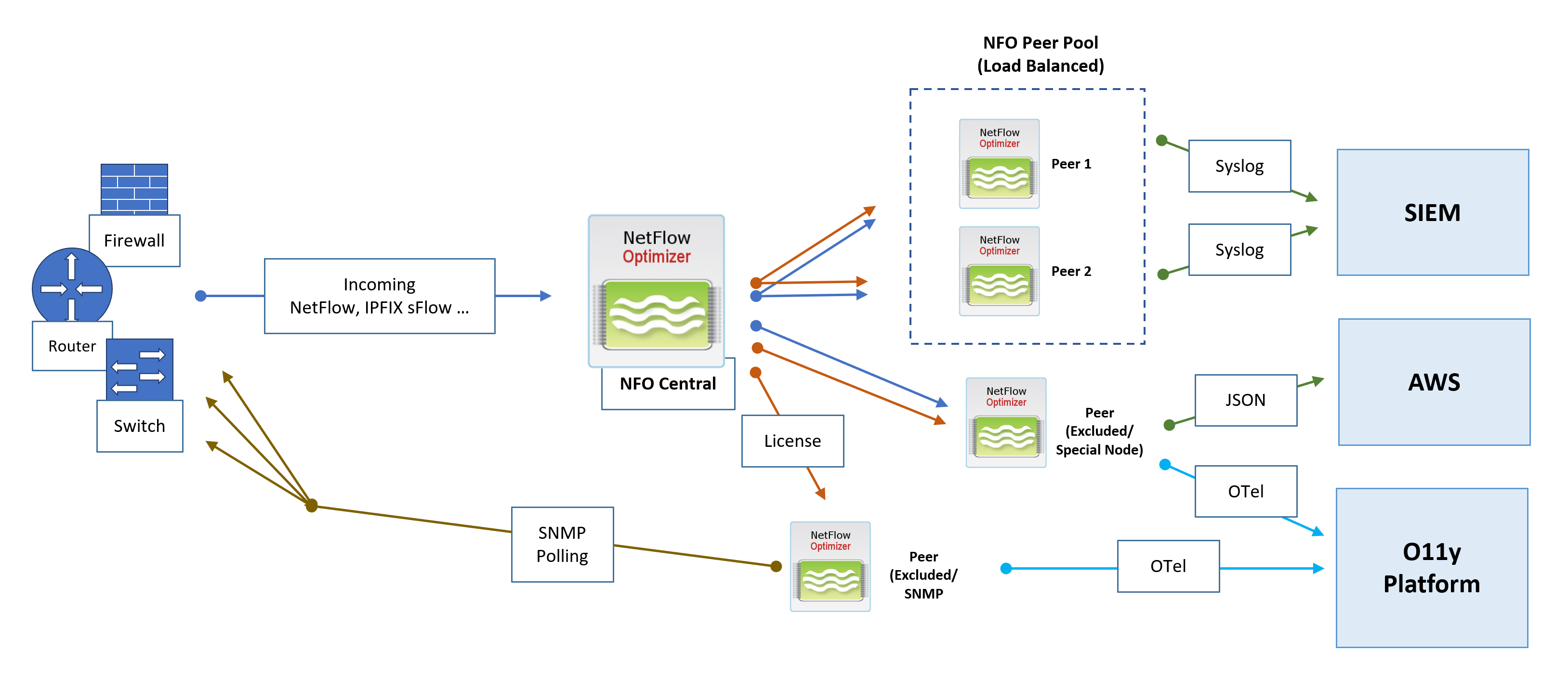
- NFO Central (Control Plane): The central management hub. It receives all incoming flow data, generates access tokens for peers, performs active health checks, optionally manages licenses, and dynamically distributes traffic to NFO Peers Pools.
- NFO Peer Pool (Load Balanced): A cluster of NFO Peer Nodes designated to receive and process the intelligently distributed NetFlow workload.
- NFO Peer (Excluded/Special Node): Nodes that can be excluded from the load balancing pool via the NFO Central GUI. These nodes may optionally receive all incoming flows and are excluded from central configuration pushes, allowing them to handle special configurations with unique rules or outputs, or used exclusively for SNMP polling.
NFO Central Deployment Architecture and Data Flows
Flow Ingestion and Intelligent Distribution
- Flow Ingestion: All NetFlow, IPFIX, and sFlow traffic is directed to NFO Central as the sole point of ingress.
- Dynamic Load Balancing: NFO Central intelligently distributes incoming NetFlow traffic to the NFO Peers Pool. The Load Balancer uses dynamic rebalancing to ensure all traffic from a single exporter IP consistently goes to the same peer node. Traffic distribution is automatically rebalanced when load changes, or when a peer node comes online or goes offline.
- Health Checks: NFO Central performs active health checks and automatically removes unhealthy nodes from the load balancing pool.
- Sticky Sessions: A "sticky sessions" mechanism is implemented to ensure that a stream of traffic from a single exporter IP is consistently sent to the same peer node.
SNMP Polling
- SNMP Polling metrics are collected by a dedicated NFO Peer designated for SNMP functions.
Output and External Integration
NFO Peer Nodes are responsible for processing, enrichment, and output to various downstream collectors and platforms:
- SIEM: NFO Peers output processed data via Syslog or JSON to a Security Information and Event Management (SIEM) system.
- Cloud Integration: Peers can send specialized output, such as JSON, to cloud services like AWS. This destination can be used for inexpensive long-term storage to address compliance use cases and enable the running of various reporting and analytical jobs.
- Observability Platform: Processed data is sent as OpenTelemetry (OTel) data to an O11y Platform for unified metrics, tracing, and logging analysis.
Management and Control
The entire deployment remains managed through the NFO Central interface:
- License Management: NFO Central serves as the centralized location to push, track, and manage licenses for all NFO Peer nodes, ensuring operational compliance.
- Configuration: NFO Central provides a GUI, including the ability to create NFO Peer Pools.
In a distributed deployment with NFO Central, the Archive/Restore Configuration is the primary method for scaling your peer pool. Instead of manual configuration on every node, you should follow the "Golden Image" pattern: configure your first peer (Peer 1), archive its state, and then use that archive to "pre-configure" all subsequent peers (Peer 2, 3, 4, etc.).
Distributed Deployment in a Hybrid Environment
A hybrid environment, combining on-premises infrastructure with cloud resources, presents unique challenges and opportunities for network flow collection and analysis. NetFlow Optimizer (NFO) can be strategically deployed in such environments to provide comprehensive visibility across your entire infrastructure.
For high-volume scenarios, the NFO Central component is essential, as it manages the intelligent distribution of flow data across peer nodes, regardless of whether the data originates from your physical data center or a cloud platform (such as VPC Flow Logs). Consider the following scenarios for collecting flow data from both your physical and cloud resources.
On-Premises SIEM with Cloud Flow Collection
This scenario addresses the case where your primary Security Information and Event Management (SIEM) system is hosted within your on-premises data center, and you need to collect flow data from both your physical network devices and your cloud-based Virtual Private Cloud (VPC) environments.
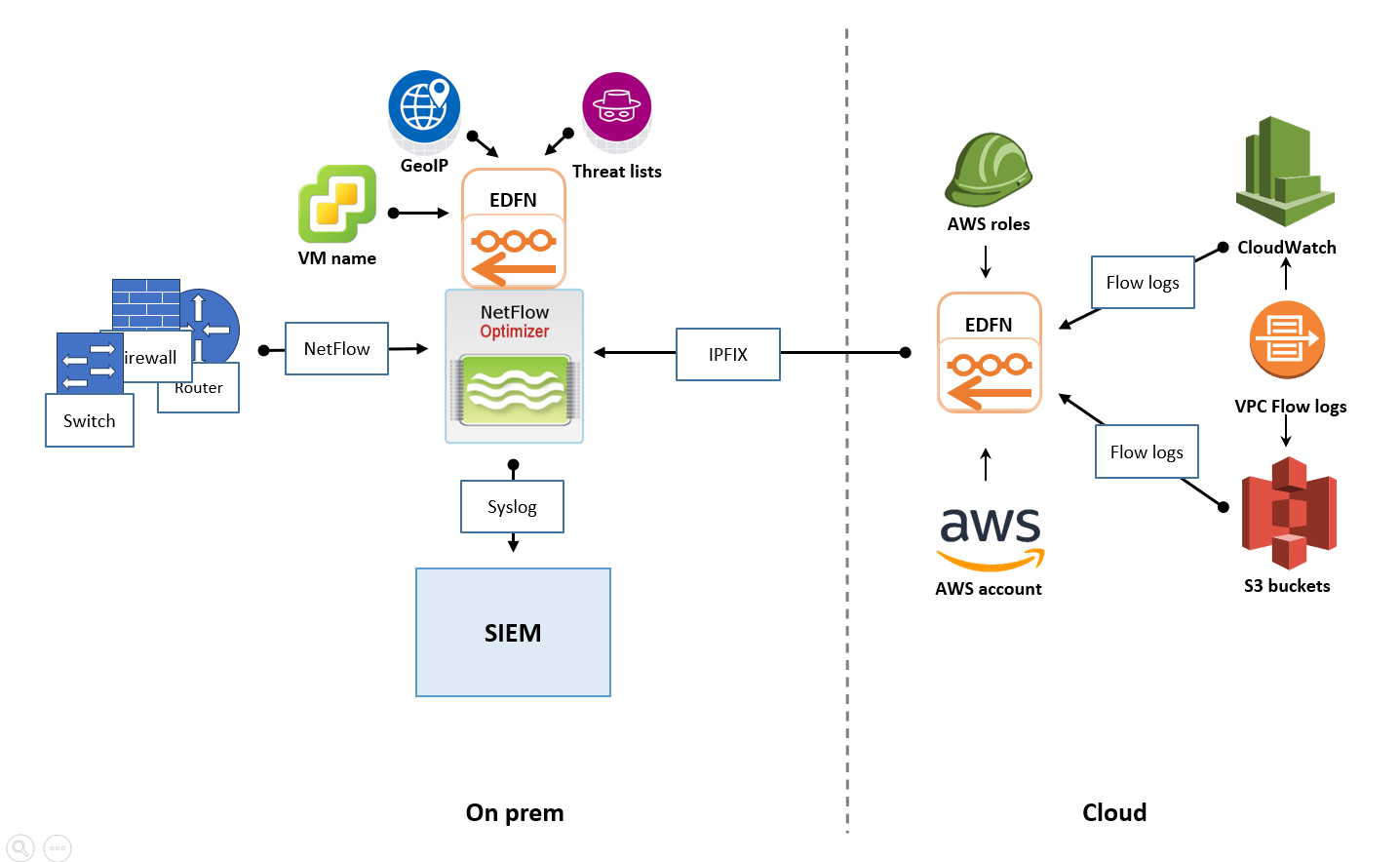
- On-Premises Flow Collection: Within your data center, you would deploy one or more NFO instances to collect NetFlow, IPFIX, or sFlow data from your physical switches, routers, firewalls, and other network devices. For high-volume environments, it is recommended to deploy NFO Central as the single ingestion point, which then intelligently distributes the data to multiple NFO Peer Nodes for processing, following the principles outlined in the "Distributed Deployment on Premises" section. These NFO instances (or peer nodes) would then process the flow data according to your defined rules and configurations.
- Cloud Flow Collection: To gather flow logs from your cloud environment (e.g., AWS VPC Flow Logs, Azure Network Watcher flow logs, GCP VPC Flow Logs), you would typically deploy a separate EDFN instance within the cloud environment, ideally co-located within the same region as your VPCs. This cloud-based EDFN instance would be configured to ingest the native cloud flow logs, convert them to IPFIX, and send them to NFO instance insatalled on premises.
- Centralized Output to On-Premises SIEM: The key to this scenario is to ensure that the flow data collected and processed by both the on-premises NFO instances and the cloud-based EDFN instance is ultimately sent to your central SIEM located in your data center. This requires establishing secure network connectivity between your cloud environment and your on-premises network, allowing the cloud-based EDFN instance to forward its processed data to the SIEM. This might involve VPN tunnels or dedicated network connections.
Cloud-Based SIEM with Hybrid Flow Collection
If your organization has adopted a cloud-first strategy and your SIEM solution is hosted in the cloud, the deployment architecture for NFO would shift accordingly. This scenario illustrates a recommended deployment approach in such cases.
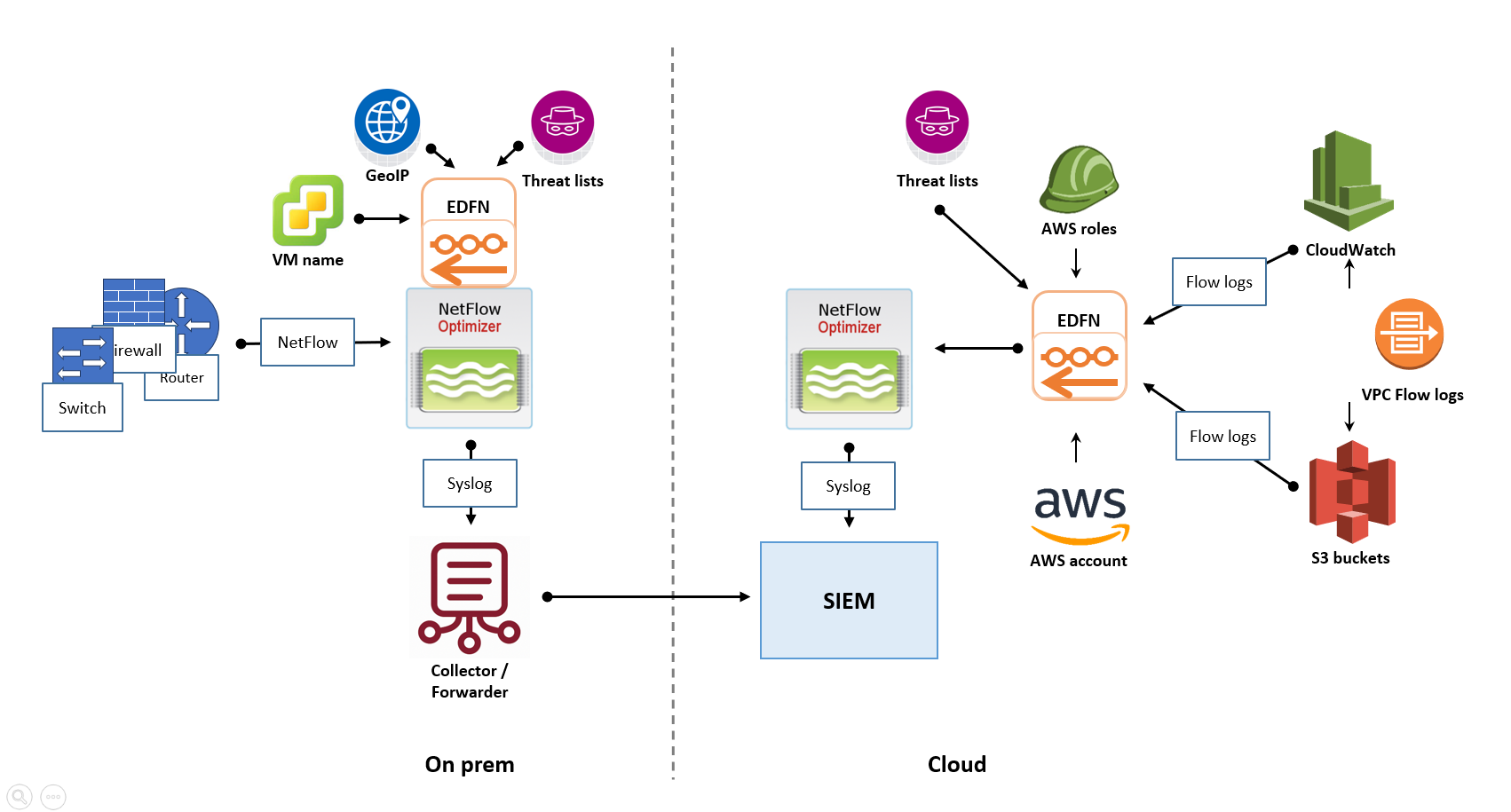
- On-Premises Flow Collection and Forwarding: In your on-premises data center, you would still deploy one or more NFO instances to collect flow data from your physical network devices. For high-volume environments, it is recommended to deploy NFO Central as the unified management and ingestion point, which then distributes traffic to multiple NFO Peer Nodes for processing. Instead of sending the processed data to an on-premises SIEM, these NFO instances (or peer nodes) would be configured to securely forward their output to your cloud-based SIEM, requiring secure network connectivity from your data center to your cloud environment.
- Cloud Flow Collection: Similar to the previous scenario, you would deploy an NFO instance within your cloud environment, ideally near your VPCs, to ingest the native cloud flow logs. For very high-volume cloud ingestion, this may involve deploying NFO Central in the cloud to manage multiple NFO Peer Nodes within the cloud environment. This cloud-based NFO instance (or cluster) would then directly forward its processed data to the cloud-based SIEM.
- Centralized Output in the Cloud: In this architecture, the processed flow data originating from both your on-premises network and your cloud environment converges and is analyzed within your cloud-based SIEM.
Key Considerations for Hybrid Deployments
- Network Connectivity: Establishing reliable and secure network connectivity between all NFO instances and your SIEM is crucial.
- Security: Ensure all communication channels are secured using appropriate encryption.
- Cost Optimization: Right-size your cloud-based NFO instances to manage data transfer and storage costs.
- Centralized Management: Utilize NFO Central to manage the configuration and licenses of all distributed NFO Peer Nodes.
By strategically deploying NFO in a hybrid environment, you can gain comprehensive visibility into network traffic patterns and security events across your entire infrastructure, regardless of where your resources are located. Remember to consult the NFO Administration Guide for detailed configuration instructions on connecting NFO instances and forwarding data to various destinations.
High Availability (HA) Planning (Conceptual)
If high availability is a requirement, the High Availability Deployment section of the Administration Guide will detail the steps for configuring HA features.