SNMP Management
NFO's SNMP service polls your network devices to enrich flow records with device and interface context (names, speeds, locations), discover your network inventory and topology, and collect device health metrics. This page is the full reference for that service. It covers service configuration, credentials, Auto-discovery, device classification, manual device management, connectivity testing, module integration, and performance tuning.
For first-time setup, see the SNMP Setup Guide.
SNMP content is split across several pages by purpose:
| Page | Use it for |
|---|---|
| SNMP Setup Guide | First-time setup, a five-step walkthrough from credentials to verified polling |
| SNMP Management (this page) | The full configuration reference: credentials, Auto-discovery, classification, MIBs, interface overrides, and tuning |
| SNMP Overview | How the SNMP subsystem fits together and how SNMP data enriches flow records |
| SNMP Trap Inputs | Configuring the UDP ports that receive traps from your devices |
| SNMP modules | Module references: SNMP Basic, SNMP Pro (10103), and SNMP Traps (10700) |
SNMP Service supports SNMPv2c and SNMPv3, and includes:
- SNMP Polling
- SNMP Traps
- SNMP Auto-discovery
Before configuring the service, review the feature breakdown below. Capabilities are determined by your NFO license level.
SNMP Basic and SNMP Pro
Your NFO license determines the complexity and security of the SNMP features available to you.
| Capability | SNMP Basic (included with NetFlow license) | SNMP Pro (licensed separately) |
|---|---|---|
| Protocol Support | SNMPv2c | SNMPv2c & SNMPv3 |
| Authentication & Security | Clear-text Community String | Encryption & Authentication |
| Auto-discovery | Manual device entry only | Automated IP Range Scanning |
| Device Grouping | Individual device lists only | Multi-Group Inheritance & Layered Monitoring |
| Custom OID Sets | Limited to Standard MIB-II | User MIBs & Custom OID Sets |
The ability to select SNMPv3 in the SNMP Credentials section, and the subsequent configuration of secure user-based authentication, is a feature exclusive to the SNMP Pro license. SNMP Pro is required for environments demanding data security and compliance.
Understanding Multi-Group Inheritance
NFO doesn't just put a device in a folder; it applies layered intelligence. As devices respond, NFO analyzes system attributes (such as sysObjectID, sysDescription, and Private Enterprise Numbers) to classify them into multiple functional layers simultaneously. Unlike traditional systems that lock a device into a single folder, NFO uses Multi-Group Membership to tag assets by:
- Vendor & Model: (e.g., Cisco, Catalyst)
- Functional Roles: (e.g., Switching, Firewall)
- Feature Tags: (e.g., StackWise, VPN Gateway)
NetFlow Optimizer uses a layered Multi-Group Classification system. Instead of a single static assignment, devices inherit intelligence from multiple groups simultaneously to build a comprehensive monitoring profile. This hierarchy allows for both vendor-specific technical accuracy and role-based operational reporting.
Device Groups (Vendor, Role, & Features)
A Device Group identifies the "What": the manufacturer, the product line, and the specific capabilities of the hardware. This is the technical layer of NFO.
- Purpose: Determines the technical monitoring profile. It tells NFO which vendor-specific MIBs, OIDs, or YANG models (for Model-Driven Telemetry) to use for data collection.
- Multi-Group Logic: A single device can belong to several groups at once to inherit layered intelligence.
- Examples:
Router,Cisco,Cisco Firewall,Juniper,Juniper Router,FortiGate,FortinetSwitch,PAN Firewall,Switch.
Device Types (Visualization & Orchestration)
A Device Type identifies the "How": the primary category used to organize your data globally. This is the operational layer of NFO.
- Purpose: Used exclusively to organize visualizations, dashboards, KPIs, and alerts. It enables unified reporting across different vendors (e.g., an "All Firewalls" alert policy that covers both Cisco and Palo Alto).
- Logic: While a device can have many Groups, it is assigned a single primary Device Type to anchor it within the UI and reporting engine.
- Examples:
router,switch,firewall,load balancer,wireless,storage,power.
Device Tiers (Topology Position)
A Device Tier identifies the "Where": the device's position in the network hierarchy. NFO derives it from the connections discovered across your whole topology, not from the device's own attributes.
- Purpose: Drives topology visualization, so a network map can be drawn in layers rather than as a flat mesh.
- Logic: Assigned automatically. Every discovered device receives exactly one tier.
- Values:
edge,core,spine,access,endpoint.
Tier is independent of Device Type. Type says what a device is; tier says where it sits. A firewall is edge at the perimeter and access in front of a server rack, and its type stays firewall in both cases.
When Enable device tier classification is enabled, every discovered device receives a tier, and so does the far end of every discovered connection. When it is disabled, no tier is assigned and the field is empty.
Not every network uses all five positions, however. A two-layer network has no device classified as spine, and a site with no routed perimeter has none at edge. A tier with no devices in it is normal and does not indicate a classification problem.
A device keeps its last known tier while it is temporarily unreachable, so a brief outage does not move it on the map.
Tiers are reported by the Auto-discovery Reporter as the device_tier field. Discovered connections carry the far end's tier as dest_tier.
Overriding a tier. Where the computed tier does not match how your network is actually organized, use the Device Tier Override tab to assign a tier directly.
Summary: Intelligence vs. Visualization
| Attribute | Device Group | Device Type | Device Tier |
|---|---|---|---|
| Focus | Technical intelligence | Operational visualization | Topology position |
| Function | Maps OIDs, MIBs, and YANG models | Organizes dashboards, KPIs, and alerts | Places devices in a layered network map |
| Source | Device attributes | Device attributes | Discovered connections |
| Membership | Multi-Group (inherits from many) | Single category (standardizes view) | Single value |
The Result: Your Device Groups ensure NFO is polling the right data, the Device Type ensures that data is easy to find and alert on, and the Device Tier ensures your topology renders as a hierarchy rather than a mesh.
Classification Rules
While NFO provides extensive built-in logic to handle this hierarchy automatically, administrators can use the Classification Rules tab to create overrides. This is useful for:
- Custom Tagging: Re-classifying a specific Linux server as a
Security Appliance. - Organizational Logic: Moving devices into groups based on custom
sysNamepatterns (e.g., all devices withNY-COREin the name).
SNMP Service Configuration Parameters
The SNMP service is enabled by default and can be disabled if not needed.
To configure SNMP polling navigate to SNMP Management in the NFO web interface.
| Parameter | Description |
|---|---|
| T - SNMP expiration time in secs | Expiration time of SNMP data held in cache. Default: 86400 seconds (1 day) |
| Enable(1) or disable(0) SNMP service | 1: SNMP service enabled; 0: SNMP service disabled |
| SNMP transport timeout in sec | Time to wait for SNMP reply from network devices to polling requests |
The following image highlights the key parameters and sections within the SNMP Management interface. Refer to the numbered items and their descriptions below.
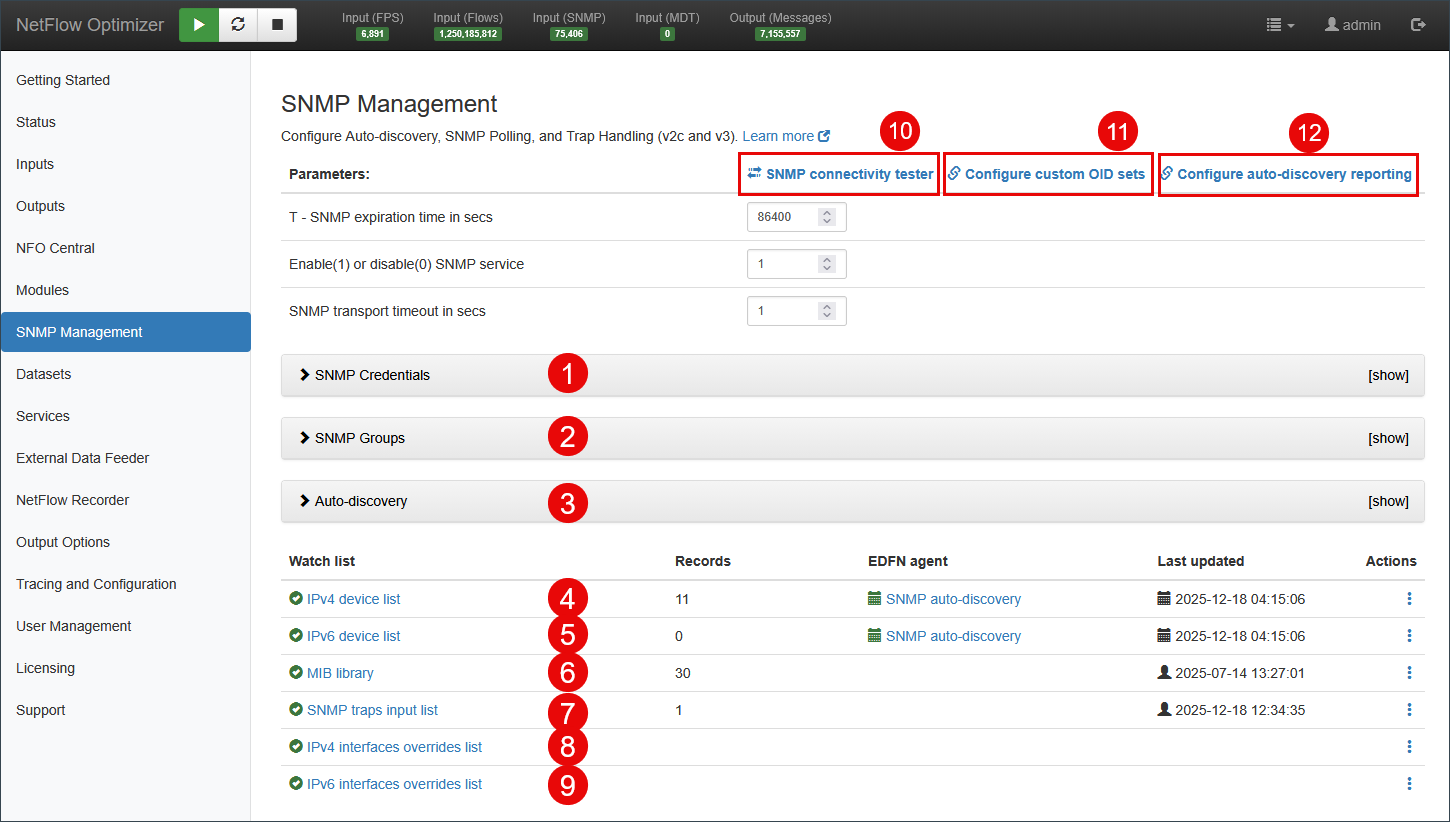
- SNMP Credentials: Authentication credentials for SNMP polling.
- SNMP Groups: Settings for SNMP device groups.
- Auto-discovery: Settings for SNMP-based auto-discovery, such as IP ranges, device groups, and other parameters.
- IPv4 device list: The list of IPv4 devices to be polled, including mapping to Exporter IP in case you receive flow data from these devices.
- IPv6 device list: The list of IPv6 devices to be polled, including mapping to Exporter IP in case you receive flow data from these devices.
- MIB library: Optionally add MIBs not included in NFO to build OID sets.
- SNMP traps input list: A list of active SNMP Trap ports. Configuration is also available under Inputs > SNMP Trap Inputs.
- IPv4 interfaces overrides list: SNMP Polling data defaults / overrides for IPv4 interfaces.
- IPv6 interfaces overrides list: SNMP Polling data defaults / overrides for IPv6 interfaces.
- Link to SNMP connectivity tester: Opens a pop-up to test SNMP connectivity using IP address and credentials.
- Link to Custom OID Sets: Takes you to Custom OID Sets Monitor Module for SNMP metrics configuration.
- Link to Auto-discovery Reporter: Takes you to Auto-discovery Reporter Module to configure reporting of discovered devices and connections.
SNMP Credentials
SNMP polling requires authentication. NFO supports SNMPv2c community string authentication and SNMPv3 user-based authentication. You can add an unlimited number of credential entries to support diverse network environments.
Navigate to SNMP Management > SNMP Credentials and click Add SNMP Credentials.
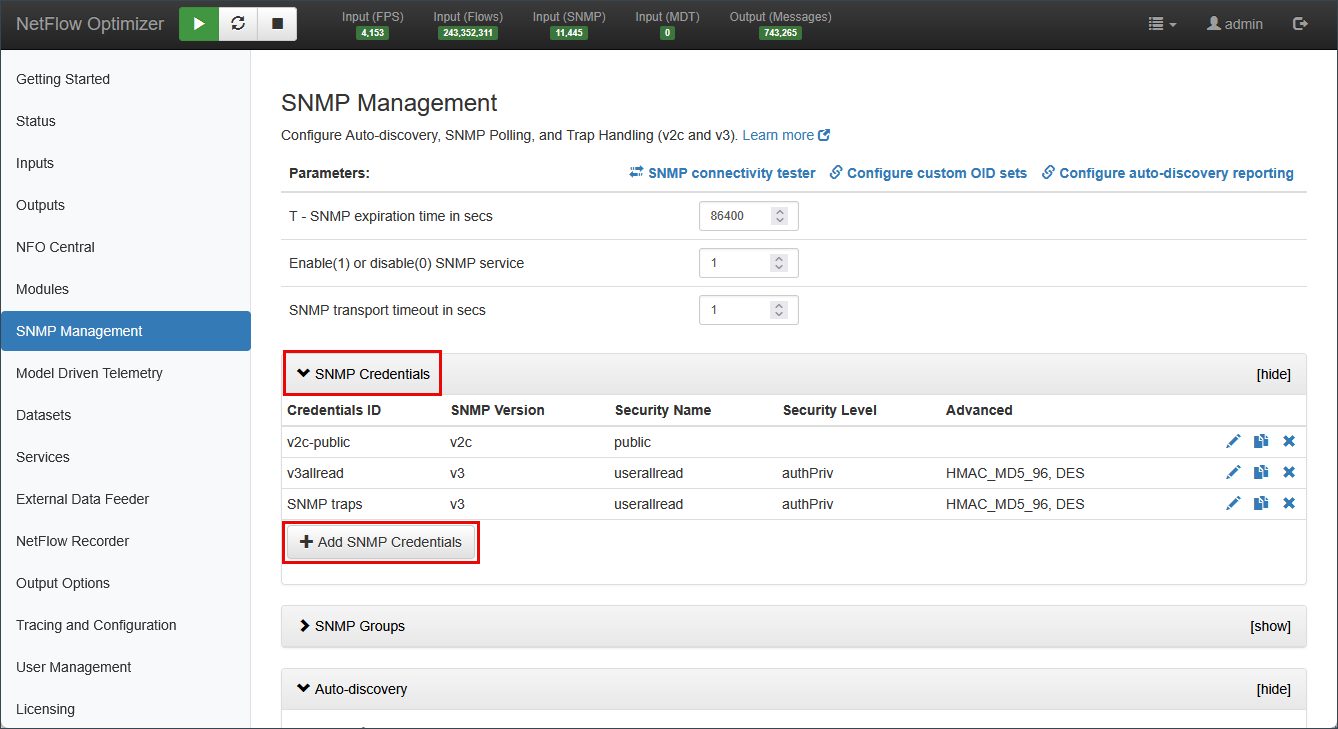
Adding SNMPv2c Credentials
For legacy environments or isolated networks where performance is prioritized over security, use SNMPv2c:
- Community String: The read-only community string (e.g.,
public) configured on the device.
Adding SNMPv3 Credentials
SNMPv3 provides authentication and privacy (encryption). This feature requires an SNMP Pro license.
| Field | Description |
|---|---|
| Security Level | noAuthNoPriv (no security), authNoPriv (authentication only), or authPriv (authentication and encryption) |
| User Name | The SNMPv3 username configured on the network device |
| Authentication Protocol | MD5 or SHA. Newer versions support SHA224, SHA256, SHA384, SHA512 |
| Authentication Password | The secret key used for authentication |
| Privacy Protocol | DES or AES (including AES/192/192C/256/256C) |
| Privacy Password | The secret encryption key for the user |
| Engine ID | (Optional) Unique identifier for the device sending traps. Ignored during polling; used for SNMPv3 trap receipt only |
The only difference between these protocols is the key extension algorithm used when an authentication hash is too short for the encryption key.
- AES-256 & AES-256-C: Function identically when paired with SHA-256 or stronger.
- AES-192 & AES-192-C: Function identically when paired with SHA-224 or stronger.
If the authentication protocol generates a long enough key, the standard and "-C" variants are bit-for-bit identical. The "-C" logic only triggers when a short key must be stretched.
Auto-Discovery
NFO's Auto-discovery engine probes your network, identifies hardware by analyzing sysObjectID, sysDescription, and Private Enterprise Numbers, and automatically assigns Device Groups. The discovery dialog has five tabs.
Navigate to SNMP Management > Auto-discovery and select the SNMP auto-discovery EDFN agent.
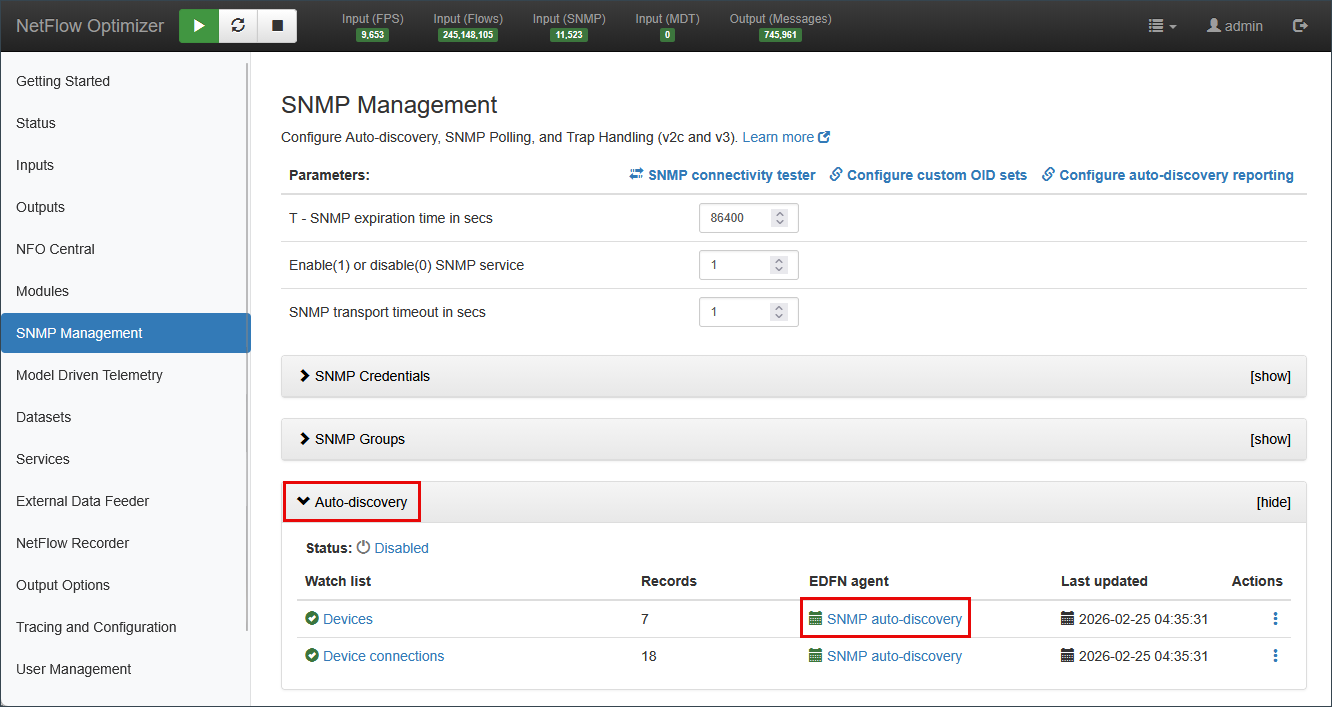
Settings Tab
Controls the core discovery process parameters.
Auto-discovery itself is enabled and disabled on the SNMP Management page, not inside this dialog.
| Parameter | Description |
|---|---|
| Next time | Timestamp of the next scheduled run. Run now triggers a run immediately; Stop halts a run in progress |
| Schedule | Cron expression for automatic re-discovery. Default: twice daily (15 0/12 * * *) |
| IPv4 devices URL | Location of a CSV file listing IPv4 devices to include in discovery. See Device List Files |
| IPv6 devices URL | Location of a CSV file listing IPv6 devices to include in discovery. See Device List Files |
| Discovery mode | How the agent builds the device inventory. Full scan probes every address in the configured networks. Topology traversal starts from the configured addresses and follows discovered neighbor connections (LLDP, CDP) to find adjacent devices, using each newly found device as a further starting point |
| Scan concurrency | Number of devices scanned in parallel. Default: 1000 |
| SNMP GET retries | Number of retry attempts per device. Default: 2 |
| SNMP GET timeout, msec | Maximum wait time per SNMP request. Default: 2000 |
| Ignore duplicate SNMP agents | Skips devices that share an SNMP agent IP. Default: 1 |
| Force include all devices (SNMP troubleshooting) | Forces all devices into inventory regardless of response. Use for troubleshooting only. Default: 0 |
| Skip route table polling if rows exceed | Routing tables larger than this row count are not polled for topology. Layer 3 connections for those devices come from BGP and OSPFv3 adjacencies instead. Default: 10000 |
| Enable BGP peer discovery | Build topology connections from established BGP peer adjacencies. Polled on Layer 3 devices only |
| Enable OSPFv3 neighbor discovery | Build topology connections from OSPFv3 neighbor adjacencies. Polled on Layer 3 devices only |
| Enable/Disable STP/RSTP polling | Build Layer 2 topology connections from spanning tree data. Default: 1 |
| Enable device tier classification | Assign each discovered device a position in the network hierarchy, reported as device_tier. Default: 1 |
| Enable VRRP polling (device tier classification only) | Identify redundant gateway groups by polling VRRP state. Improves tier accuracy on networks using gateway redundancy. Has no effect unless device tier classification is enabled. Default: 0 |
| Log level | Verbosity of discovery logs: INFO, DEBUG, WARN |
Device List Files
The IPv4 devices URL and IPv6 devices URL parameters point to a CSV file listing devices to include in discovery, so devices can be supplied directly rather than found by scanning.
For a file on the EDFN host, use the file:// scheme:
file://<path>/filename.csv
The file starts with a header row, followed by one row per device:
"### Exporter IPv4","### SNMP Management IPv4","### SNMP Port","### SNMP Credentials ID","### Group","### Type","### Comment"
10.1.1.5,10.1.1.5,161,v2c-public,Juniper;Router,router,"From CSV file"
| Column | Description |
|---|---|
| Exporter IPv4 | The address the device uses when sending flow records to NFO |
| SNMP Management IPv4 | The address NFO polls over SNMP. Often the same as the exporter address |
| SNMP Port | SNMP port on the device, usually 161 |
| SNMP Credentials ID | Name of a credential set defined under SNMP Credentials |
| Group | Device Group assignment. Separate multiple groups with semicolons |
| Type | Device Type assignment |
| Comment | Free text, not used by NFO |
The IPv6 file uses the same format with IPv6 addresses in the first two columns.
Discovery Modes
NFO offers two ways to build the device inventory:
- Full scan probes every address in the networks you configure on the Auto-discovery Networks tab. Use it when you want a complete sweep of known address ranges and you have those ranges defined.
- Topology traversal starts from the addresses you configure and then follows the neighbor connections each device reports (through LLDP and CDP) to reach adjacent devices. Each newly discovered device becomes a new starting point, so the agent walks outward across your network from the initial seeds. Use it when you want NFO to map connected infrastructure without enumerating every subnet in advance.
Both modes also build topology connections between the devices they find. See Connection Discovery Sources below for the connection types NFO reports.
Connection Discovery Sources
As NFO discovers devices, it also records the connections between them. Each connection is reported with a con_source value identifying how it was found:
| Source | Layer | Description |
|---|---|---|
| LLDP | Layer 2 | Neighbor reported through the Link Layer Discovery Protocol |
| CDP | Layer 2 | Neighbor reported through the Cisco Discovery Protocol |
| BRIDGE | Layer 2 | Connection derived from the device's bridge tables (MAC-based) |
| IP_FORWARDING | Layer 3 | Connection derived from the device's routing table |
| NEXT_HOP | Layer 3 | Connection derived from a resolved next-hop route |
| BGP | Layer 3 | Established BGP peer adjacency. Requires Enable BGP peer discovery |
| OSPF | Layer 3 | OSPFv3 neighbor adjacency. Requires Enable OSPFv3 neighbor discovery |
These connections are published by the Auto-discovery Reporter module. For the full message field reference, see Auto-discovery Reporter (10701).
Auto-Discovery Networks Tab
Defines the IP subnets, ranges, or individual addresses the EDFN agent scans, along with the credentials and optional grouping to apply per range.
| Field | Description |
|---|---|
| Subnet (IP/mask) or IP range (IP1 - IP2) | The network range to scan (e.g., 10.0.0.0/24 or 192.168.20.1 - 192.168.20.24) |
| Port | SNMP port to use for this range. Default: 161 |
| Credentials name | The SNMPv2c or SNMPv3 credential set to use when probing devices in this range |
| Notes | Optional free-text label for this range |
| LLDP/CDP seed | If enabled, NFO uses this range as a seed for LLDP/CDP topology traversal |
| Disabled | If checked, this range is skipped during discovery runs |
Use Upload CSV to bulk-import ranges. Click Dry run to preview results without committing changes to inventory.
Classification Rules Tab
Defines override rules that reassign Device Group or Device Type when NFO's automatic classification does not match your operational requirements. Rules are evaluated in order; the first matching rule wins.
See Understanding Multi-Group Inheritance for the full explanation of how Device Groups and Device Types are applied.
Preview sysObjectIDs Tab
Displays all unique sysObjectID values returned by devices in the last discovery run, along with the PEN (Private Enterprise Number) and the Device Group NFO mapped them to. Use this tab to verify that your hardware is being recognized correctly before committing to inventory.
Preview Devices Tab
This tab displays the full list of all devices discovered in the last dry run or live run, along with their key identification details and the Device Group automatically assigned to each (based on PEN Organization). Use it to verify discovery results before committing them to your active inventory, and to see the data elements available for building more granular, needs-specific group assignments with expressions on the Classification Rules tab.
The table includes:
| Column | Description |
|---|---|
| IP address | The device's SNMP management IP |
| Port | SNMP port used |
| Credentials | Credential set used to query this device |
| Status | Up or Down based on SNMP response |
| Group | Device Group automatically assigned |
| Type | Device Type automatically assigned |
| Tier | Topology position automatically assigned. Read-only |
| sysDescr | Raw system description string returned by the device |
| PEN | Private Enterprise Number |
| sysObjectID | Full OID identifying the device model |
| sysName | Hostname as reported by the device |
| sysLocation | Location string as reported by the device |
| sysServices | SNMP sysServices value, indicating which protocol layers the device supports |
| EngineID | SNMP engine ID, present for SNMPv3 devices |
| Capabilities | Device capabilities reported through LLDP, for example router, bridge, wlanAccessPoint |
| Error | Reason the device could not be polled, where applicable |
Use Download to export the list, Dry run to re-run discovery without saving, and Save to commit the discovered devices to your active inventory.
Exporter IP Override Tab
Maps a device's SNMP Management IP to its Exporter IP, the source address it uses when sending flow records to NFO. This mapping is required for the SNMP service to join SNMP interface and device data to the corresponding flow records.
Use this tab when a device's management IP and flow exporter IP are different addresses.
Device Tier Override Tab
Assigns a device tier directly, replacing the tier NFO computes from discovered connections. Use this tab where the computed tier does not match how your network is actually organized.
Entries match on a device's SNMP management address only, not on its interface addresses. An override that appears to have no effect is most often matched against the wrong address.
See Device Tiers for what the tiers mean.
Manual Device Configuration
If your security policy restricts network probing, or you prefer to manage inventory without automated scanning, you can configure devices manually.
Disabling Auto-Discovery
To prevent the system from automatically adding or reclassifying devices:
- Navigate to SNMP Management > Auto-discovery.
- Toggle the Enable Auto-discovery switch to Off.
- Click Save.
Managing the Device List
Manual configuration is handled within the Watch list section. Click IPv4 device list or IPv6 device list to open the configuration pop-up.
- Auto-update by SNMP devices IPv4: Uncheck this checkbox to make the device list editable.
- Direct Entry: Use the Add record button to manually provide the SNMP Management IP, SNMP Port, select pre-configured SNMP Credentials, and map the device to its corresponding Exporter IP (if it is a flow source).
- Bulk Import: Upload a list of devices via CSV. The file must follow this format:
Exporter IPv4, SNMP Management IPv4, SNMP Port, SNMP Credentials ID, Device Group, Device Type, Comment
These are often different addresses on the same physical device. The SNMP Management IP is the address NFO uses to poll the device. The Exporter IP is the source address the device uses when sending flow records to NFO. Providing this mapping allows the SNMP service to join SNMP interface and device metrics to the corresponding flow records. If the device does not send flow data, leave Exporter IP blank.
- Assigning Groups: Unlike Auto-discovery, manual entries require you to explicitly assign Device Groups. You can select multiple groups to ensure the device inherits the correct OID sets and polling intervals.
MIB Library
NFO ships with a standard set of MIBs covering common vendor hardware. The MIB library allows you to extend this by loading additional standard or custom MIBs. This is required when you need to poll OIDs that fall outside MIB-II or NFO's built-in vendor MIBs.
When you need this: Custom OID Sets (Module 10103) can only reference OIDs that NFO can resolve by name. If you are building an OID set for proprietary hardware and the OID name is not recognized, load the vendor's MIB here first.
To add a MIB:
- Navigate to SNMP Management and click MIB library.
- Upload the MIB file (
.mibor.txtformat). - NFO parses and registers the OID tree. Once loaded, OID names from that MIB become available for use in Custom OID Sets.
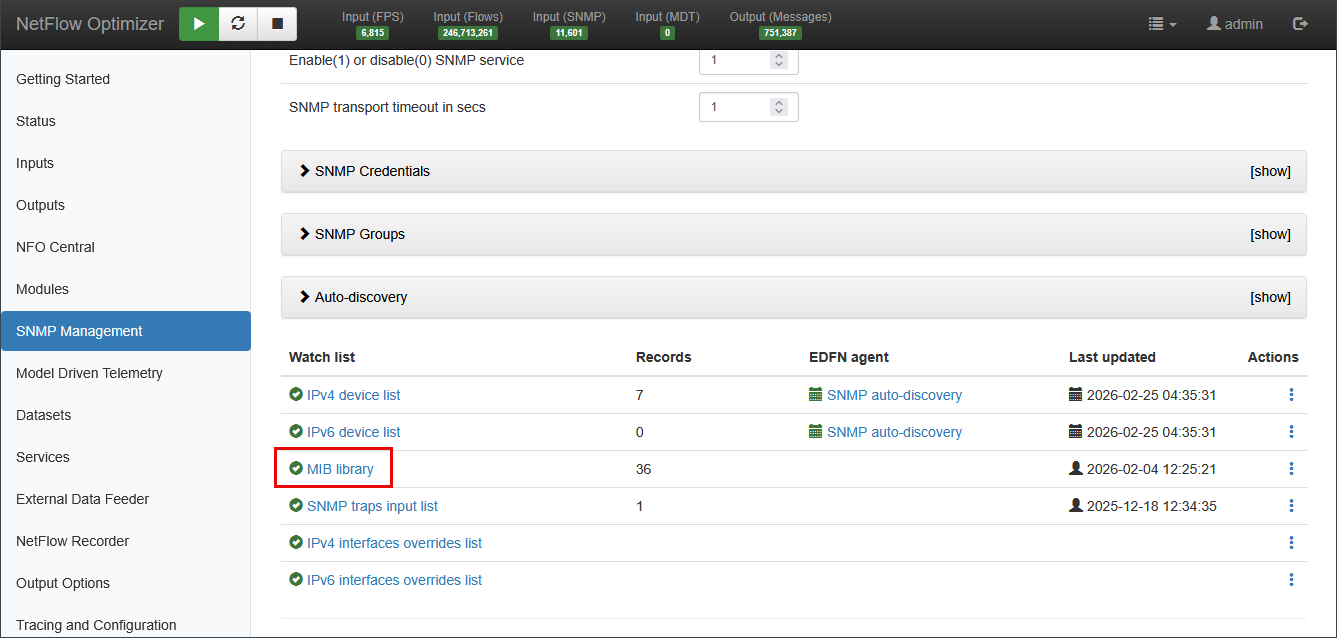
MIB files must be valid SMIv2 format. If a MIB has dependencies (IMPORTS), load those MIBs first.
SNMP Trap Handling
NFO can receive SNMP traps from network devices and process them through the SNMP Traps Monitor (Module 10700). Trap inputs are configured from two places in the UI: here under SNMP Management > SNMP traps input list, and under Inputs > SNMP Trap Inputs. Both views manage the same configuration.
Configuring Trap Inputs
- Navigate to SNMP Management and click SNMP traps input list, or navigate to Inputs > SNMP Trap Inputs.
- Click + to add a new trap listener, or click the edit icon to modify the existing default port.
- Set the UDP port to listen on. Default:
162. - Click Save.
- Navigate to Modules > Utilities > 10700: SNMP Traps Monitor and toggle to Enabled.
- To monitor trap activity, go to Status > Statistics and locate the SNMP panel.
SNMPv3 Trap Credentials
To receive SNMPv3 traps, you must first create a matching SNMPv3 credential entry in SNMP Credentials. The Engine ID field in the credential entry is used exclusively for trap receipt; it identifies the device sending the trap and is ignored during polling.
NFO automatically extracts and associates the Engine ID from incoming SNMPv3 trap PDUs. Pre-configuring the Engine ID is only required if you need to register a device before it has sent its first trap.
Trap Processing
Received traps are processed by Module 10700: SNMP Traps Monitor, which normalizes trap varbinds into NFO output fields. For output field mapping and SIEM forwarding configuration, see SNMP Traps Monitor (10700).
If traps are being received but not appearing in output, verify that the sending device's source IP has a matching credential entry, and that the trap port is not blocked by a host firewall on the NFO server.
Interface Overrides
The IPv4 interfaces overrides list and IPv6 interfaces overrides list allow you to set default or forced values for interface-level SNMP fields on a per-device or per-interface basis.
When you need this: By default, NFO uses the values returned by the device via SNMP: interface name, description, speed, and so on. Use overrides when:
- A device returns incomplete or incorrect interface descriptions.
- You want to standardize interface naming across vendors for consistent dashboard labels (e.g., forcing
WANinstead of a vendor-specific string). - An interface speed reported via SNMP is incorrect and affects bandwidth utilization calculations.
To configure an override:
- Navigate to SNMP Management and click IPv4 interfaces overrides list (or IPv6 as applicable).
- Click Add record.
- Specify the Exporter IP, Interface Index (ifIndex), and the field value to override.
Overrides apply at poll time; the substituted value is used in all downstream flow enrichment and output events for that interface.
Polling Rules
Polling Rules, introduced in NFO 2.12.0, allow you to filter which devices or interfaces are included in SNMP polling based on defined conditions. This reduces unnecessary polling load and keeps collected data focused on relevant infrastructure.
Rules are evaluated against device and interface attributes at poll time. A device or interface that does not match the rule conditions is skipped for that polling cycle.
For configuration instructions, see Configuring Rules in SNMP Custom OID Sets Monitor (10103).
SNMP Connectivity Tester
The SNMP Connectivity Tester verifies that NFO can successfully reach and query a target network device using specified credentials. Use this before adding a device to the polling lists.
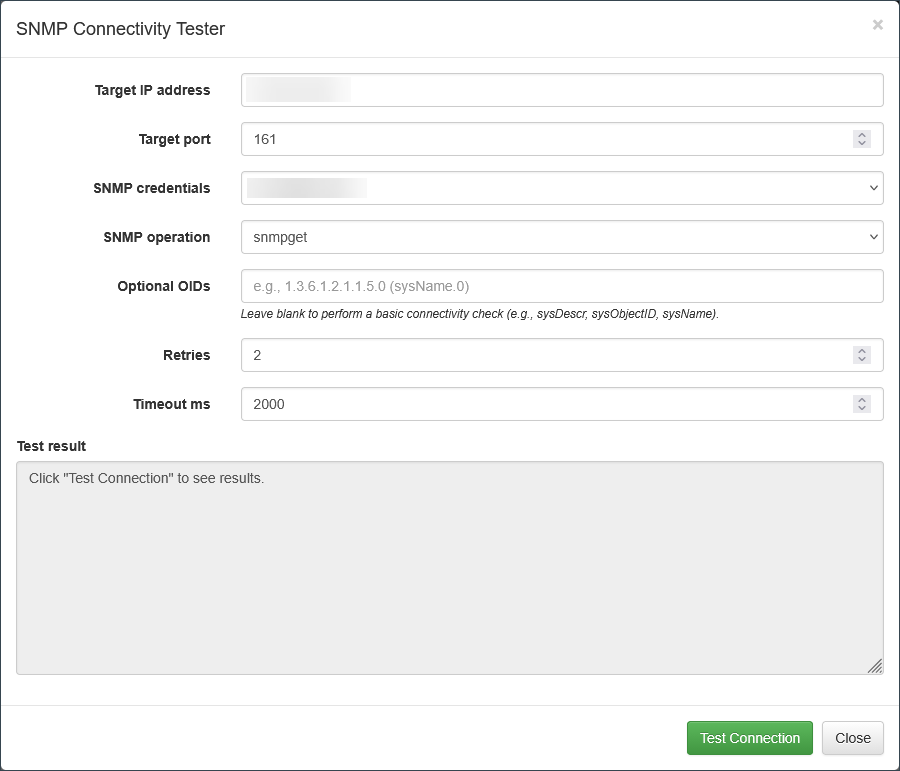
Navigate to SNMP Management and click SNMP connectivity tester.
| Parameter | Description |
|---|---|
| Target IP address | The IP address of the device to test |
| Target port | UDP port for SNMP communication. Default: 161 |
| SNMP credentials | Select a configured SNMPv2c or SNMPv3 credential set |
| SNMP operation | snmpget (single OID) or snmpwalk (traverse OID tree) |
| Optional OIDs | OIDs to query (e.g., sysName.0). Leave blank for a basic connectivity check using sysDescr and sysName |
| Retries | Number of retry attempts if the initial request fails |
| Timeout ms | Maximum wait time in milliseconds before the attempt is marked as failed |
After configuring the parameters, click Test Connection to view results in the Test result box.
NFO Modules Using SNMP Data
10103: SNMP Custom OID Sets Monitor
Module 10103 polls devices according to the OID sets you enable, and reports the results as SNMP metrics such as CPU, memory, and interface statistics. Device Groups link OID sets to the groups a device is assigned to.
For more information, see SNMP Custom OID Sets Monitor (10103 / 20103).
Enriching flow records with interface names is handled by the SNMP service itself, which is enabled by default. The Network Conversations Module (20062) calls the SNMP service and receives the interface names. No SNMP module needs to be enabled for this to work.
Module 10003 (SNMP Information Monitor) is deprecated. Its functionality has been absorbed by Module 10103. Existing deployments running 10003 continue to work, but new configurations should use 10103.
10700: SNMP Traps Monitor
Reports SNMP traps received by NFO.
For more information, see SNMP Traps Monitor (10700).
10701: Auto-discovery Reporter
Reports auto-discovered devices and device connections.
For more information, see Auto-discovery Reporter (10701).
Suspending SNMP Polling from Inactive Devices
The success of SNMP polling depends on device availability and responsiveness. Depending on device status and the OIDs queried, the following outcomes may occur:
| Potential Issue | Output |
|---|---|
| Device is unresponsive | None. Check Status > Logs or nfo_audit.log |
| Requested OID is not supported by the device | OID is not included in output |
| OID is returned but value is null | MISSING |
| Returned value is invalid (wrong type, length, etc.) | na |
If a device does not respond to SNMP polling, polling for that device is suspended for a configurable period of time, set by the environment variable NFO_SNMP_INACTIVE_POLL_TIMEOUT (default: 3600 seconds).
While suspended, SNMP requests for that device are skipped and counted under number of SNMP polling skipped requests on the Status page.
When a device is placed on the skip polling list, an event is recorded in nfo_audit.log in the $NFO_HOME/logs directory. These messages are also visible on the Logs tab of the Status page.
Example:
2026-02-23 10:08:03 NOTICE #-1 service=SNMP threadId=1 description="Unresponsive device" node=10.1.1.6:161 requestType=table(bulk) setName="cisco_mem" resultCode=-1
2026-02-23 10:07:57 NOTICE #-1 service=SNMP threadId=1 description="Unresponsive device" node=10.1.1.6:161 requestType=table(bulk) setName="cisco_cpu" resultCode=-1
2026-02-23 10:07:51 NOTICE #-1 service=SNMP threadId=1 description="Unresponsive device" node=10.1.1.6:161 requestType=arbitrary setName="cisco_cpu" resultCode=-1
2026-02-23 10:07:44 NOTICE #-1 service=SNMP threadId=1 description="Unresponsive device" node=10.1.1.9:161 requestType=arbitrary setName="device_info" resultCode=-1
You may forward these logs to your SIEM for active monitoring and alerting.
SNMP Tuning Environment Variables
The following environment variables allow for granular optimization of SNMP polling and trap processing.
These variables are intended for advanced performance tuning in specific high-scale environments. Modifying these values without consulting NetFlow Logic Support is not recommended, as improper configuration can lead to increased CPU load, memory exhaustion, or data loss.
To configure these variables:
- Navigate to Tracing and Configuration.
- Enter the desired variables in the NFO Server environment variables section.
- Restart the NFO service for changes to take effect.
| Parameter | Description | Default |
|---|---|---|
| NFO_SNMP_REQ_QUEUE_LEN | SNMP requests queue length (default and arbitrary) | 1000 (min 100, max 100000) |
| NFO_SNMP_TRAP_QUEUE_LEN | SNMP traps queue length | 1000 (min 100, max 100000) |
| NFO_SNMP_GETBULK_DISABLE | Disable GetBulk requests | 0 (enabled); 1 (disabled) |
| NFO_SNMP_GETBULK_REPEATERS | SNMP max-repetitions for GetBulk | 10 (min 1, max 100) |
| NFO_SNMP_MSG_MAX_SIZE | Maximum SNMP message size (maxMsgSize) | 0 (uses NetSNMP default of 1500; min 484, max 65507) |
| NFO_SNMP_RETRIES | SNMP retries count | -1 (uses NetSNMP default of 5; min 0, max 10) |
| NFO_SNMP_INACTIVE_POLL_TIMEOUT | Suspension period for unresponsive devices (per OID Set) | 3600 seconds |
| NFO_SNMP_THREAD_COUNT | Number of threads allocated for SNMP polling | 1 (min 1, max 1024) |
| NFO_SNMP_TRAP_UNK_SEC_NAME_TIMEOUT | Suspension period when a trap arrives from a device with unconfigured credentials | 600 seconds (min 60, max 86400) |