HTTP Event Collector (HEC)
Use this output type to send enriched NFO data to analytics platforms that support the HTTP Event Collector API, such as Splunk and CrowdStrike Falcon LogScale.
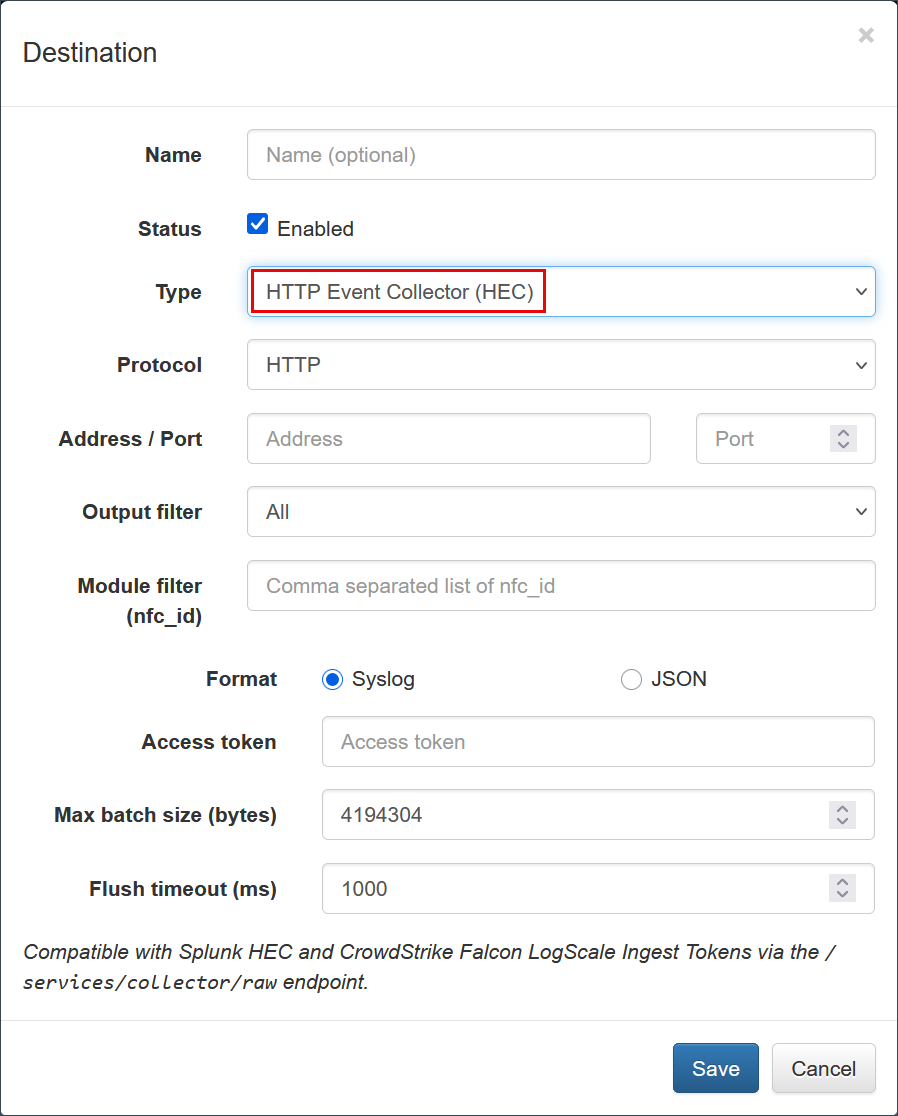
Overview
The HTTP Event Collector (HEC) output provides a high-performance, token-based data ingestion method. While originally developed for Splunk, this protocol is also used by CrowdStrike Falcon LogScale (formerly Humio) to provide a compatible ingestion path for third-party telemetry.
Configuration Parameters
| Parameter | Description |
|---|---|
| Protocol | Select HTTP or HTTPS. HTTPS is recommended for production environments to ensure data encryption in transit. |
| Address | The destination IP address or Hostname of the analytics platform (e.g., splunk-server.example.com or cloud.community.humio.com). |
| Port | The destination port number (Default for Splunk is typically 8088; for LogScale, it is often 443 for cloud or 8080 for on-prem). |
| Format | Select JSON or Syslog. JSON is highly recommended for structured analytics in both Splunk and LogScale. |
| Access Token | The unique authentication token provided by your platform. • Splunk: Use your HEC Access Token. • LogScale: Use your Repository Ingest Token. |
| CAcert file name | The CA certificate file name (PEM format) required for HTTPS verification. |
| Max batch size | The maximum buffer size in bytes. When reached, NFO pushes the data to the destination. |
| Flush timeout | The interval in milliseconds after which NFO data is sent, even if the maximum batch size has not been reached. |
Platform Specifics
Splunk
For Splunk environments, ensure that HEC is enabled in your Global Settings and that your token is associated with the correct Source Type (e.g., flowintegrator) and Index (e.g., flowintegrator).
- Standard Endpoint:
/services/collector/event
CrowdStrike Falcon LogScale
LogScale provides a Splunk-compatible HEC endpoint. The Ingest Token you provide determines which Repository and Parser will be applied to the data.
- Standard Endpoint:
/api/v1/ingest/hec - Authentication: LogScale HEC endpoints are designed for compatibility and accept the standard
Authorization: Splunk <Token>header format used by NFO.
When using the HEC output for CrowdStrike Falcon LogScale, ensure that an appropriate NFO parser is assigned to the Ingest Token within the LogScale UI to correctly structure the incoming JSON fields.
Troubleshooting
- Verify Connectivity: Ensure that the NFO server has network access to the destination Address and Port.
- Token Validation: Double-check that the Access Token is active and has permissions to write to the intended index or repository.
- SSL/TLS Errors: If using HTTPS, verify that the
CAcertmatches the certificate chain of the destination server.